Security as Code is more than a buzzword. It’s a practical approach to embedding security into the development lifecycle. Instead of treating security as a separate process, we codify policies, checks, and controls so they run automatically alongside builds and deployments. For DevSecOps professionals, this is the foundation of scalable, repeatable security.
GitHub Actions makes this vision achievable. By leveraging workflows, you can integrate security checks into CI/CD pipelines without slowing down delivery. In this post, we’ll explore what Security as Code means, why it matters, and how to implement it using GitHub Actions.
Why Security as Code Matters
Traditional security practices often rely on manual reviews and ad-hoc scans. These approaches don’t scale in modern development environments where teams push code multiple times a day. Security as Code solves this by:
- Automating enforcement: Policies and checks run consistently.
- Reducing human error: Less reliance on manual steps.
- Improving speed: Security becomes part of the pipeline, not a bottleneck.
- Enhancing visibility: Logs and reports are centralized and auditable.
For DevSecOps engineers, this approach aligns perfectly with the “shift-left” philosophy. that is, catching issues early when they’re cheaper and easier to fix.
“Shift-left” is a software development principle that moves critical activities, like testing and security, earlier in the lifecycle. Instead of waiting until code is complete or deployed to check for vulnerabilities, teams integrate these checks during development. The goal is simple: catch issues sooner, fix them faster, and reduce risk. By shifting security left, DevSecOps teams prevent costly late-stage fixes and make security a natural part of coding, not an afterthought.
GitHub Actions: The Engine Behind Security Automation
GitHub Actions is a workflow automation tool built into GitHub. It allows you to define jobs triggered by events like pushes, pull requests, or scheduled intervals. For security, this means:
- Running static analysis on every commit.
- Static analysis examines source code without executing it, looking for patterns that indicate potential bugs, vulnerabilities, or compliance issues.
- Scanning for secrets and credentials before merging.
- Enforcing dependency checks to prevent vulnerable packages.
- Validating infrastructure-as-code for compliance.
- such as: no large VMs, resources created in the correct region, affixing tags to each resource, etc.
Key Features for Security
-
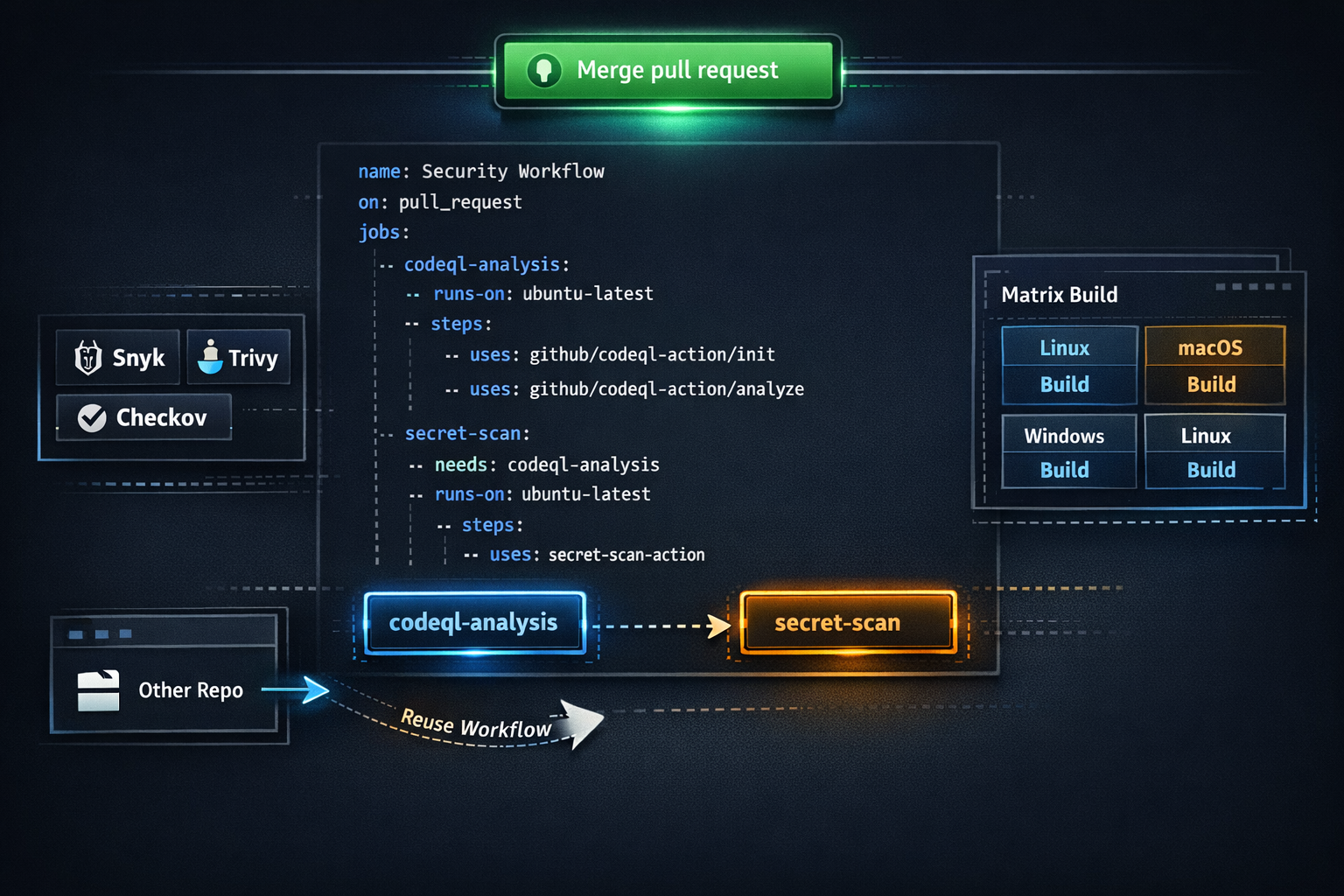
Reusable Workflows: Share security workflows across repositories. One of the most powerful features of GitHub Actions is the ability to create reusable workflows. Instead of duplicating security checks in every repository, you can define a single workflow in a central location and reference it across multiple projects. This approach ensures consistency, reduces maintenance overhead, and accelerates adoption of security best practices.
Best Practice: Combine reusable workflows with organization-level policies to enforce usage across teams. This ensures security automation is embedded in the development process.
-
Marketplace Actions: Integrate tools like Snyk, Trivy, and Checkov. One of GitHub Actions’ biggest strengths is its Marketplace, which hosts thousands of pre-built actions created by GitHub and the community. For DevSecOps engineers, this means you don’t have to reinvent the wheel because security tools are ready to plug into your workflows.
Best Practice: Combine multiple Marketplace actions in a single workflow to cover different layers (dependency, containers, IaC, etc.) to ensure comprehensive coverage without adding complexity
-
Matrix Builds: Test security across multiple environments. Matrix builds in GitHub Actions allow you to run the same job across multiple configurations (i.e. operating systems, language versions, dependency sets, etc.) in parallel. For DevSecOps, this is a game-changer because vulnerabilities often surface only under certain conditions.
Best Practice: Combine matrix builds with Reusable workflows for consistency, Marketplace actions for specialized scans, and fail-fast strategies so a critical vulnerability halts the pipeline immediately.
Implementing Security as Code with GitHub Actions
Here’s a practical example of a workflow that runs CodeQL and secret scanning on every pull request:
name: Security Checks
on:
  pull_request:
    branches: [ main ]
jobs:
  codeql-analysis:
    runs-on: ubuntu-latest
    steps:
      - uses: actions/checkout@v3
      - uses: github/codeql-action/init@v2
        with:
          languages: javascript
      - uses: github/codeql-action/analyze@v2

  secret-scan:
    runs-on: ubuntu-latest
    steps:
      - uses: actions/checkout@v3
      - uses: github/secret-scanning-action@v1
This workflow ensures that every pull request undergoes static analysis and secret scanning before merging.
Best Practices
- Start Small: Begin with one or two critical checks, then expand.
- Fail Fast: Configure workflows to block merges on high-severity findings.
- Use Reusable Components: Standardize workflows across teams.
- Monitor and Iterate: Review logs and metrics regularly.
Common Challenges
- False Positives: Tune your tools to reduce noise.
- Developer Resistance: Communicate the benefits and provide quick fixes.
- Performance Impact: Optimize workflows to run in parallel.
Closing Thoughts
Security as Code isn’t optional. It’s essential for modern software delivery. GitHub Actions provides the flexibility and power to make it real. By automating security checks, you can reduce risk, improve compliance, and keep development moving at full speed.
Start small, iterate, and share your workflows. The sooner you embed security into your pipelines, the stronger your software supply chain becomes.
Need help? Ask me!