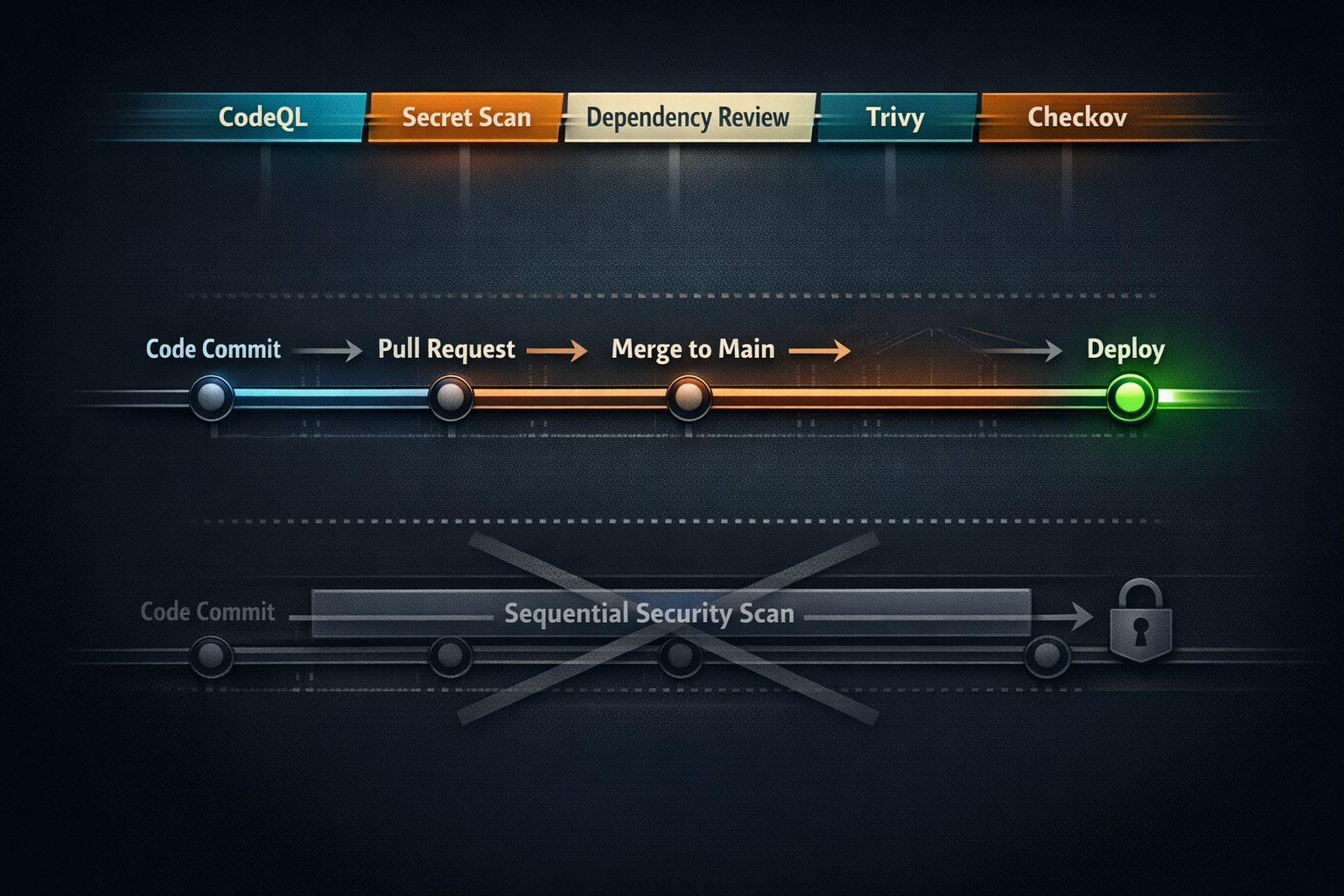
Modern software delivery is a race against time. Teams push code faster than ever, deploying multiple times a day to meet customer demands. But speed without security is a recipe for disaster. Vulnerabilities introduced early in development can cascade into production, where they’re exponentially harder and more expensive to fix. That’s why the principle of “shift left” has become a cornerstone of DevSecOps.
Shifting left means moving security checks earlier in the development lifecycle, embedding them into the same workflows that developers use every day. It’s a powerful idea, but it comes with a challenge: how do you integrate security without slowing down the pipeline? Developers want velocity. Security teams want control. The goal is to design a pipeline that satisfies both.
This article explores how to achieve that balance using GitHub as the foundation. We’ll look at the philosophy behind shift left, the practical steps to embed security into CI/CD, and the strategies that keep your pipeline fast while making it secure.
Why Shift Left Matters
Traditional security models treated security as a gatekeeper. Code would flow through development and testing, and only at the end, right before deployment, would security teams step in. This approach worked when release cycles were measured in months. It doesn’t work in a world of continuous delivery.
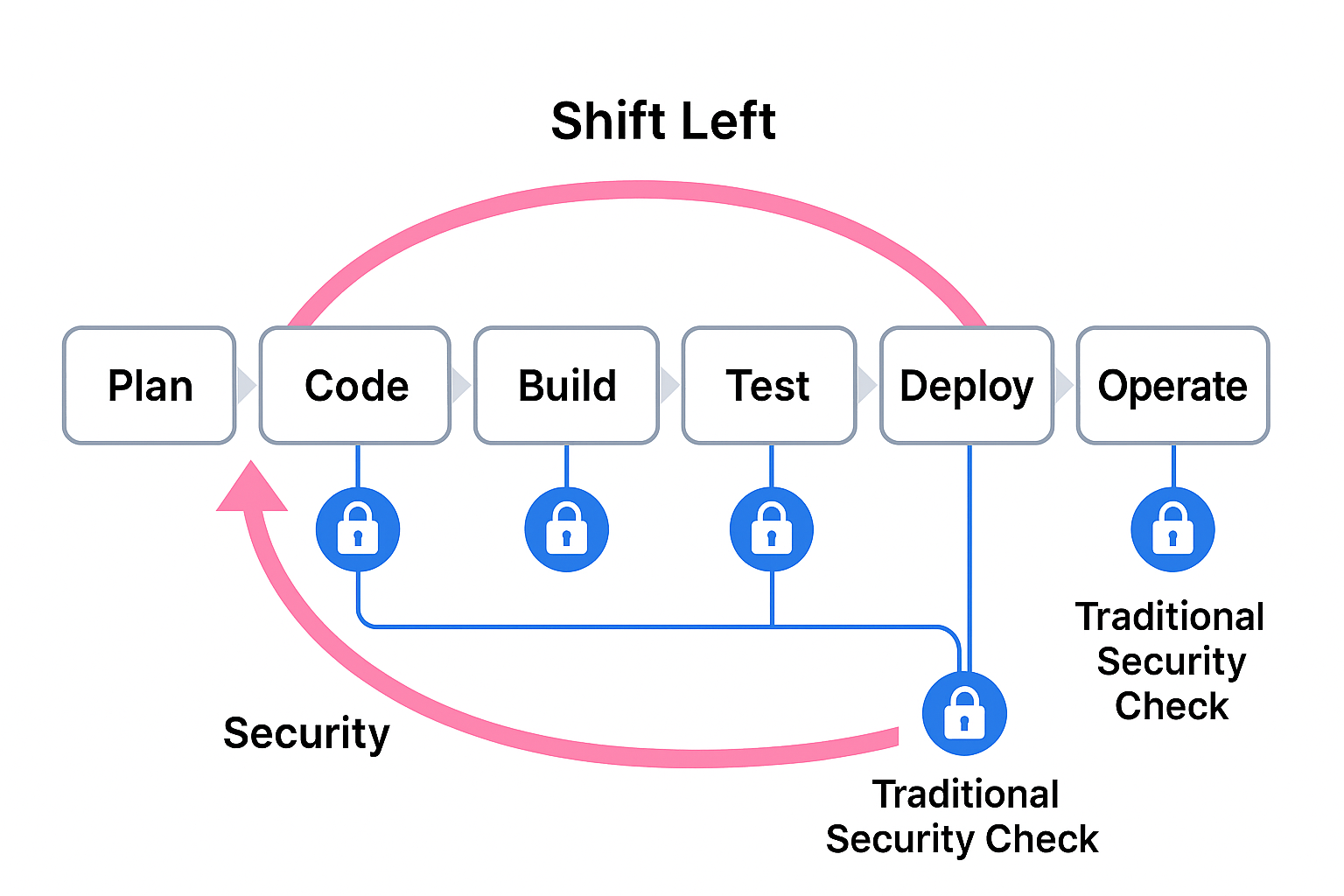
Late-stage security checks create bottlenecks. They force developers to rework code they wrote weeks ago, slowing releases and creating friction between teams. Worse, they allow vulnerabilities to linger until the last possible moment, increasing the risk of exposure.
Shift left flips the model. Instead of waiting until the end, security becomes part of the development process. Vulnerability scans run on every pull request. Secrets are checked before they hit the repository. Infrastructure-as-code is validated before provisioning resources. The result is fewer surprises, faster remediation, and a culture where security is everyone’s responsibility.
The Fear of Slowing Down
If shift left is so effective, why do some teams resist it? The answer is simple: performance anxiety. Developers worry that adding security checks will make pipelines sluggish. Security teams worry that developers will bypass controls to keep things moving.
The truth is, poorly implemented security can slow things down. If scans take 30 minutes to run or generate endless false positives, developers will see security as an obstacle, not an enabler. That’s why pipeline design matters. The goal isn’t just to add security, it’s to integrate it intelligently so it complements speed rather than killing it.
Designing a DevSecOps Pipeline on GitHub
GitHub provides a rich ecosystem for building secure pipelines without sacrificing agility. At the heart of this is GitHub Actions, which allows you to automate workflows triggered by events like pushes, pull requests, or scheduled intervals.
A well-designed pipeline starts with a clear separation of concerns. Security checks should run where they make sense, and they should run in parallel whenever possible. For example, static analysis can run alongside unit tests, while dependency checks can execute independently of build steps.
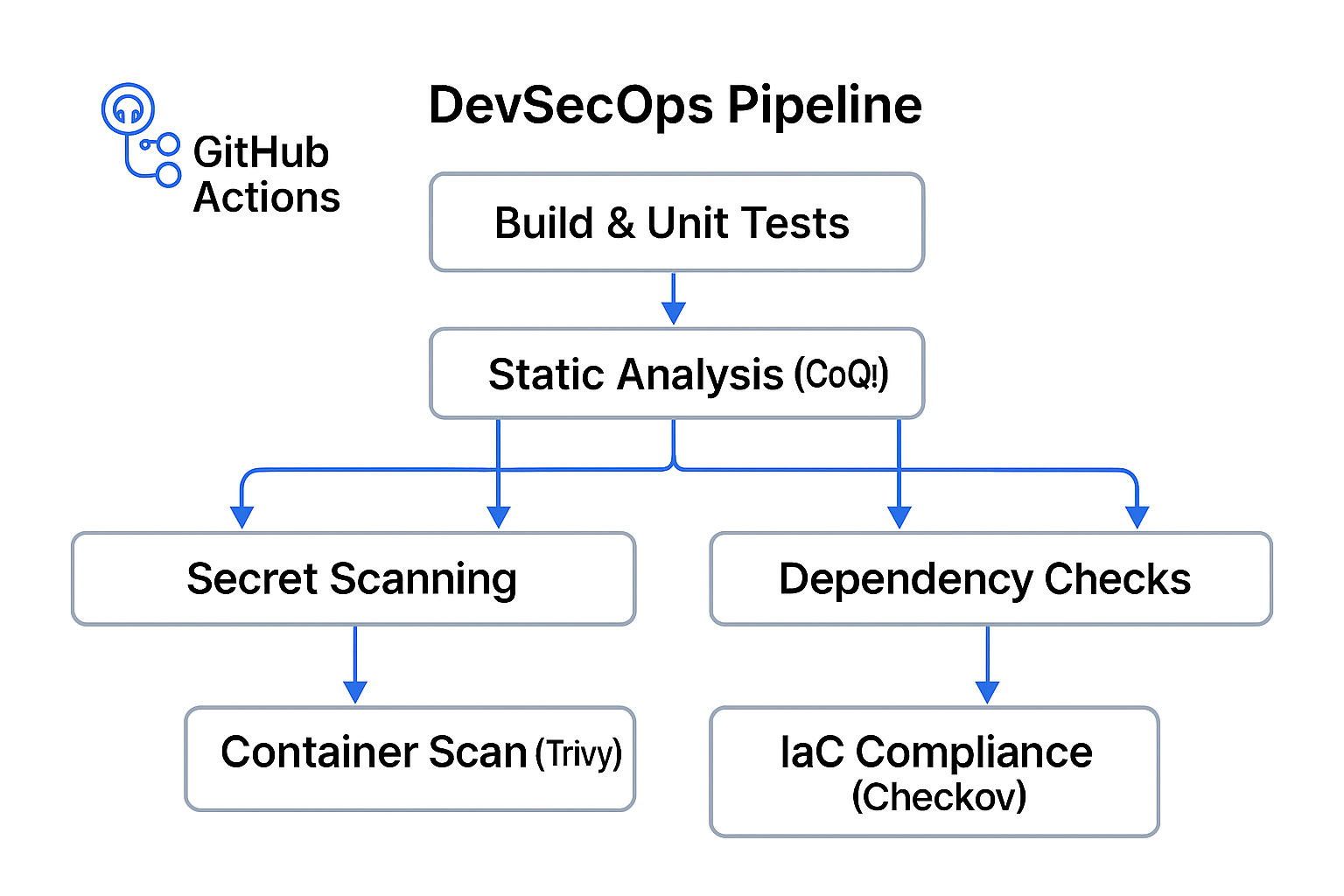
The key is modularity. Instead of one monolithic workflow that does everything, break your pipeline into smaller jobs. Each job handles a specific responsibility (build, test, scan) and runs concurrently. This approach minimizes bottlenecks and makes troubleshooting easier.
Embedding Security Without Friction
The first step is to identify which security controls belong in the pipeline. At a minimum, you want static analysis, secret scanning, and dependency checks. These are lightweight and can run quickly on every pull request.
Static analysis tools like CodeQL examine source code for vulnerabilities without executing it. They’re ideal for catching issues early, and when configured properly, they add only a few minutes to the pipeline. Secret scanning prevents accidental exposure of credentials, and GitHub provides this natively. Dependency checks, powered by tools like Dependabot, ensure that third-party libraries remain secure.
For heavier scans, like container image analysis or infrastructure compliance, you can schedule them to run nightly or on merge to main. This keeps pull request workflows lean while still providing comprehensive coverage.
Parallelization and Caching: The Unsung Heroes
One of the easiest ways to keep pipelines fast is to run jobs in parallel. GitHub Actions supports matrix builds, which allow you to test across multiple environments simultaneously. This is particularly useful for security because vulnerabilities can be environment-specific.
Caching is another performance booster. Many security tools rely on large databases of vulnerability signatures. By caching these between runs, you avoid downloading them every time, shaving minutes off your workflow.
Handling False Positives
Nothing kills developer trust faster than noisy security alerts. If every pull request triggers a dozen false positives, developers will tune out. The solution is tuning. Configure your tools to focus on high-severity issues and suppress rules that don’t apply to your codebase.
It’s also important to provide actionable feedback. A vague “security issue detected” message isn’t helpful. Developers need context about what’s wrong, why it matters, and how to fix it. GitHub’s integration with CodeQL and other tools makes this possible by surfacing detailed findings directly in pull requests.
Culture Is the Glue
Technology alone won’t make shift left successful. You need a culture that values security as much as speed. That means involving developers in the process, explaining why controls exist, and celebrating wins when vulnerabilities are caught early.
Security champions (developers who advocate for best practices) can help bridge the gap between teams. Training sessions, documentation, and clear communication go a long way toward making security feel like a shared goal rather than an imposed burden.
A Sample Pipeline Design
Imagine a pipeline that runs on every pull request. It starts by checking out the code and running unit tests. In parallel, it launches three security jobs: static analysis with CodeQL, secret scanning, and dependency checks. Each job runs independently, and the workflow is configured to fail fast if a critical vulnerability is found.
On merge to main, the pipeline triggers additional jobs: container image scanning with Trivy and infrastructure compliance checks with Checkov. These heavier scans run asynchronously, so they don’t block developers waiting for feedback on their pull requests.
The result is a pipeline that enforces security without slowing development. Developers get quick feedback on critical issues, and security teams get the assurance that controls are in place.
You can find some examples below
Pull Request workflow - fast feedback, parallel security
File: '.github/workflows/pr-pipeline.yml'
{% raw %}
name: PR Pipeline (Fast Feedback)

on:
  pull_request:
    types: [opened, synchronize, reopened, ready_for_review]
    branches: [main]
  workflow_dispatch:

# Prevent redundant runs on the same PR head sha
concurrency:
  group: pr-${{ github.ref }}-${{ github.head_ref }}
  cancel-in-progress: true

permissions:
  contents: read
  actions: read
  security-events: write   # for CodeQL to upload SARIF
  pull-requests: write     # to annotate PRs with findings
  id-token: write          # optional: for OIDC to cloud scanners (if needed)

env:
  NODE_VERSION: '20'
  # Example registry mirror settings (adjust to your org)
  # NPM_REGISTRY: 'https://registry.npmjs.org'

jobs:
  build_and_test:
    name: Build & Unit Tests (matrix)
    runs-on: ubuntu-latest
    timeout-minutes: 20
    strategy:
      fail-fast: true
      matrix:
        node: [18, 20]
    steps:
      - uses: actions/checkout@v4

      - name: Setup Node.js ${{ matrix.node }}
        uses: actions/setup-node@v4
        with:
          node-version: ${{ matrix.node }}
          cache: 'npm'

      - name: Install deps
        run: npm ci

      - name: Unit tests
        run: npm test -- --ci --reporter=junit
      # Optionally upload coverage/test reports to your system

  codeql:
    name: Static Analysis (CodeQL)
    runs-on: ubuntu-latest
    timeout-minutes: 25
    permissions:
      contents: read
      security-events: write
      actions: read
    steps:
      - uses: actions/checkout@v4

      - name: Initialize CodeQL
        uses: github/codeql-action/init@v3
        with:
          languages: javascript # add more e.g., javascript,python,java,go,cpp,csharp
          queries: +security-and-quality

      - name: Autobuild
        uses: github/codeql-action/autobuild@v3

      - name: Perform CodeQL Analysis
        uses: github/codeql-action/analyze@v3
        with:
          category: '/language:javascript'

  dependency_review:
    name: Dependency Checks (PR Diff)
    runs-on: ubuntu-latest
    timeout-minutes: 10
    permissions:
      contents: read
      pull-requests: write
    steps:
      - uses: actions/checkout@v4
      - name: Dependency Review
        uses: actions/dependency-review-action@v4
        with:
          fail-on-severity: critical
          comment-summary-in-pr: true

  secrets_scan:
    name: Secret Scanning (Push Protection Guide)
    runs-on: ubuntu-latest
    timeout-minutes: 5
    steps:
      - uses: actions/checkout@v4
      # Native GitHub Secret Scanning runs automatically on Advanced Security-enabled repos.
      # This step enforces a quick pre-commit/PR check with gitleaks as a complement (optional).
      - name: Run Gitleaks
        uses: zricethezav/gitleaks-action@v2
        with:
          args: detect --no-git -v --redact
      # Note: enable "Push Protection" in repo/org settings to block secrets before they land.

  # Optional: run lightweight container scan on PRs, keep it fast
  trivy_pr:
    name: Container Scan (Trivy)
    runs-on: ubuntu-latest
    timeout-minutes: 10
    needs: [build_and_test]
    steps:
      - uses: actions/checkout@v4

      - name: Build app image (local)
        run: |
          docker build -t app:${{ github.sha }} .

      - name: Cache Trivy DB
        uses: actions/cache@v4
        with:
          path: ~/.cache/trivy
          key: trivy-db-${{ runner.os }}-${{ hashFiles('**/Dockerfile') }}
          restore-keys: |
            trivy-db-${{ runner.os }}-

      - name: Scan image with Trivy (critical only)
        uses: aquasecurity/trivy-action@master
        with:
          image-ref: app:${{ github.sha }}
          severity: CRITICAL,HIGH
          exit-code: '1'
          ignore-unfixed: true
          vuln-type: 'os,library'

  # Keep IaC checks in PR but quick
  checkov_pr:
    name: IaC Compliance (Checkov)
    runs-on: ubuntu-latest
    timeout-minutes: 8
    steps:
      - uses: actions/checkout@v4
      - name: Run Checkov
        uses: bridgecrewio/checkov-action@v12
        with:
          directory: .
          quiet: true
          soft_fail: false
          framework: terraform,kubernetes,cloudformation,arm

  # Gate: if any critical job fails, whole PR is blocked (default behavior)
{% endraw %}
Why this works for speed + security
- Jobs run in parallel (build/tests, CodeQL, dependency review, secrets, light Trivy, Checkov).
- Matrix ensures cross-version coverage without serial runs.
- Caching speeds Trivy DB and Node modules.
- Fail on severity and exit codes keep signal strong and avoid noisy false positives.
Main branch workflow - heavier scans on merge
File: '.github/workflows/main-security.yml'
{% raw %}
name: Main Branch Security (Heavier Coverage)

on:
  push:
    branches: [main]
  schedule:
    - cron: "17 2 * * *"   # nightly deeper scan (UTC)
  workflow_dispatch:

concurrency:
  group: main-${{ github.ref }}
  cancel-in-progress: true

permissions:
  contents: read
  security-events: write
  actions: read
  id-token: write

jobs:
  build_release_artifacts:
    name: Build Release Artifacts
    runs-on: ubuntu-latest
    steps:
      - uses: actions/checkout@v4
      - uses: actions/setup-node@v4
        with:
          node-version: '20'
          cache: 'npm'
      - run: npm ci
      - run: npm run build
      - name: Archive build
        uses: actions/upload-artifact@v4
        with:
          name: app-build
          path: dist/

  trivy_image_scan:
    name: Container Image Scan (Trivy - full)
    runs-on: ubuntu-latest
    needs: build_release_artifacts
    steps:
      - uses: actions/checkout@v4

      - name: Build production image
        run: |
          docker build -t app:release .

      - name: Cache Trivy DB
        uses: actions/cache@v4
        with:
          path: ~/.cache/trivy
          key: trivy-db-${{ runner.os }}-${{ github.sha }}
          restore-keys: |
            trivy-db-${{ runner.os }}-

      - name: Trivy scan (fail on High/Critical)
        uses: aquasecurity/trivy-action@master
        with:
          image-ref: app:release
          severity: CRITICAL,HIGH
          exit-code: '1'
          ignore-unfixed: false
          format: 'sarif'
          output: 'trivy-results.sarif'

      - name: Upload SARIF to code scanning
        uses: github/codeql-action/upload-sarif@v3
        with:
          sarif_file: trivy-results.sarif

  checkov_full:
    name: IaC Compliance (Checkov - full)
    runs-on: ubuntu-latest
    steps:
      - uses: actions/checkout@v4
      - name: Run Checkov (report + fail on high)
        uses: bridgecrewio/checkov-action@v12
        with:
          directory: .
          quiet: true
          soft_fail: false
          skip_check: CKV_SECRET_1  # example of tuning; adjust to your baseline
      - name: Upload Checkov results
        if: always()
        uses: actions/upload-artifact@v4
        with:
          name: checkov-report
          path: results_json/*.json
{% endraw %}
Optional: Reusable workflow for org-wide consistency
If you manage many repos, create a reusable workflow and call it from each repo.
File: '.github/workflows/reusable-security.yml'
{% raw %}
name: Reusable Security
on:
  workflow_call:
    inputs:
      languages:
        required: false
        type: string
        default: 'javascript'
    secrets:
      token:
        required: false

jobs:
  codeql:
    runs-on: ubuntu-latest
    steps:
      - uses: actions/checkout@v4
      - uses: github/codeql-action/init@v3
        with:
          languages: ${{ inputs.languages }}
          queries: +security-and-quality
      - uses: github/codeql-action/autobuild@v3
      - uses: github/codeql-action/analyze@v3
{% endraw %}
Then invoke it:
{% raw %}
jobs:
  security:
    uses: your-org/your-repo/.github/workflows/reusable-security.yml@main
    with:
      languages: 'javascript,python'
{% endraw %}
Additional settings that will provide more options for protection and performance:
- Push Protection & Secret Scanning: Enable at the org/repo level to block secrets before they land; use a lightweight PR scanner as a safety net.
- Tuning & Noise Reduction: Set 'fail-on-severity', 'ignore-unfixed', and 'skip_check' to align with your baseline; revisit quarterly.
- Parallelization: Keep PR feedback fast by running security jobs concurrently and shifting heavier scans to 'push'/'schedule'.
- Least Privilege: Use minimal 'permissions' and OIDC ('id-token') for cloud scanners instead of long‑lived secrets.
Looking Ahead
Shift left isn’t a one-time project. It’s an ongoing evolution. As threats change and tools improve, your pipeline will need to adapt. GitHub is investing heavily in security features like push protection, which blocks commits containing secrets before they even hit the repository. Expect more automation, better integrations, and smarter alerts in the future.
The goal is simple: make security invisible. When developers don’t have to think about it (because it’s baked into their workflows) you’ve achieved true DevSecOps.
Final Thoughts
Balancing speed and security isn’t easy, but it’s possible. By designing pipelines that integrate security intelligently, you can shift left without slowing down. Start small, iterate often, and keep the conversation open between development and security teams.
In the end, the fastest pipeline isn’t the one that skips security. It’s the one that makes security seamless.
Need help shifting left? Contact me!