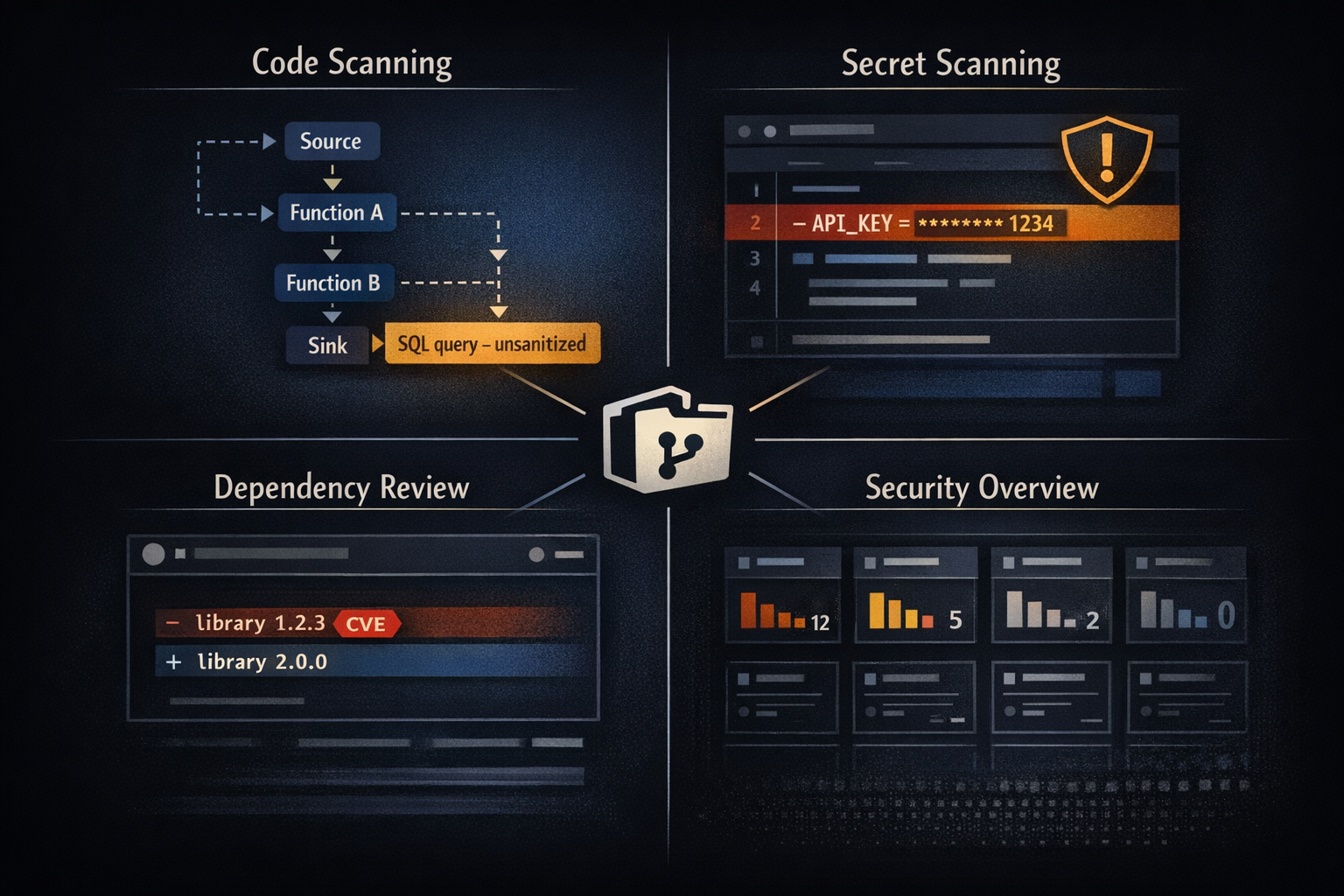
Security is no longer an afterthought in modern software development. With the rise of DevSecOps, security practices are woven into every stage of the development lifecycle. GitHub, as one of the most widely used platforms for code collaboration, has stepped up its game with GitHub Advanced Security (GHAS), a suite of premium features designed to help teams identify, prevent, and remediate vulnerabilities before they reach production.
If you’re a DevOps practitioner new to GitHub Advanced Security, this guide will walk you through what GHAS offers, why it matters, and how to use its features effectively. By the end, you’ll understand how to integrate these tools into your workflow and elevate your security posture without slowing down development.
Why GitHub Advanced Security matters
Traditional security models often rely on periodic audits or post-release vulnerability scans. These approaches are reactive and costly. DevSecOps flips the script by embedding security checks into the development pipeline, catching issues early when they’re cheaper and easier to fix.
GitHub Advanced Security is built on this principle. It provides automated, developer-friendly tools that surface security risks directly in your repositories. Instead of waiting for a penetration test or a compliance review, your team can address problems as part of everyday coding.
What’s Included in GitHub Advanced Security?
GHAS is not just one feature. Instead, it's a collection of capabilities designed to tackle different aspects of application security. The four pillars you'll work with are:
- Code Scanning (powered by CodeQL)
- Secret Scanning
- Dependency Review
- Security Overview
Each of these plays a unique role in safeguarding your codebase. Let's break them down.
Code Scanning: Find Vulnerabilities in Your Code
Code Scanning is GitHub's flagship static application security testing (SAST) tool, powered by CodeQL, a semantic code analysis engine. Unlike simple pattern-matching tools that look for suspicious strings, CodeQL understands the structure and flow of your code. It can trace how data moves through your application, identify where user input enters the system, and detect when that untrusted data reaches a dangerous sink without proper sanitization.
How CodeQL Works
CodeQL treats your code as a database. It builds a semantic model of your entire codebase, including control flow, data flow, and the relationships between functions and variables. You then query this database using a declarative language to find patterns that represent vulnerabilities.
For example, CodeQL can detect SQL injection by identifying code paths where:
- User input enters the system (source)
- That data flows through the application (data flow analysis)
- The data is used to construct a SQL query without sanitization (sink)
This approach catches vulnerabilities that simpler tools miss, including complex multi-step exploits where tainted data passes through several functions before reaching a vulnerable point.
What CodeQL Catches
CodeQL comes with hundreds of built-in queries covering the most critical security issues across multiple languages (JavaScript/TypeScript, Python, Java, C#, C/C++, Go, Ruby):
- Injection Flaws: SQL injection, command injection, LDAP injection, XPath injection
- Cross-Site Scripting (XSS): Reflected, stored, and DOM-based XSS
- Path Traversal: Directory traversal and arbitrary file access
- Authentication Issues: Hardcoded credentials, weak crypto, insecure random number generation
- Authorization Bypasses: Missing access controls, IDOR vulnerabilities
- Resource Management: Memory leaks, resource exhaustion, uncontrolled recursion
- Cryptographic Issues: Weak algorithms, improper key management, insufficient entropy
Enabling Code Scanning
Using the GitHub UI
- Navigate to your repository.
- Click Security → Code scanning.
- Click Set up code scanning.
- Choose CodeQL Analysis and select Default or Advanced setup.
The default setup automatically configures CodeQL for your detected languages and runs on every push and pull request.
Using GitHub Actions (Advanced)
For more control, create .github/workflows/codeql.yml:
{% raw %}
name: "CodeQL"
on:
  push:
    branches: [ main, develop ]
  pull_request:
    branches: [ main ]
  schedule:
    - cron: '0 6 * * 1'  # Weekly scan on Mondays

jobs:
  analyze:
    name: Analyze
    runs-on: ubuntu-latest
    permissions:
      actions: read
      contents: read
      security-events: write

    strategy:
      matrix:
        language: [ 'javascript', 'python' ]

    steps:
      - name: Checkout repository
        uses: actions/checkout@v4

      - name: Initialize CodeQL
        uses: github/codeql-action/init@v3
        with:
          languages: ${{ matrix.language }}
          queries: security-extended  # Include additional security queries

      - name: Autobuild
        uses: github/codeql-action/autobuild@v3

      - name: Perform CodeQL Analysis
        uses: github/codeql-action/analyze@v3
        with:
          category: "/language:${{ matrix.language }}"
{% endraw %}
Custom CodeQL Queries
Beyond the built-in queries, you can write custom queries tailored to your organization's specific security requirements. For example, you might want to flag usage of deprecated internal APIs or enforce that certain sensitive functions are always called with specific security parameters.
Here's a simple custom query that finds direct use of eval() in JavaScript:
import javascript

from CallExpr call
where call.getCalleeName() = "eval"
select call, "Direct use of eval() is dangerous and should be avoided."
To use custom queries, add them to your repository in a .github/codeql/queries directory and reference them in your workflow:
- name: Initialize CodeQL
  uses: github/codeql-action/init@v3
  with:
    languages: javascript
    queries: ./.github/codeql/queries
What Good Coverage Looks Like
High-performing teams using Code Scanning typically see:
- 90%+ of repositories with Code Scanning enabled
- Critical and high-severity alerts resolved within 7 days
- False positive rate below 10% (achieved through query tuning)
- Weekly or bi-weekly scans on active branches, plus scans on every PR
- Zero critical vulnerabilities in production code paths
Teams often start with the default query suite and gradually expand to security-extended or security-and-quality as they mature.
Why Organizations Choose GHAS: Real-World Impact
Before diving into setup and configuration, let's look at how real organizations use GitHub Advanced Security and the tangible value it delivers. These examples illustrate why GHAS has become essential for DevSecOps teams.
Case Study: Catching Leaked AWS Credentials Before Exploitation
A fintech startup building a payment processing platform accidentally committed AWS access keys to their public repository. Within minutes of the commit, GitHub's Secret Scanning detected the credentials and sent alerts to both the repository maintainers and the security team.
The Response:
- The security team received an immediate notification via Slack integration
- They revoked the exposed AWS credentials through their AWS account within 15 minutes
- They rotated all related secrets and updated the application configuration
- They implemented a pre-commit hook using
git-secretsto prevent future incidents - The entire incident was resolved in under an hour, before any external party could exploit the credentials
The Impact: Without Secret Scanning, those credentials could have remained exposed for days or weeks. The company estimated this early detection saved them from potential unauthorized AWS charges (potentially tens of thousands of dollars) and regulatory compliance issues related to PCI-DSS.
Case Study: Supply Chain Attack Prevention Through Dependency Review
A healthcare SaaS company using GHAS received a Dependabot alert about a critical vulnerability in a popular logging library they used. The vulnerability (CVE-2021-44228, Log4Shell) had a CVSS score of 10.0 and was being actively exploited in the wild.
The Response:
- Dependency Review flagged the vulnerable version in all pull requests attempting to merge code
- The platform team created a dedicated task force to assess impact across 200+ repositories
- Using the Security Overview dashboard, they identified 47 repositories using the vulnerable version
- They used GitHub's bulk operations API to create automated pull requests with the patched version
- Within 72 hours, 45 of 47 repositories were patched and deployed
The Impact: The centralized visibility through Security Overview turned what could have been a months-long remediation effort into a coordinated 3-day sprint. Their competitors without similar tooling took an average of 3-6 weeks to fully remediate.
Enterprise Migration Strategy: From Manual Reviews to Automated Security
A global enterprise with 500+ repositories and 200+ developers was struggling with their manual security review process. Security reviews were creating a bottleneck, with a median 5-day wait time before security approval. Developers saw security as an impediment rather than an enabler.
The Transformation:
- Phase 1 (Month 1-2): Enabled Code Scanning on 10 pilot repositories representing different tech stacks (Node.js, Python, Java, .NET). Tuned false positive rates to below 15%.
- Phase 2 (Month 3-4): Rolled out Secret Scanning and Dependabot alerts to all 500 repositories. Integrated alerts with their existing ticketing system (Jira) for tracking.
- Phase 3 (Month 5-6): Implemented branch protection rules requiring passing Code Scanning and Dependency Review checks before merge. Reduced manual security reviews from 100% to only high-risk changes (infrastructure changes, authentication modifications, API design changes).
- Phase 4 (Month 7-8): Established security champions program with two developers per team trained on GHAS. Created internal documentation and runbooks for common alert types.
The Impact:
- Median time to security approval dropped from 5 days to 4 hours
- Critical vulnerability detection increased by 300% (from catching ~25% to ~75% based on penetration test results)
- Developer satisfaction with security processes increased from 2.1/5 to 4.3/5
- Security team shifted focus from manual code review to threat modeling and security architecture
The ROI Case: GHAS Cost vs. Breach Cost
GitHub Advanced Security costs approximately $49 per active committer per month. For a team of 50 developers, that's $29,400 per year. This investment must be weighed against security risks:
Cost of a security breach:
- Average data breach cost: $4.45 million (IBM 2023 Cost of a Data Breach Report)
- Regulatory fines: GDPR fines up to €20 million or 4% of annual revenue; HIPAA fines up to $1.5 million per violation
- Reputational damage: Customer churn typically 5-10% after a public breach
- Incident response costs: $245 per hour for forensics, $500-$1,000 per hour for specialized consultants
- Legal costs: Average $1.2 million for breach-related litigation
Break-even analysis: If GHAS prevents even one moderate security incident (estimated cost $150,000 in remediation, notification, and regulatory response), it pays for itself 5x over for a 50-person team.
Additional value beyond breach prevention:
- Velocity preservation: Automated security checks don't slow developers down like manual reviews do
- Developer empowerment: Immediate, actionable feedback rather than abstract security guidelines
- Compliance evidence: Auditors love documented, automated security controls
- Insurance benefits: Some cyber insurance providers offer premium reductions for organizations with SAST/DAST tooling
For most organizations shipping customer-facing applications, the question isn't whether GHAS is worth the cost, but whether they can afford not to have it.
Getting Started: Enabling Core Features
The case studies above demonstrate GHAS's value, but how do you actually implement it? This section walks through enabling each core feature. The key principle: start simple with basic enablement, prove value quickly, then expand with advanced configuration.
Secret Scanning: Stop Leaks Before They Happen
Secrets, such as API keys, tokens and passwords, are the crown jewels of your application. Accidentally committing them to a repository can lead to catastrophic breaches. GitHub’s Secret Scanning feature helps prevent this.
How It Works
Secret Scanning automatically scans your commits for patterns that match known secret formats. This includes credentials for cloud providers, database connection strings, and more. When it detects a secret, it alerts you so you can revoke and rotate it immediately.
Enabling Secret Scanning
Using the GitHub UI
- Navigate to your repository.
- Click Settings → Code security and analysis.
- Under Secret scanning, click Enable.
Using GitHub API
curl \
  -X PATCH \
  -H "Accept: application/vnd.github+json" \
  -H "Authorization: Bearer YOUR_TOKEN" \
  https://api.github.com/repos/OWNER/REPO \
  -d '{"security_and_analysis":{"secret_scanning":{"status":"enabled"}}}'
Replace OWNER and REPO with your repository details.
Dependency Review: Know What You’re Shipping
Modern applications rely heavily on third-party libraries. While this accelerates development, it also introduces risk. Vulnerabilities in dependencies can become entry points for attackers. Dependency Review helps you manage this risk by providing visibility into changes to your dependency graph.
How Dependency Review Works
Dependency Review integrates with pull requests to show you exactly what dependencies are being added, removed, or updated. It displays:
- New dependencies introduced in the PR
- Known vulnerabilities in those dependencies (powered by GitHub Advisory Database)
- License information to catch licensing issues before merge
- Dependency graph changes showing direct and transitive dependencies
When you open a pull request that modifies a manifest file (package.json, requirements.txt, pom.xml, Gemfile, etc.), Dependency Review automatically generates a comparison showing the security impact.
Understanding Dependabot vs. Dependency Review
These two features work together but serve different purposes:
Dependabot Alerts:
- Continuously monitors your existing dependencies
- Notifies you when vulnerabilities are discovered in dependencies you're already using
- Generates automated pull requests to update vulnerable dependencies
- Runs on a schedule (daily checks)
Dependency Review:
- Runs on pull requests before code is merged
- Prevents new vulnerable dependencies from being introduced
- Blocks merges based on configurable severity thresholds
- Provides just-in-time security feedback during development
Think of Dependabot as your continuous monitoring system and Dependency Review as your gate keeper.
Enabling Dependency Review
Using the GitHub UI
- Go to Settings → Code security and analysis.
- Under Dependency review, click Enable.
Example Workflow with License Controls
You can enforce dependency review checks using GitHub Actions with additional license compliance:
name: Dependency Review
on: [pull_request]
jobs:
  dependency-review:
    runs-on: ubuntu-latest
    steps:
      - name: Checkout repository
        uses: actions/checkout@v3
      - name: Dependency Review
        uses: actions/dependency-review-action@v3
        with:
          fail-on-severity: high
          deny-licenses: GPL-3.0, AGPL-3.0
          allow-licenses: MIT, Apache-2.0, BSD-3-Clause
Understanding the Dependency Graph
The dependency graph visualizes all packages your project depends on, distinguishing between:
- Direct dependencies: Packages explicitly declared in your manifest files
- Transitive dependencies: Dependencies of your dependencies
Most vulnerabilities (80-90%) exist in transitive dependencies, making the graph view essential for understanding your complete security exposure. The graph also helps identify which direct dependency is pulling in a problematic transitive dependency, making it easier to address the issue.
Prioritizing Dependency Updates
Not all vulnerabilities require immediate action. Use these criteria to prioritize:
| Priority | CVSS Score | Characteristics | Action Timeline |
|---|---|---|---|
| Immediate | 9.0-10.0 | Active exploits, network-accessible, no auth required | 24 hours |
| High | 7.0-8.9 | Exploitable with user interaction or limited scope | 7 days |
| Medium | 4.0-6.9 | Requires specific conditions or configuration | 30 days |
| Low | 0.1-3.9 | Difficult to exploit or minimal impact | 90 days |
To check if a vulnerability has known exploits, query the GitHub Advisory Database:
query {
  securityVulnerabilities(first: 1, ecosystem: NPM, package: "lodash") {
    nodes {
      advisory {
        summary
        severity
        cvss {
          score
        }
        references {
          url
        }
      }
    }
  }
}
Cross-reference with the CISA KEV (Known Exploited Vulnerabilities) catalog and EPSS (Exploit Prediction Scoring System) scores for additional context.
Security Overview: Your Command Center
Managing security across multiple repositories can feel overwhelming. Security Overview provides a centralized dashboard for your organization’s security posture. It aggregates alerts from Secret Scanning, Dependabot, and Code Scanning, giving you a bird’s-eye view of risks.
Accessing Security Overview
Navigate to:
Organization Settings → Security → Security Overview
Advanced Configuration & Customization
Now that you have the basics running, it's time to tailor GHAS to your organization's specific needs. The default configurations provide solid coverage, but customization unlocks the full power of GHAS for your unique security requirements and development workflows.
Custom Secret Patterns for Internal Tokens
GitHub's Secret Scanning includes patterns for hundreds of popular services (AWS, Azure, GitHub tokens, Stripe keys, etc.), but your organization likely has internal secrets that don't match public patterns. You can define custom patterns to detect these.
Creating a Custom Pattern:
- Navigate to Organization Settings → Code security and analysis → Secret scanning
- Click New pattern
- Define your pattern using regular expressions
Example: Internal API Token Pattern
company_api_key_[a-zA-Z0-9]{32}
Example: Database Connection String
Server=.+;Database=.+;User Id=.+;Password=.+;
Custom patterns support:
- Test strings to validate your regex before publishing
- Dry run mode to see what would be detected without generating alerts
- False positive suppression through comment annotations in code
Configuring Severity Thresholds and Alert Routing
Not all alerts require the same urgency. You can configure how alerts are prioritized and who receives notifications based on severity.
Branch Protection Rules Tied to Security:
# .github/settings.yml (using probot/settings)
branches:
  - name: main
    protection:
      required_status_checks:
        strict: true
        contexts:
          - "CodeQL Analysis"
          - "Dependency Review"
          - "Secret Scanning Check"
      required_pull_request_reviews:
        required_approving_review_count: 1
        dismiss_stale_reviews: true
Alert Routing with GitHub Actions:
Route different severity levels to different channels:
{% raw %}
name: Security Alert Router
on:
  code_scanning_alert:
    types: [created, reopened]
jobs:
  route-alert:
    runs-on: ubuntu-latest
    steps:
      - name: Route Critical Alerts
        if: github.event.alert.rule.severity == 'critical'
        run: |
          curl -X POST ${{ secrets.PAGERDUTY_WEBHOOK }} \
            -H "Content-Type: application/json" \
            -d '{"severity":"critical","summary":"Critical security alert in ${{ github.repository }}"}'

      - name: Route High Alerts
        if: github.event.alert.rule.severity == 'high'
        run: |
          curl -X POST ${{ secrets.SLACK_SECURITY_CHANNEL }} \
            -H "Content-Type: application/json" \
            -d '{"text":"High severity alert: ${{ github.event.alert.rule.description }}"}'

      - name: Route Medium/Low Alerts
        if: github.event.alert.rule.severity == 'medium' || github.event.alert.rule.severity == 'low'
        run: |
          gh issue create \
            --title "Security Alert: ${{ github.event.alert.rule.description }}" \
            --label security,automated \
            --body "Alert details: ${{ github.event.alert.html_url }}"
{% endraw %}
Integrating with Jira and ServiceNow
For enterprises with existing ticketing systems, you can automatically create tickets for security alerts.
Jira Integration Example:
{% raw %}
name: Create Jira Ticket for Security Alerts
on:
  code_scanning_alert:
    types: [created]
jobs:
  create-jira-ticket:
    runs-on: ubuntu-latest
    steps:
      - name: Create Jira Issue
        uses: atlassian/gajira-create@v3
        with:
          project: SECURITY
          issuetype: Bug
          summary: "[${{ github.event.alert.rule.severity }}] ${{ github.event.alert.rule.description }}"
          description: |
            Alert detected in repository ${{ github.repository }}
            Severity: ${{ github.event.alert.rule.severity }}
            File: ${{ github.event.alert.instances[0].location.path }}
            Line: ${{ github.event.alert.instances[0].location.start_line }}

            GitHub Alert: ${{ github.event.alert.html_url }}
          fields: '{"priority": {"name": "${{ github.event.alert.rule.severity == 'critical' && 'Highest' || 'High' }}"}}'
{% endraw %}
Setting Up Security Policies at Organization Level
Instead of configuring security settings repository-by-repository, you can establish organization-wide policies that apply to all repositories (or specific subsets).
Organization Security Policy (SECURITY.md in .github repo):
# Security Policy

## Reporting a Vulnerability

Report vulnerabilities to security@company.com or through our private disclosure program at https://hackerone.com/company

## Security Scanning Requirements

All repositories must have:
- Code Scanning enabled with at least weekly scans
- Secret Scanning enabled with push protection
- Dependabot alerts enabled with auto-merge for patch updates

## Remediation SLAs

- **Critical vulnerabilities**: 24 hours
- **High vulnerabilities**: 7 days
- **Medium vulnerabilities**: 30 days
- **Low vulnerabilities**: 90 days

## Branch Protection

Production branches (`main`, `production`) must:
- Require passing Code Scanning and Dependency Review
- Require at least one approval from CODEOWNERS
- Prohibit force pushes
- Require signed commits
Enforcing Policies with GitHub API:
# Enable GHAS features for all repos in an organization
for repo in $(gh repo list myorg --json name --jq '.[].name'); do
  gh api -X PATCH /repos/myorg/$repo \
    -f security_and_analysis[secret_scanning][status]=enabled \
    -f security_and_analysis[secret_scanning_push_protection][status]=enabled \
    -f security_and_analysis[dependabot_security_updates][status]=enabled
done
Customizing CodeQL Queries
You can adjust which CodeQL queries run to balance security coverage with false positive rates.
Query Suites:
default: Standard security queries, good balancesecurity-extended: Additional security queries, more comprehensive but higher false positive ratesecurity-and-quality: Security plus code quality checks
Custom Query Configuration (.github/codeql/codeql-config.yml):
name: "Custom CodeQL Config"
queries:
  - uses: security-extended
  - uses: ./.github/codeql/custom-queries

query-filters:
  - exclude:
      id: js/incomplete-sanitization
  - exclude:
      tags:
        - experimental

paths-ignore:
  - "**/*.test.js"
  - "**/vendor/**"
  - "**/node_modules/**"

paths:
  - "src/**"
  - "lib/**"
Managing False Positives
False positives are inevitable with any security tool. The key is having a systematic process for handling them.
Dismissing Alerts with Reason Tracking:
# Dismiss a false positive via API with reason
gh api -X PATCH /repos/OWNER/REPO/code-scanning/alerts/ALERT_NUMBER \
  -f state=dismissed \
  -f dismissed_reason="false positive" \
  -f dismissed_comment="This regex pattern only matches internal test data, not user input"
Common Dismissal Reasons:
- False positive: The tool incorrectly identified an issue
- Won't fix: The issue is real but accepted risk (document why!)
- Used in tests: The code only runs in test environments
Best Practices:
- Require a comment explaining every dismissal
- Review dismissed alerts quarterly to ensure decisions still make sense
- Track dismissal rates by team to identify training opportunities
- Use suppressions in code for persistent false positives:
# github/codeql: disable sql-injection
# This query is safe because user_input is validated against whitelist
query = f"SELECT * FROM users WHERE role = '{user_input}'"
Integrating GHAS into CI/CD Workflows
Configuration alone isn't enough—security checks must be enforced in your development workflow. This section shows how to weave GHAS into CI/CD pipelines, transforming security from optional to mandatory. By shifting security left, you catch issues in pull requests before they reach production.
Enforcing Secret Scanning in CI/CD
Block merges when secret scanning detects exposed credentials:
{% raw %} {% raw %}
name: Block Merge on Secret Alerts
on: [pull_request]
jobs:
  check-secrets:
    runs-on: ubuntu-latest
    steps:
      - name: Check for Secret Scanning Alerts
        run: |
          alerts=$(gh api repos/$GITHUB_REPOSITORY/secret-scanning/alerts --jq '.[] | select(.state=="open")')
          if [ -n "$alerts" ]; then
            echo "Open secret scanning alerts detected. Failing build."
            exit 1
          fi
        env:
          GH_TOKEN: ${{ secrets.GITHUB_TOKEN }}
{% endraw %} {% endraw %}
Enforcing Dependency Review in CI/CD
Prevent vulnerable dependencies from being merged:
name: Dependency Review
on: [pull_request]
jobs:
  dependency-review:
    runs-on: ubuntu-latest
    steps:
      - name: Checkout repository
        uses: actions/checkout@v3
      - name: Dependency Review
        uses: actions/dependency-review-action@v3
        with:
          fail-on-severity: high
          deny-licenses: GPL-3.0, AGPL-3.0
          allow-licenses: MIT, Apache-2.0, BSD-3-Clause
Enforcing Code Scanning in CI/CD
Block pull request merges when Code Scanning detects critical or high-severity issues:
{% raw %}
name: Enforce Code Scanning
on: [pull_request]
jobs:
  check-code-scanning:
    runs-on: ubuntu-latest
    steps:
      - name: Check for Critical Alerts
        run: |
          alerts=$(gh api repos/$GITHUB_REPOSITORY/code-scanning/alerts \
            --jq '[.[] | select(.state=="open" and (.rule.severity=="critical" or .rule.severity=="high"))] | length')
          if [ "$alerts" -gt 0 ]; then
            echo "Critical or high-severity code scanning alerts detected. Failing build."
            exit 1
          fi
        env:
          GH_TOKEN: ${{ secrets.GITHUB_TOKEN }}
{% endraw %}
Branch Protection Rules
Configure branch protection to require passing security checks before merge:
GitHub UI:
- Navigate to Settings → Branches
- Add a branch protection rule for
main - Enable "Require status checks to pass before merging"
- Select your security workflows (Code Scanning, Dependency Review, Secret Scanning)
- Enable "Require branches to be up to date before merging"
Using GitHub API:
curl -X PUT \
  -H "Accept: application/vnd.github+json" \
  -H "Authorization: Bearer $GITHUB_TOKEN" \
  https://api.github.com/repos/OWNER/REPO/branches/main/protection \
  -d '{
    "required_status_checks": {
      "strict": true,
      "contexts": ["CodeQL", "Dependency Review", "Secret Scanning"]
    },
    "enforce_admins": true,
    "required_pull_request_reviews": {
      "required_approving_review_count": 1
    }
  }'
Best Practices for Long-Term Success
With GHAS enabled and integrated into your CI/CD pipeline, focus shifts to operational excellence. These practices help teams maintain security effectiveness over time.
Establish Clear Remediation SLAs
Security alerts are only valuable if teams act on them. Establish service level agreements (SLAs) for remediation based on severity:
- Critical: 24 hours - These represent actively exploitable vulnerabilities or exposed secrets
- High: 7 days - Serious vulnerabilities that could lead to compromise
- Medium: 30 days - Issues that increase attack surface but aren't immediately exploitable
- Low: 90 days - Code quality or defense-in-depth improvements
Track compliance with these SLAs and surface teams that consistently miss targets. This isn't about punishment; it's about identifying training needs or resource constraints.
Example SLA Dashboard Query:
# Get all open high/critical alerts older than 7 days
gh api /repos/OWNER/REPO/code-scanning/alerts \
  --jq '.[] | select(.state=="open" and (.rule.severity=="critical" or .rule.severity=="high") and (now - (.created_at | fromdateiso8601) > 604800)) | {number, severity: .rule.severity, age: ((now - (.created_at | fromdateiso8601)) / 86400 | floor)}'
Handle False Positives Systematically
False positives erode trust in security tools. When developers see too many incorrect alerts, they start ignoring all alerts, including real ones.
Strategies to manage false positives:
Tune your queries: Start with default CodeQL queries, then gradually add security-extended queries as your team gains expertise
Use path filters: Exclude test code, vendor libraries, and generated files from scanning
Document dismissals: Require a clear explanation for every dismissed alert
Review dismissals quarterly: Ensure past decisions still make sense
Create custom suppressions: For persistent false positives, use in-code suppressions with explanatory comments
Acceptable false positive rate: Aim for under 10%. If you're above 20%, invest time in tuning queries and training your team on what constitutes a real vulnerability.
Run Security Checks Efficiently
Security scans can slow down your CI/CD pipeline if not configured properly. Here are strategies to keep things fast:
Parallel Execution: {% raw %}
jobs:
  security:
    strategy:
      matrix:
        check: [code-scanning, secret-scanning, dependency-review]
    runs-on: ubuntu-latest
    steps:
      - name: Run ${{ matrix.check }}
        run: ./scripts/${{ matrix.check }}.sh
{% endraw %}
Caching: {% raw %}
- name: Cache CodeQL
  uses: actions/cache@v3
  with:
    path: ~/.codeql
    key: codeql-${{ runner.os }}-${{ hashFiles('**/codeql-config.yml') }}
{% endraw %}
Incremental Analysis: Only scan changed files on pull requests: {% raw %}
- name: Get changed files
  id: changed-files
  run: |
    echo "files=$(git diff --name-only ${{ github.event.pull_request.base.sha }} ${{ github.sha }} | tr '\n' ' ')" >> $GITHUB_OUTPUT

- name: Run CodeQL on changed files
  if: steps.changed-files.outputs.files != ''
  run: codeql analyze --sarif-category=pr --paths=${{ steps.changed-files.outputs.files }}
{% endraw %}
Benchmark: Well-configured GHAS scans should add no more than 5-10 minutes to your CI/CD pipeline for most repositories.
Integrate Alerts with Communication Channels
Developers are most likely to act on security alerts when they see them in their existing workflows. Don't expect them to regularly check a dashboard.
Slack Integration:
- name: Notify Slack on Critical Alert
  if: github.event.alert.rule.severity == 'critical'
  run: |
    curl -X POST -H 'Content-type: application/json' \
    --data '{"text":"🚨 Critical security alert in ${{ github.repository }}: ${{ github.event.alert.rule.description }}\nView: ${{ github.event.alert.html_url }}"}' \
    ${{ secrets.SLACK_WEBHOOK }}
Microsoft Teams Integration:
- name: Notify Teams
  uses: toko-bifrost/ms-teams-deploy-card@master
  with:
    github-token: ${{ secrets.GITHUB_TOKEN }}
    webhook-uri: ${{ secrets.TEAMS_WEBHOOK }}
    card-layout-start: cozy
    show-on-start: false
    show-on-exit: true
    custom-facts: |
      - name: Severity
        value: ${{ github.event.alert.rule.severity }}
      - name: Rule
        value: ${{ github.event.alert.rule.description }}
PagerDuty for Critical Issues:
- name: Page on-call for critical vulnerability
  if: github.event.alert.rule.severity == 'critical'
  run: |
    curl -X POST https://events.pagerduty.com/v2/enqueue \
      -H 'Content-Type: application/json' \
      -d '{
        "routing_key": "${{ secrets.PAGERDUTY_ROUTING_KEY }}",
        "event_action": "trigger",
        "payload": {
          "summary": "Critical vulnerability in ${{ github.repository }}",
          "severity": "critical",
          "source": "GitHub Advanced Security"
        }
      }'
Build a Security Metrics Dashboard
Track your security posture over time with key metrics:
Alert volume trends: Are new alerts decreasing as your code improves?
Remediation time by severity: Are you meeting your SLAs?
False positive rate: Is your tuning working?
Coverage metrics: What percentage of repositories have GHAS enabled?
Alert aging: How many alerts are older than 90 days?
Example: Query for metrics collection
#!/bin/bash
# Collect security metrics across all repos

ORG="your-org"
OUTPUT="security-metrics-$(date +%Y-%m-%d).json"

echo "{" > $OUTPUT
echo "  \"timestamp\": \"$(date -Iseconds)\"," >> $OUTPUT
echo "  \"repositories\": [" >> $OUTPUT

for repo in $(gh repo list $ORG --json name --jq '.[].name'); do
  echo "    {" >> $OUTPUT
  echo "      \"name\": \"$repo\"," >> $OUTPUT

  # Code scanning alerts by severity
  critical=$(gh api /repos/$ORG/$repo/code-scanning/alerts --jq '[.[] | select(.state=="open" and .rule.severity=="critical")] | length')
  high=$(gh api /repos/$ORG/$repo/code-scanning/alerts --jq '[.[] | select(.state=="open" and .rule.severity=="high")] | length')

  # Secret scanning alerts
  secrets=$(gh api /repos/$ORG/$repo/secret-scanning/alerts --jq '[.[] | select(.state=="open")] | length')

  # Dependabot alerts
  deps=$(gh api /repos/$ORG/$repo/dependabot/alerts --jq '[.[] | select(.state=="open")] | length')

  echo "      \"code_scanning\": {\"critical\": $critical, \"high\": $high}," >> $OUTPUT
  echo "      \"secret_scanning\": $secrets," >> $OUTPUT
  echo "      \"dependabot\": $deps" >> $OUTPUT
  echo "    }," >> $OUTPUT
done

echo "  ]" >> $OUTPUT
echo "}" >> $OUTPUT
Provide Developer Training
The most sophisticated security tools are useless if developers don't understand them. Invest in training:
Onboarding for New Developers:
- 30-minute GHAS overview session
- Hands-on lab: trigger an alert, triage it, fix it, verify resolution
- Documentation on how to dismiss false positives correctly
Ongoing Education:
- Monthly "security office hours" where developers can ask questions
- Quarterly reviews of common vulnerability patterns found in your codebase
- Annual security training with real examples from your organization
Security Champions Program:
- Identify 1-2 developers per team interested in security
- Provide deeper training (OWASP Top 10, threat modeling, secure coding)
- Give them time (20%) to triage alerts and mentor teammates
Start Small, Scale Gradually
Don't try to enable everything everywhere on day one. Follow a phased approach:
Phase 1: Pilot (1-2 months)
Enable GHAS on 5-10 repositories that represent your tech stack diversity. Focus this phase on tuning the configuration and learning how the tools work in your environment. Gather feedback from developers to understand their experience and identify any friction points.
Phase 2: Expand (3-6 months)
Roll out GHAS to 25% of your repositories, prioritizing those with the highest business impact. During this phase, integrate security checks into your CI/CD pipelines to enforce quality gates. Establish clear remediation SLAs so teams know how quickly they need to address different severity levels of security issues.
Phase 3: Scale (6-12 months)
Enable GHAS on all active repositories across your organization to achieve full security coverage. Implement branch protection rules that prevent merges when security issues are detected, ensuring no vulnerabilities slip through to production. Enforce compliance through automation by creating organizational policies and using GitHub Actions to maintain consistent security standards across all teams.
Phase 4: Optimize (ongoing)
Continuously improve your GHAS implementation by reducing false positive rates through better query tuning and path filters. Work to decrease remediation times by streamlining workflows and providing better training to developers. Add custom queries tailored to your organization's specific risks and coding patterns, ensuring GHAS catches vulnerabilities unique to your technology stack and business domain.
Build Effective Security Champions Teams
Organizations that succeed with GHAS typically don't rely solely on a central security team. They establish a security champions program where developers across teams receive additional security training and act as the first line of defense.
Typical Structure:
- Central Security Team (2-5 people): Owns security policy, manages GHAS configuration at the organization level, tunes alert rules, conducts security architecture reviews
- Security Champions (1-2 per team): Embedded developers with 20% time allocation to security, triage GHAS alerts within their team, provide peer education, participate in security council meetings
- Platform Team: Maintains security automation, manages CI/CD security gates, creates shared GitHub Actions for security checks
- Development Teams: Own remediation of alerts in their codebases, integrate security checks into their workflows, participate in game days and security training
This distributed model ensures security knowledge spreads throughout the organization while keeping security experts focused on high-value activities.
Troubleshooting & Common Pitfalls
Even with careful planning, you'll encounter challenges when operating GHAS at scale. Here's how to address the most common issues teams face.
Even with the best planning, you'll encounter challenges when rolling out GHAS. Here are the most common issues and how to address them:
Alert Fatigue
Problem: Teams receive hundreds of alerts on day one and become overwhelmed, leading to alerts being ignored entirely.
Solution:
- Start with critical and high severity alerts only
- Use the
security-severityfilter in CodeQL to focus on high-impact issues - Implement a phased rollout where you fix existing issues before enabling additional scanning
- Set up alert routing so only relevant teams see their alerts (not organization-wide notifications)
Prevention strategy:
# Enable CodeQL with limited severity
- uses: github/codeql-action/init@v3
  with:
    queries: security-extended
    # Only fail on critical/high issues initially
- uses: github/codeql-action/analyze@v3
  with:
    upload: true
    wait-for-processing: true
False Positives Derailing Adoption
Problem: Developers lose trust in the tool when they see too many false positives, especially in legacy codebases.
Solution:
- Create a documented process for dismissing alerts (require justification in comments)
- Use CodeQL query exclusions for known false positive patterns specific to your codebase
- Invest time upfront to tune queries before requiring remediation
- Track false positive rates and continuously improve
Example: Suppress specific CWE in CodeQL config:
name: "CodeQL Config"
disable-default-queries: false
queries:
  - uses: security-extended
packs:
  - codeql/javascript-queries
paths-ignore:
  - test/**
  - vendor/**
query-filters:
  - exclude:
      id: js/sql-injection
      problem.severity: warning
Performance Impact on CI/CD Pipelines
Problem: CodeQL analysis adds 5-15 minutes to build times, slowing down development velocity.
Solution:
- Run CodeQL on scheduled workflows (nightly) rather than on every commit
- Use incremental analysis (only scan changed code) for pull requests
- Run security scans in parallel with other CI jobs, not sequentially
- Use self-hosted runners with better CPU resources for large repositories
- Enable caching for CodeQL databases to speed up subsequent runs
Performance-optimized workflow:
name: "CodeQL - Optimized"
on:
  push:
    branches: [ main ]
  pull_request:
    branches: [ main ]
  schedule:
    - cron: '0 2 * * 1'  # Weekly deep scan

jobs:
  analyze:
    runs-on: ubuntu-latest-8-cores  # Use larger runners
    timeout-minutes: 30
    steps:
      - uses: actions/checkout@v3
      - uses: github/codeql-action/init@v3
      - uses: github/codeql-action/autobuild@v3
      - uses: github/codeql-action/analyze@v3
        with:
          category: "/language:javascript"
          # Upload results but don't block PR on scheduled runs
          upload: true
          checkout_path: ${{ github.workspace }}
Secret Scanning Revealing Embarrassing Legacy Issues
Problem: Enabling secret scanning exposes years of accumulated secrets in commit history, creating a massive cleanup effort.
Solution:
- Use GitHub's secret scanning push protection to prevent new secrets immediately
- Prioritize active secrets over historical ones (check if tokens still work)
- Use
git-filter-repoor BFG Repo-Cleaner to rewrite history for critical secrets - Accept that some historical secrets may need to remain (if rotated/inactive) rather than rewriting years of history
- Focus remediation efforts on secrets exposed in the last 90 days first
Quick check if a token is still active:
# For GitHub tokens
curl -H "Authorization: token ghp_xxxxx" https://api.github.com/user

# For AWS keys
aws sts get-caller-identity --profile compromised-key
Licensing Costs vs. Security Value
Problem: Justifying the per-user cost of GHAS to leadership when ROI isn't immediately visible.
Solution:
- Start with a pilot on critical repositories to demonstrate value with concrete metrics
- Calculate cost of a breach ($4.45M average) vs. GHAS investment (~$49/user/month = $588/year)
- Track time saved by preventing vulnerabilities from reaching production
- Measure reduction in post-production security incidents
- Document compliance benefits (SOC 2, ISO 27001 require security scanning)
ROI Calculation Example:
- Team of 50 developers: 50 × $49/month = $2,450/month = $29,400/year
- One prevented breach (MTTR from 48 hours to 4 hours saves $183K in incident response)
- Prevented vulnerabilities reaching production: 12 critical issues caught in PR = $500K+ saved
- Compliance audit time reduced: 40 hours saved = $8K
- Net benefit: $661K/year vs. $29K investment = 22x ROI
Dependency Scanning Overhead on Large Monorepos
Problem: Dependency Review on monorepos with 50+ manifest files takes too long and creates noise.
Solution:
- Use
pathsfilters in workflows to only scan changed directories - Implement matrix strategies to scan different ecosystems in parallel
- Configure
allow-licensesto reduce license violation noise - Use Dependabot groups to batch related updates rather than individual PRs
Integrating GHAS with Your Broader Security Ecosystem
GHAS shouldn't operate in isolation. Modern security requires a layered approach where multiple tools complement each other. Here's how GHAS fits into your broader security strategy:
Complementing Commercial SAST/SCA Tools
If you already use tools like Snyk, Aqua Security, or Checkmarx, GHAS doesn't replace them—it complements them:
CodeQL (GHAS) strengths:
- Deep semantic analysis of first-party code
- Native GitHub integration with no third-party API dependencies
- Customizable queries for organization-specific patterns
- Free for public repositories
Commercial tool strengths:
- Broader language support (Snyk supports 10+ more languages)
- Container and infrastructure-as-code scanning
- Advanced license compliance management
- Dedicated support and consulting
Best practice: Use GHAS as your primary gate in the CI/CD pipeline for fast feedback, and run commercial tools on a nightly schedule for comprehensive coverage. Configure both to write to your centralized security dashboard.
Exporting to SIEM and Analytics Platforms
Send GHAS alert data to your Security Information and Event Management (SIEM) system for centralized monitoring:
Example: Export to Splunk
#!/bin/bash
# Export GHAS alerts to Splunk HEC endpoint

ORG="your-org"
SPLUNK_HEC_TOKEN="your-token"
SPLUNK_URL="https://splunk.company.com:8088/services/collector"

# Fetch all code scanning alerts
gh api "/orgs/$ORG/code-scanning/alerts" --paginate | \
jq -c '.[] | {
  time: .created_at,
  source: "github_ghas",
  sourcetype: "code_scanning",
  event: {
    repo: .repository.full_name,
    severity: .rule.severity,
    rule_id: .rule.id,
    state: .state,
    url: .html_url
  }
}' | \
while read -r event; do
  curl -k "$SPLUNK_URL" \
    -H "Authorization: Splunk $SPLUNK_HEC_TOKEN" \
    -d "$event"
done
Building Custom Dashboards with GitHub API
GHAS provides robust REST and GraphQL APIs for building custom security dashboards:
Example: GraphQL query for organization-wide security posture
query OrgSecurityPosture($org: String!) {
  organization(login: $org) {
    repositories(first: 100) {
      nodes {
        name
        vulnerabilityAlerts(first: 10, states: OPEN) {
          totalCount
          nodes {
            securityVulnerability {
              severity
              package { name }
            }
          }
        }
      }
    }
  }
}
Use this data to create real-time dashboards in Grafana, Datadog, or your internal portal showing:
- Alert trends over time
- Repository risk scores
- Remediation velocity by team
- Compliance coverage metrics
Integrating with Policy-as-Code Frameworks
Combine GHAS with Open Policy Agent (OPA) or Conftest to enforce security policies:
Example: OPA policy requiring zero critical vulnerabilities
package github.security

deny[msg] {
  input.code_scanning_alerts[_].severity == "critical"
  input.code_scanning_alerts[_].state == "open"
  msg := "Deployment blocked: Critical security vulnerabilities must be resolved"
}

deny[msg] {
  input.secret_scanning_alerts[_].state == "open"
  msg := "Deployment blocked: Active secrets detected"
}
Enforce this policy in your deployment pipeline before promoting to production.
Final Thoughts
If you're serious about DevSecOps, GitHub Advanced Security is a must-have. It empowers developers to take ownership of security without sacrificing speed. Start small by enabling Secret Scanning on a few repositories, experiment with Dependency Review, and explore Security Overview. As you gain confidence, scale these practices across your organization.
Security isn’t a destination; it’s a journey. With GHAS, you have the tools to make that journey smoother, safer, and more efficient.
Need help on your GitHub Journey? Ask me!