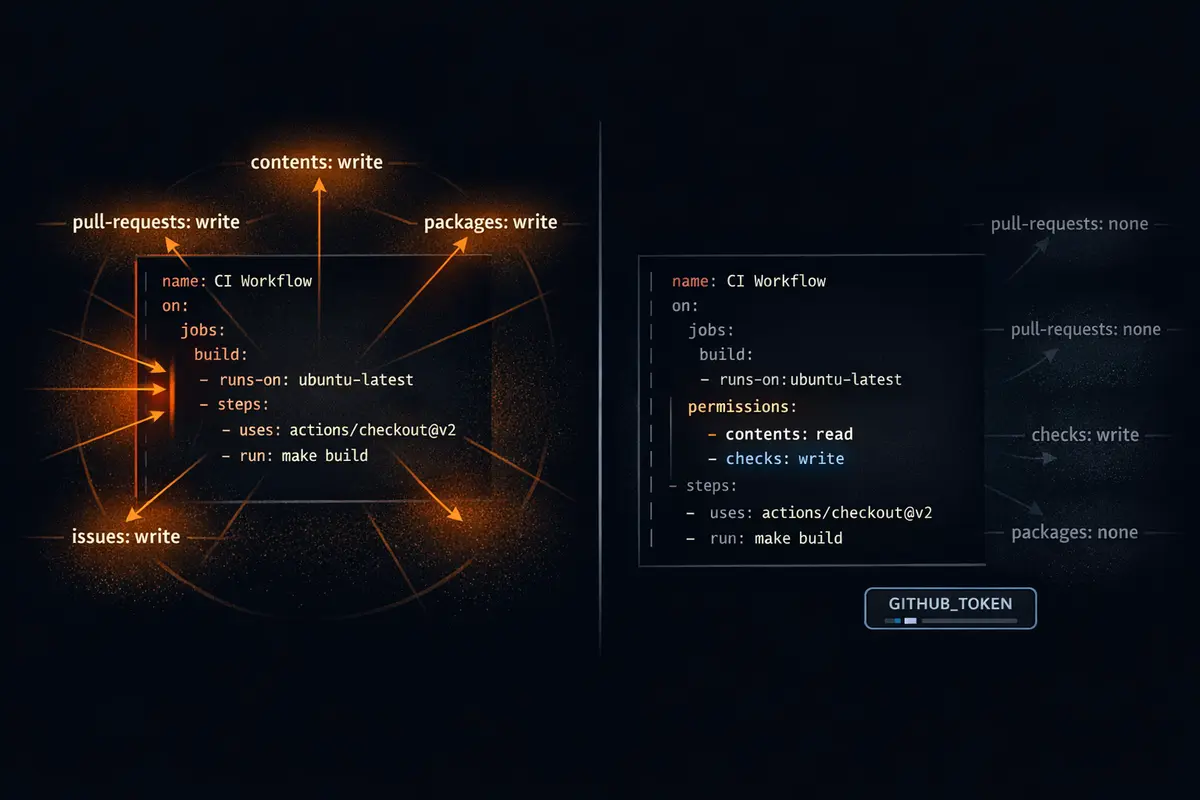
Every time a GitHub Actions workflow runs, GitHub provisions a GITHUB_TOKEN automatically - a short-lived credential scoped to the repository. You don't create it, rotate it, or store it as a secret. It just appears. What most developers don't realize is what that token can do by default: write to repository contents, open and merge pull requests, push packages, create deployments, manage releases, and more. All of it, unless you say otherwise. The default exists because GitHub designed it for ease of adoption - get a workflow running without thinking about permissions. That's reasonable for a first prototype. It's a real problem for anything that runs in production.
The attack surface is concrete. A compromised dependency in a build step. A malicious action injected through a supply-chain attack. A command injection vulnerability in an untrusted PR title. Any of these can use the workflow's default GITHUB_TOKEN to read secrets, push code, or overwrite a release. Not because the workflow was misconfigured. Because the default is permissive and nobody added the permissions block.
The fix is three to six lines of YAML. The return on investment is not subtle.
What the Default Permissions Actually Are
By default, when the
permissionskey is absent from a workflow, GitHub Actions grants write access to most token scopes when the workflow is triggered by an event on the default branch. Workflows triggered by pull requests from forks get read-only by default - but that's a different default, and it applies only to that specific case.
Here are the actual scopes that GITHUB_TOKEN receives when you don't specify a permissions block:
| Scope | Default (non-fork) | Description |
|---|---|---|
actions |
write | Manage workflow runs |
checks |
write | Create and update check runs |
contents |
write | Read/write repo contents, create commits and branches |
deployments |
write | Create deployments |
id-token |
none | Request OIDC tokens - must be explicitly opted in |
issues |
write | Create and update issues |
packages |
write | Push packages to GitHub Packages |
pages |
write | Manage GitHub Pages |
pull-requests |
write | Open, edit, and merge pull requests |
repository-projects |
write | Manage projects |
security-events |
write | Upload SARIF results, manage Dependabot alerts |
statuses |
write | Set commit statuses |
Notice id-token: it is the one scope that is not granted by default. Everything else in this table is write-enabled unless you turn it off. A workflow that runs unit tests needs one of these - checks: write to post test results, or sometimes nothing at all. It has all of them.
The practical implication: if your test workflow checks out code, installs dependencies from npm or PyPI, and runs tests, every package in your transitive dependency tree is running code inside a process that holds a token with write access to your repository. That's the blast radius. It exists whether or not anyone intended it.
Workflow-Level vs. Job-Level Permissions
The permissions block can appear at two places in a workflow file. Understanding both is necessary to use it correctly.
Workflow-level permissions sit at the top of the file, under the on: block. They establish a baseline that every job in the workflow inherits unless a job explicitly overrides them:
name: CI
on: [push]

permissions:
  contents: read
  checks: write

jobs:
  test:
    runs-on: ubuntu-latest
    steps:
      - uses: actions/checkout@v4
      - run: npm ci && npm test
Job-level permissions sit inside a specific job and override the workflow baseline for that job only. This lets different jobs in the same workflow operate with different scopes:
jobs:
  test:
    runs-on: ubuntu-latest
    permissions:
      contents: read
      checks: write
    steps:
      - uses: actions/checkout@v4
      - run: npm test

  deploy:
    runs-on: ubuntu-latest
    permissions:
      contents: read
      pages: write
      id-token: write
    steps:
      - uses: actions/deploy-pages@v4
The correct pattern for any workflow with more than one job - or any workflow where you care about security at all - is to set permissions: {} at the workflow level and then declare exactly what each job needs at the job level:
name: CI
on: [push]

permissions: {}  # zero baseline - every job must declare what it needs

jobs:
  test:
    permissions:
      contents: read
      checks: write
    runs-on: ubuntu-latest
    steps:
      ...

  deploy:
    permissions:
      pages: write
      id-token: write
    runs-on: ubuntu-latest
    steps:
      ...
The empty object {} grants zero permissions. Any job added later starts with nothing and will fail visibly in CI if it uses a token operation it hasn't been granted. That failure in CI is strictly preferable to silently holding permissions that were never intended.
Three Real Workflow Scenarios
Scenario 1: Run Tests and Post Results
A test workflow needs two things: to read the repository code (contents: read) and to post check results (checks: write). That's the complete list.
name: Test
on: [push, pull_request]

permissions: {}

jobs:
  test:
    runs-on: ubuntu-latest
    permissions:
      contents: read
      checks: write
    steps:
      - uses: actions/checkout@v4
      - uses: actions/setup-node@v4
        with:
          node-version: 20
          cache: npm
      - run: npm ci
      - run: npm test
What this workflow does not have: write access to repository contents, issues, pull requests, packages, or anything else. A compromised dependency in npm ci or npm test cannot push a commit, open a PR, or modify a release with this configuration. The blast radius is contained to the job's declared scope.
Scenario 2: Comment on a Pull Request
A workflow that posts a comment on a PR - a code coverage summary, a preview URL, a diff report - needs pull-requests: write. It still does not need contents: write.
name: Coverage Report
on: pull_request

permissions: {}

jobs:
  coverage:
    runs-on: ubuntu-latest
    permissions:
      contents: read
      pull-requests: write
    steps:
      - uses: actions/checkout@v4
      - run: npm ci && npm run test:coverage
      - uses: actions/github-script@v7
        with:
          script: |
            github.rest.issues.createComment({
              issue_number: context.issue.number,
              owner: context.repo.owner,
              repo: context.repo.repo,
              body: '## Coverage: 94.2%'
            })
One thing worth calling out explicitly: commenting on a pull request uses pull-requests: write, not issues: write. Pull requests and issues share an API in GitHub - a PR is technically an issue - but they are separate GITHUB_TOKEN scopes. Grant only pull-requests: write; issues: write gives the workflow access to create and modify issues across the repository.
Scenario 3: Deploy to GitHub Pages with OIDC
This scenario requires the most permissions, which makes it the most important one to scope correctly. A misconfigured deploy workflow with an overly broad GITHUB_TOKEN can modify branches, overwrite releases, or interact with packages - none of which a Pages deployment needs.
The correct approach splits build and deploy into separate jobs, each with only what it needs:
name: Deploy
on:
  push:
    branches: [main]

permissions: {}

jobs:
  build:
    runs-on: ubuntu-latest
    permissions:
      contents: read
    steps:
      - uses: actions/checkout@v4
      - run: npm ci && npm run build
      - uses: actions/upload-pages-artifact@v3
        with:
          path: _site/

  deploy:
    needs: build
    runs-on: ubuntu-latest
    environment:
      name: github-pages
      url: ${{ steps.deploy.outputs.page_url }}
    permissions:
      pages: write
      id-token: write
    steps:
      - uses: actions/deploy-pages@v4
        id: deploy
The id-token: write scope deserves special attention here. It is the one scope in the permissions table that is not granted by default and must be explicitly declared. It authorizes the workflow to request an OIDC token from GitHub - the short-lived, keyless credential used for authentication with GitHub Pages and cloud providers. Without id-token: write, OIDC-based deployments fail. The error messages are not always clear about why. When a Pages or cloud deploy workflow silently fails to authenticate, the missing id-token: write permission is the first thing to check.
The permissions: {} Pattern - Zero Baseline
There are three ways to handle the workflow-level permissions block, and they are not equivalent:
# Inherits GitHub's permissive defaults - write access to almost everything
name: Dangerous Workflow
on: [push]
# no permissions key

---

# Better - grants read access to all scopes; still broader than necessary
name: Less Dangerous Workflow
on: [push]
permissions: read-all

---

# Correct - jobs declare exactly what they need, nothing is inherited
name: Correct Workflow
on: [push]
permissions: {}
The read-all shorthand is a common stopping point for teams that know they should restrict permissions but aren't ready to audit each job. It meaningfully reduces the write blast radius. But read access to contents still means any step in the workflow can read the full repository source, read secrets exposed as environment variables via env:, and exfiltrate data to an external endpoint. Read-only is not zero. permissions: {} is zero.
The other reason the zero baseline matters: it makes security visible in code review. When a developer adds a new job that calls softprops/action-gh-release to create a release, and the workflow has permissions: {} at the top, the CI run will fail immediately with a 403. The review conversation becomes "this job needs contents: write to create a release - is that the right tool for this workflow?" instead of "the release job works, ship it." The failure surface in CI is the faster feedback loop.
Organization-Level Defaults
Individual workflow permissions blocks are the most important control - but GitHub also allows setting a default permissions policy at the organization level. Navigate to Settings → Actions → Workflow permissions at the org level and you'll find two options:
- "Read and write permissions" - the default for most organizations, grants write access to most scopes
- "Read repository contents and packages permissions" - grants read-only by default
Set the org default to read-only. This doesn't replace per-workflow permissions blocks - those override the org default and should still be explicit - but it reduces the blast radius for any workflow file in any repository in the org that is missing its permissions block entirely. In a large organization with dozens of repositories and workflows, that gap is not hypothetical.
For organizations using GitHub Enterprise or GitHub Advanced Security, this setting is often the fastest compliance win available: one checkbox that immediately restricts the default token scope across the entire org, with no workflow changes required.
Auditing Existing Workflows
Before adding permissions blocks to new workflows, it's worth knowing which existing workflows don't have them.
Manual scan - find workflow files with no permissions key:
grep -rL "^permissions:" .github/workflows/
This outputs every workflow file in .github/workflows/ that has no permissions declaration at all. Each result is a workflow running on GitHub's permissive defaults.
Using step-security/harden-runner - for determining what permissions a workflow actually uses before committing to a minimal set:
- uses: step-security/harden-runner@v2
  with:
    egress-policy: audit
Harden-runner logs all outbound network calls and the permissions the workflow actually exercises during a run. Run it in audit mode for a few cycles before adding a permissions block - it tells you the minimal set you need rather than requiring you to read every action's documentation to figure it out.
Using actionlint - static analysis for GitHub Actions workflows:
# Install and run actionlint
brew install actionlint
actionlint .github/workflows/*.yml
actionlint catches a broad range of workflow issues including type mismatches, invalid expressions, and - with the right configuration - jobs without explicit permission declarations. It's the fastest way to get a baseline audit across all workflows in a repository.
Permissions Quick Reference
| Use case | Minimum permissions needed |
|---|---|
| Checkout and build | contents: read |
| Run tests, post check results | contents: read, checks: write |
| Comment on a PR | contents: read, pull-requests: write |
| Create a release | contents: write |
| Push to GitHub Packages | packages: write |
| Deploy to GitHub Pages (OIDC) | pages: write, id-token: write |
| Upload SARIF to code scanning | security-events: write |
| Request OIDC token (cloud deploy) | id-token: write |
Key rules:
- Set
permissions: {}at the workflow level as a zero baseline - Grant only what each job needs, declared at the job level
- Set "Read repository contents" as the org-level default in Actions settings
id-token: writeis never granted by default - always declare it explicitly- Add
step-security/harden-runnerin audit mode to discover actual permissions used before writing yourpermissionsblock - Run
grep -rL "^permissions:" .github/workflows/to find workflows still on GitHub defaults
The permissions block is three lines of YAML that meaningfully reduces the attack surface of every workflow that includes it. It doesn't require a security team, a policy review, or a platform migration. It requires looking at what each job actually does, mapping that to the minimum set of scopes, and writing it down. GitHub's defaults were designed for ease of adoption - get something running without friction. The permissions block is how you opt out of that tradeoff once the workflow is running in production. That's the right time to do it, which means the right time is now.
Want to talk through permissions strategy for your workflows, or work through a permissions audit for your GitHub Actions setup? Reach out.