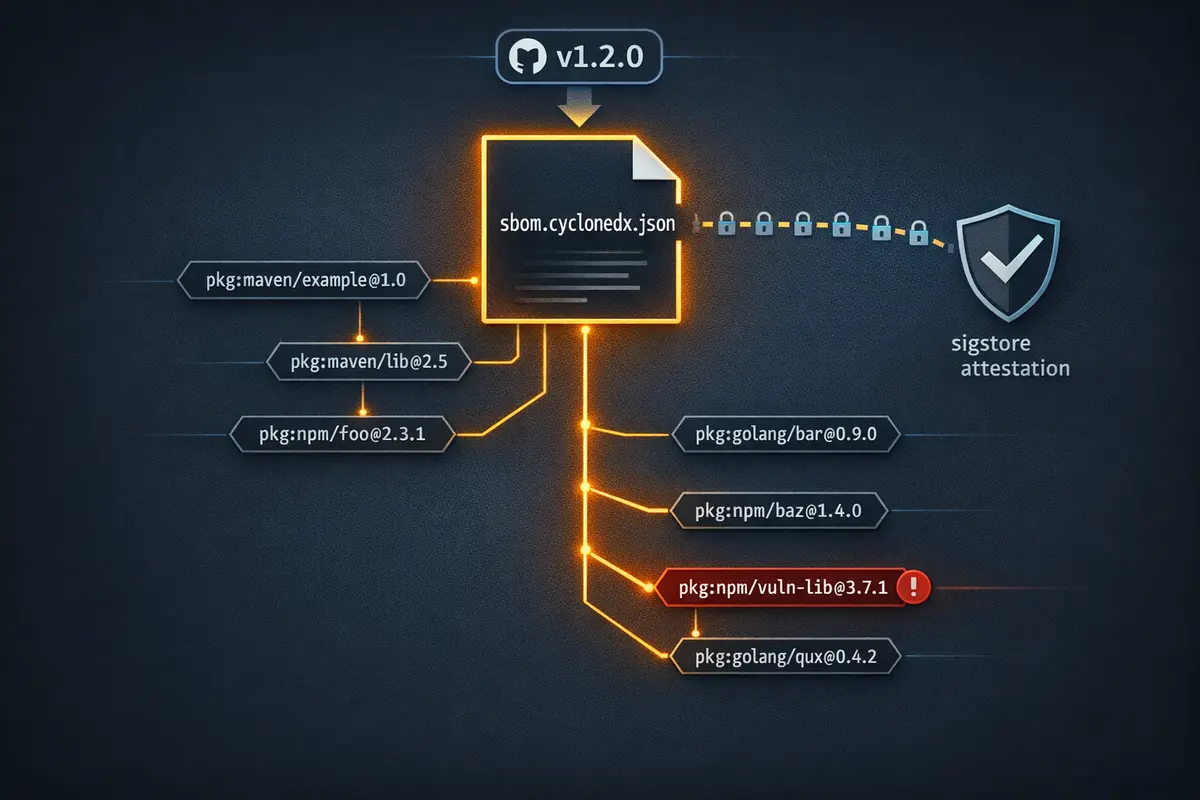
The SBOM requirement showed up in a procurement questionnaire. Someone on the team generated one, attached it to a Confluence page, checked the box, and moved on. Six months later a new CVE dropped for a package nobody had heard of. It turned out to be a transitive dependency - the dependency of a dependency - that had been in every release for two years. The Confluence document, already stale the day it was created, couldn't answer the question that mattered: was the vulnerable version in the build that shipped last week, or the one that shipped the week before? The audit trail was blank. The compliance checkbox was green.
This is the gap between compliance theater and an actually useful SBOM - Software Bill of Materials. A document filed in a wiki tells you roughly what was on a developer's machine the day someone decided to run a scan. An SBOM attached to a specific release commit, generated automatically by your CI pipeline, cryptographically signed, and queryable on demand tells you exactly what shipped and when. The difference isn't philosophical. One is evidence; the other is paperwork. GitHub Actions - specifically anchore/sbom-action and GitHub's artifact attestation - makes producing the real version take about fifteen lines of YAML.
What an SBOM Actually Is
An SBOM is a machine-readable inventory of every component in your software - direct dependencies, transitive dependencies, their versions, licenses, and known vulnerabilities at the time of build.
The two dominant formats are SPDX (Linux Foundation, widely used in government and enterprise procurement) and CycloneDX (OWASP, richer vulnerability data, better tooling ecosystem). The NTIA minimum elements guidance and Executive Order 14028 are format-agnostic, but in practice CycloneDX has better tooling support for querying and analysis. This post uses CycloneDX JSON.
A CycloneDX SBOM contains, per component:
- Package name and version - exactly what was resolved and installed, not what was specified
- PURL - a Package URL in the form
pkg:npm/lodash@4.17.21that uniquely identifies the component across ecosystems - License - often the thing legal is actually asking about
- Supplier - the entity that published the package
- Hashes - SHA-256 and SHA-512 digests of the component at the time of inclusion
The version and hash fields are what make the SBOM meaningful for security response. When a CVE drops, you don't ask "do we use this package?" - you ask "which of our releases included version X, and is that version still deployed?" The SBOM answers both questions directly.
The reason transitive dependencies matter more than most developers realize: the majority of documented supply chain attacks target transitive dependencies, not the packages a team explicitly installs. Your package.json might list twenty direct dependencies. Your resolved dependency tree likely contains several hundred packages. Most of your team can't name ten of them. The SBOM names all of them.
An SBOM is a snapshot of your software's supply chain at a specific point in time. Its value degrades as soon as a dependency changes - which is why generating it at build time, not manually, is the only approach that scales.
The GitHub Tooling Stack
Four components do the work in this post:
anchore/sbom-action generates CycloneDX or SPDX SBOMs from a source repository, a compiled artifact, or a container image. Under the hood it wraps Syft, Anchore's open-source SBOM generator. The action handles ecosystem detection automatically - npm, Maven, Go modules, Python, NuGet, and others are all supported without configuration.
actions/attest creates a sigstore-based attestation that cryptographically binds your SBOM file to the specific GitHub Actions workflow run and commit that produced it. The attestation is stored in GitHub's attestation API, not as a file in your repo. It uses the workflow's OIDC identity - a short-lived token issued to the specific run - as the signing key, so there's no long-lived secret to manage and no key rotation story to write.
GitHub Releases is where the SBOM gets attached as a named asset. Consumers - security teams, procurement reviewers, downstream pipelines - can retrieve it without cloning the repository.
gh attestation verify is how any consumer, including your own audit workflow, validates that an SBOM file was produced by the claimed workflow run and hasn't been tampered with since.
Generating the SBOM: Step by Step
Step 1: Basic SBOM Generation on Release
This workflow triggers on any tag matching v*, generates a CycloneDX JSON SBOM, attests it, and attaches it to the GitHub Release created by the tag push.
name: Release

on:
  push:
    tags:
      - 'v*'

permissions:
  contents: write
  id-token: write
  attestations: write

jobs:
  release:
    runs-on: ubuntu-latest
    steps:
      - uses: actions/checkout@v4

      - name: Generate SBOM
        uses: anchore/sbom-action@v0
        with:
          format: cyclonedx-json
          output-file: sbom.cyclonedx.json

      - name: Attest SBOM
        uses: actions/attest@v1
        with:
          subject-path: sbom.cyclonedx.json

      - name: Attach SBOM to release
        uses: softprops/action-gh-release@v2
        with:
          files: sbom.cyclonedx.json
The three permissions are not interchangeable defaults - each one does specific work:
contents: writeallows the workflow to create and upload assets to the GitHub Release created by the tag pushid-token: writeallows the workflow to request an OIDC token from GitHub, which is the signing identity that sigstore uses for the attestation - without this, the attest step fails silentlyattestations: writeallows the workflow to write the attestation record to GitHub's attestation API
If you're building a container image alongside the release, anchore/sbom-action can generate an image SBOM instead by setting image instead of scanning the source tree:
- name: Generate image SBOM
  uses: anchore/sbom-action@v0
  with:
    image: ghcr.io/your-org/your-image:${{ github.ref_name }}
    format: cyclonedx-json
    output-file: sbom.cyclonedx.json
Source-tree and image SBOMs answer different questions. The source-tree SBOM reflects what your build process consumed. The image SBOM reflects what ended up in the container, including any OS-level packages installed in the base image. For a complete supply chain picture you want both, attached as separate release assets.
Step 2: Validating the Attestation Downstream
After the release is created, any consumer can verify the SBOM's provenance:
gh attestation verify sbom.cyclonedx.json \
  --owner your-org \
  --repo your-repo
What this checks: that the file was signed by a GitHub Actions workflow running in the specified org and repo, using the OIDC identity of the specific workflow run. The attestation record includes the git commit SHA, the workflow file path, and the ref that triggered the run. If the file has been modified since it was attested - even a single byte - verification fails.
You can add this as a gate in a downstream audit workflow, or run it manually in an incident response scenario to confirm that the SBOM you're looking at is the one that was produced at release time and hasn't been manipulated:
# Output shows the signer identity, workflow ref, and commit
gh attestation verify sbom.cyclonedx.json \
  --owner your-org \
  --repo your-repo \
  --format json | jq '.verificationResult.statement.predicate'
The SBOM as a Debugging Tool
Compliance is the reason most teams generate an SBOM. Debugging transitive dependency surprises is the reason you'll be glad you did. Three concrete scenarios:
Scenario A: The Mystery Vulnerability
Dependabot fires an alert for a package you don't recognize. You search your package.json - it's not there. It's a transitive dependency. Without the SBOM you trace the tree manually: npm ls <package>, follow the chain, work out which of your direct dependencies pulled it in, decide whether you can bump that direct dep or need a resolution override.
With the SBOM, you query it:
# Find the affected component and its PURL
jq '.components[] | select(.name == "vulnerable-package") | {name, version, purl}' \
  sbom.cyclonedx.json
The PURL tells you the ecosystem, the package registry, the name, and the exact version. From there you know immediately whether the version in the release matches the affected range in the CVE. You're not guessing based on what's currently installed - you're looking at the resolved state at the moment the build ran.
Scenario B: License Audit
Legal asks whether any GPL-licensed dependencies made it into the product. Without an SBOM this is a manual audit of every package in the tree, opening each one's LICENSE file or checking the registry. With one:
# List all components with GPL licenses
jq '.components[] | select(.licenses[]?.license.id | test("GPL"; "i")) | {name, version, licenses}' \
  sbom.cyclonedx.json
This runs in seconds and produces an exhaustive list including transitive dependencies that almost certainly weren't reviewed during the original dependency selection. License compliance failures are disproportionately found in transitive deps - packages that seemed safe because nobody chose them.
Scenario C: Point-in-Time Comparison
A new CVE drops on a Tuesday. Your current codebase has already been patched - the vulnerable package was bumped in a PR three weeks ago. But you need to know whether the release that's currently in production, tagged v2.4.1 two months ago, was affected. The SBOM attached to that release tag is the authoritative answer. No guessing from git history, no reconstructing lock files, no hoping that the package manager's lock file actually reflects what was installed in CI.
This is the scenario that makes the "attach to every release, don't let it be ephemeral" rule non-negotiable. An SBOM that lives only in a workflow artifact expires in 90 days by default. One attached to a GitHub Release lives as long as the release does.
SBOM in the PR Pipeline
Generating on release is the baseline. Generating on every PR and diffing the result is the level-up. The goal is to catch unexpected changes in the transitive dependency tree before they merge - the scenario where a direct dependency bump quietly pulls in a new version of a shared transitive dep that nobody reviewed.
name: SBOM Diff

on:
  pull_request:

permissions:
  contents: read

jobs:
  sbom-diff:
    runs-on: ubuntu-latest
    steps:
      - uses: actions/checkout@v4
        with:
          fetch-depth: 0

      - name: Generate SBOM for PR branch
        uses: anchore/sbom-action@v0
        with:
          format: cyclonedx-json
          output-file: sbom-pr.cyclonedx.json

      - name: Checkout base branch
        uses: actions/checkout@v4
        with:
          ref: ${{ github.base_ref }}
          path: base

      - name: Generate SBOM for base branch
        uses: anchore/sbom-action@v0
        with:
          path: base
          format: cyclonedx-json
          output-file: sbom-base.cyclonedx.json

      - name: Diff transitive dependency count
        run: |
          base_count=$(jq '.components | length' sbom-base.cyclonedx.json)
          pr_count=$(jq '.components | length' sbom-pr.cyclonedx.json)
          echo "Base: $base_count components | PR: $pr_count components"
          if [ "$pr_count" -gt "$base_count" ]; then
            echo "::warning::Transitive dependency count increased by $((pr_count - base_count))"
          fi
This won't block PRs by default - it surfaces the signal as a warning annotation. Whether that warning should block merges is a policy call for your team. The point is making the change visible before it ships, not after someone queries the release SBOM in response to an incident.
SBOM Implementation Checklist
- Generate on every tagged release - not manually, not on demand
- Use CycloneDX JSON format for best tooling and
jqcompatibility - Attest with
actions/attest@v1for cryptographic provenance tied to the specific workflow run - Attach to GitHub Releases as a named asset (
sbom.cyclonedx.json) so it survives past artifact expiry - Set
id-token: writeandattestations: writepermissions - without both, attestation silently fails - Verify attestation in your audit workflow with
gh attestation verify - Archive SBOMs alongside release artifacts - an SBOM that expires in 90 days can't answer questions about a release from last year
- Know your transitive dependency count: if you don't know it, run
jq '.components | length' sbom.cyclonedx.jsonon your last release
Closing
The compliance requirement is a forcing function, but treat it as the floor rather than the ceiling. A manually generated SBOM filed in Confluence is compliance theater - it's a document that describes a state that no longer exists, signed by nobody, attached to nothing. The workflow in this post runs in under two minutes, produces a cryptographically attestable artifact tied to a specific git commit and workflow run, and gives your security team something they can query against a real CVE in a real incident.
The SBOM is only as useful as it is current. "Current" means generated at build time, on every release, automatically - not whenever someone on the team remembers to run a scanner. The attestation is only as useful as your ability to verify it. The debugging value is only as real as your willingness to actually query the artifact instead of filing it and forgetting it.
Your transitive dependency tree almost certainly contains packages you've never evaluated. The SBOM tells you their names, their versions, and their licenses. It takes one jq command to find out how many there are. Start there.
Have questions about supply chain security, SBOM tooling, or wiring attestation into your release pipeline? Reach out.