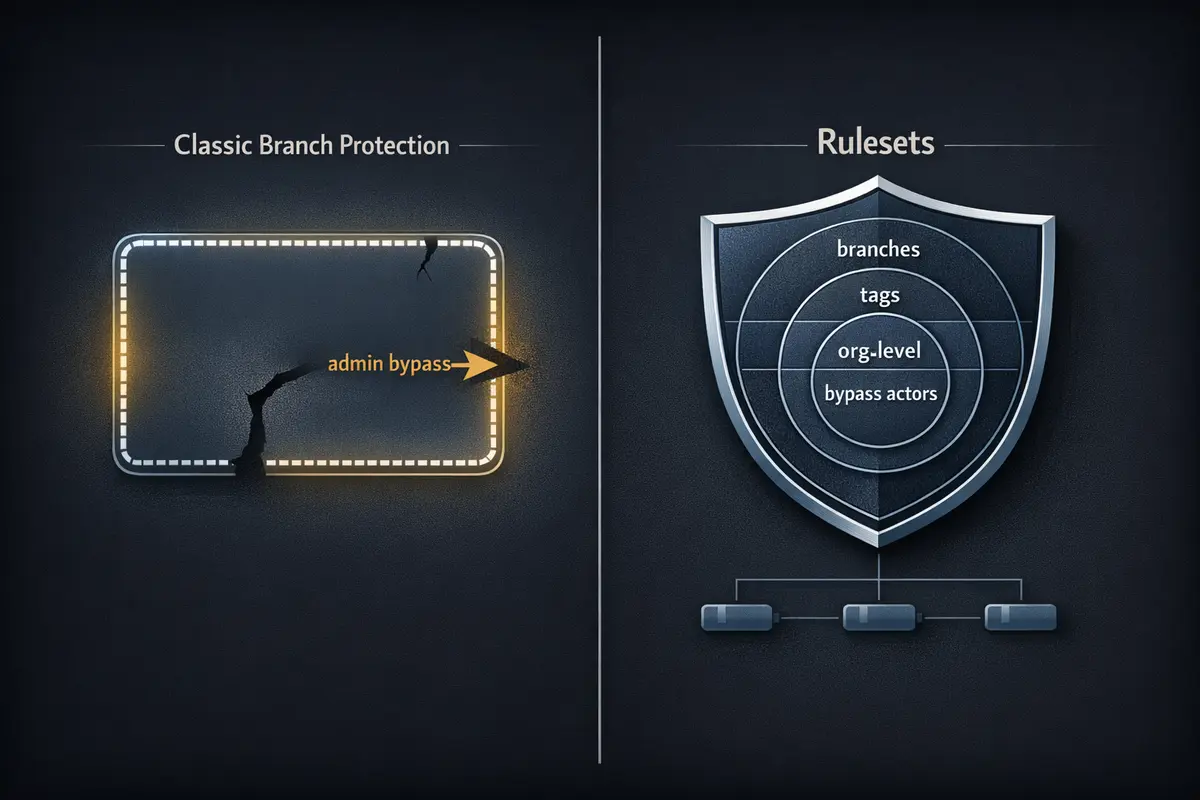
Most teams set up branch protection rules once, years ago, and haven't touched them since. That's understandable - once it's configured, it's invisible infrastructure. What's less visible is the hole in it. Classic branch protection has a default behavior that's documented but easy to miss: repository admins bypass all rules. Require pull request reviews? An admin can push directly to main. Require status checks? An admin can merge without them. For most small and medium teams - where the admin is also a developer - the protection they think they have has a gap large enough to drive a production incident through.
GitHub Rulesets close that gap. They also add organization-level enforcement, tag protection, named bypass actors, and an evaluation mode that lets you audit what would be blocked before you enforce anything. This post maps what changed between the two systems, walks through a production-ready Ruleset configuration, and includes an audit workflow that checks Ruleset coverage across every repo in your org.
What Classic Branch Protection Actually Does - and Where It Breaks Down
Classic branch protection gives you the fundamentals most teams need:
- Require pull request reviews before merging (with configurable reviewer count and stale review dismissal)
- Require status checks to pass before merging
- Require branches to be up to date before merging
- Restrict who can push to the branch
- Require signed commits
- Require linear history
That list covers a lot. For a single repo with a small team, it's often enough. The limitations become visible as teams grow or when something goes wrong.
The Admin Bypass Problem
By default, repository admins are exempt from all classic branch protection rules. There is a checkbox - "Include administrators" - that removes the exemption, but it is not enabled by default, and in practice many teams never enable it. This means that on most repos, the people most likely to push directly to main under pressure (the people with admin access) are the people for whom all those protections are silently inactive.
This isn't a fringe edge case. It's the default behavior.
Everything Else the Classic System Can't Do
Beyond admin bypass, the classic model has structural limitations:
- No tag protection: classic branch protection is branches-only. Tags have a separate, weaker protection mechanism that most teams don't configure at all. Your
v1.2.3release tags are likely unprotected. - No organization-level enforcement: branch protection is configured per-repo. If your organization has 50 repositories, you need 50 separate configurations. There's no single source of truth.
- No bypass actors: you can't grant a specific team or GitHub App the ability to bypass rules without making them full admins on the repo. The access model is binary.
- No evaluation mode: you can't test what a new protection would block before you enable it. You enforce or you don't.
What Rulesets Are and How They Differ
A Ruleset is GitHub's next-generation enforcement layer - it can target branches and tags, applies at the repo or organization level, supports named bypass actors, and can be exported and version-controlled as JSON.
Rulesets were introduced for GitHub Enterprise and are now available on all plan tiers. They don't replace the classic system immediately - you can run both simultaneously - but they are strictly more capable in every dimension that matters for compliance and security.
| Capability | Classic Branch Protection | Rulesets |
|---|---|---|
| Applies to branches | ✅ | ✅ |
| Applies to tags | ❌ | ✅ |
| Organization-level enforcement | ❌ | ✅ |
| Bypass actors (non-admin) | ❌ | ✅ |
| Admin bypass (default) | ✅ (admins bypass by default) | Configurable - admins can be included or excluded |
| Multiple rulesets per repo | ❌ | ✅ |
| Exportable as JSON | ❌ | ✅ |
| Evaluation mode (audit without enforcing) | ❌ | ✅ |
| Targets by branch name pattern | ✅ | ✅ |
| Full fnmatch pattern support | Limited | ✅ |
The Capabilities Worth Understanding Before You Migrate
Bypass Actors
This is the most important capability Rulesets add. Instead of the binary admin/non-admin split, Rulesets let you define specific bypass actors - entities that are permitted to bypass rules under defined conditions:
- A specific team - your platform engineering team can push hotfixes directly to
mainwithout a PR; no one else can - A specific GitHub App - your release automation app can create and delete version tags; human engineers cannot
- Repository roles - Maintainer role can bypass; Contributor role cannot
The bypass_mode field is particularly useful. Setting bypass_mode: "pull_request" means the bypass actor can still only merge via a pull request - they bypass the status check or review requirements, but not the PR itself. This lets you grant trusted actors flexibility without removing the audit trail that comes with PR history.
Evaluation Mode
Before enforcing a new Ruleset, set its enforcement to evaluate. In evaluation mode, GitHub runs all the checks and logs what would have been blocked - without actually blocking anything. This is indispensable for organizations rolling out standards across many repos: you see the blast radius before anyone's work is interrupted.
Run a Ruleset in evaluate mode for one to two weeks. If nothing surprising surfaces in the audit log, switch to active. If something does surface, you've caught it before it becomes an incident.
Tag Protection
Classic branch protection has no equivalent for tags. Rulesets close this. A tag-targeting Ruleset prevents deletion, non-fast-forward updates, and unauthorized creation of version tags:
{
  "name": "Protect release tags",
  "target": "tag",
  "enforcement": "active",
  "conditions": {
    "ref_name": {
      "include": ["refs/tags/v*"],
      "exclude": []
    }
  },
  "rules": [
    { "type": "deletion" },
    { "type": "non_fast_forward" },
    { "type": "creation" }
  ]
}
The creation rule blocks all creation of matching refs by default - only bypass actors can create v* tags. If your release process creates tags through a GitHub App or Actions bot, add that actor as a bypass actor on this Ruleset. Human engineers - including admins - are blocked by default.
Organization-Level Rulesets
A single Ruleset defined at the organization level applies to all repos in that org, or to a filtered subset by repo name pattern. This is the answer to "how do we enforce our branching standards across all 200 repositories" - one Ruleset, not 200 individual configuration changes. Repos can layer additional repo-level Rulesets on top of the org baseline; the most restrictive rule wins when rules conflict.
A Complete Ruleset for a Typical Project
The following is a production-ready Ruleset for protecting the main branch of a typical open-source or team project. You can import it directly through the GitHub UI (Repository → Settings → Rules → Rulesets → Import) or apply it via the API.
{
  "name": "Protect main branch",
  "target": "branch",
  "enforcement": "active",
  "conditions": {
    "ref_name": {
      "include": ["refs/heads/main"],
      "exclude": []
    }
  },
  "bypass_actors": [
    {
      "actor_id": 1,
      "actor_type": "OrganizationAdmin",
      "bypass_mode": "pull_request"
    }
  ],
  "rules": [
    {
      "type": "deletion"
    },
    {
      "type": "non_fast_forward"
    },
    {
      "type": "pull_request",
      "parameters": {
        "required_approving_review_count": 1,
        "dismiss_stale_reviews_on_push": true,
        "require_code_owner_review": false,
        "require_last_push_approval": true,
        "allowed_merge_methods": ["squash", "merge"]
      }
    },
    {
      "type": "required_status_checks",
      "parameters": {
        "strict_required_status_checks_policy": true,
        "required_status_checks": [
          {
            "context": "build / compile",
            "integration_id": null
          },
          {
            "context": "test / unit-tests",
            "integration_id": null
          }
        ]
      }
    },
    {
      "type": "required_signatures"
    }
  ]
}
A few choices worth explaining:
bypass_mode: "pull_request"on theOrganizationAdminactor: org admins can still bypass review and status check requirements, but they can't push directly tomain- they still have to open a PR. The audit trail stays intact.require_last_push_approval: true: the person who made the last push to a PR branch cannot be the one who approves the merge. This prevents a single developer from self-approving their own changes by pushing a trivial amendment to reset the review state.strict_required_status_checks_policy: true: the branch must be up to date withmainbefore merging. Disabling this allows a PR to merge even if its base has drifted in ways that would break the combined result.allowed_merge_methods: restricting tosquashandmerge(excluding rebase) is a project-specific choice - squash keepsmainhistory linear and readable; includingmergeaccommodates workflows that want to preserve PR structure. Adjust to match your conventions.
Replace build / compile and test / unit-tests with the actual check names from your Actions workflows. The names in required_status_checks must match exactly - including the <job-name> / <step-name> format that Actions generates.
Auditing Ruleset Coverage Across an Org
Rulesets are only useful if they're actually configured. As your organization grows, repos get created without anyone ensuring the baseline standards are applied. The following GitHub Actions workflow runs weekly and fails visibly if any repo in the org has no active Rulesets:
name: Audit Ruleset Coverage
on:
  schedule:
    - cron: '0 9 * * 1'  # Every Monday at 9am
  workflow_dispatch:

permissions:
  contents: read

jobs:
  audit:
    runs-on: ubuntu-latest
    steps:
      - name: Find repos without active Rulesets
        env:
          GH_TOKEN: ${{ secrets.ORG_READ_TOKEN }}
          ORG: ${{ vars.ORG_NAME }}
        run: |
          echo "Checking Ruleset coverage for org: $ORG"

          # Get all repos in the org
          repos=$(gh api /orgs/$ORG/repos --paginate \
            --jq '.[].name')

          uncovered=()

          while IFS= read -r repo; do
            ruleset_count=$(gh api /repos/$ORG/$repo/rulesets \
              --jq '[.[] | select(.enforcement == "active")] | length' \
              2>/dev/null || echo "0")

            if [ "$ruleset_count" -eq "0" ]; then
              uncovered+=("$repo")
            fi
          done <<< "$repos"

          if [ ${#uncovered[@]} -eq 0 ]; then
            echo "✅ All repos have active Rulesets configured."
          else
            echo "⚠️  Repos missing active Rulesets:"
            printf '  - %s\n' "${uncovered[@]}"
            exit 1
          fi
Two things to know about running this:
ORG_READ_TOKEN needs repo scope to read private repository metadata, or read:org if you're working with org-level Rulesets. Store it as a repository secret on wherever this workflow lives - a dedicated platform-engineering repo works well. ORG_NAME is a repository variable (not a secret) set to your GitHub organization name.
The workflow exits with code 1 when uncovered repos are found. That means it fails visibly in the Actions UI and can trigger notifications. You can extend it to open a GitHub Issue automatically or post to Slack, but the exit code alone is enough to make the gap impossible to ignore in a weekly check-in workflow.
Note that this audit only detects repos with no active Rulesets at all - it doesn't validate that the Rulesets that exist are correctly configured. For more granular compliance checking, extend the inner loop to inspect specific rule types against your organization's baseline requirements.
The Migration Path
This doesn't need to be a big-bang migration. Here's a sequence that keeps risk low.
1. Enable Rulesets in parallel. Create a Ruleset that mirrors your existing branch protection rules and set enforcement to evaluate. Run it for two weeks. Check the Insights tab under Repository → Settings → Rules - it shows every rule evaluation and whether it would have been blocked. Confirm nothing unexpected surfaces.
2. Map your bypass actors. Who on your team legitimately needs to bypass rules? Your release automation bot? A platform team doing emergency hotfixes? Write that list down and map each actor to a Ruleset bypass actor. Stop relying on admin status as a proxy for "trusted to bypass."
3. Add tag protection immediately. If you use version tags (v1.2.3, v2.0.0-rc.1), you almost certainly have no protection on them right now. Add a tag-targeting Ruleset today - this is the change with the best risk-to-effort ratio in this entire post.
4. Check your admin bypass exposure. In your existing classic branch protection, is "Include administrators" checked? If not, every repo admin bypasses every rule. Fix this in the Ruleset (the bypass_mode: "pull_request" pattern shown above), or add it to the classic rules as an immediate stopgap while you migrate.
5. For orgs with many repos: define one org-level Ruleset for baseline standards. Individual repos can add repo-level Rulesets on top for project-specific requirements.
6. Once confident, disable classic branch protection. Running both simultaneously isn't dangerous - the stricter rule always wins - but it is confusing. When a developer asks "why can't I merge this?" and the answer requires knowing which system is blocking them, you've created an unnecessary support burden. Once your Rulesets are active and validated, remove the classic rules.
Migration Checklist
- [ ] Check existing branch protection: is "Include administrators" enabled on every protected branch? If not, fix it first - this is your current exposure.
- [ ] Create a mirror Ruleset in
evaluatemode and run it for 1-2 weeks; review the Insights log for unexpected evaluations - [ ] Map your bypass needs: list who legitimately needs to bypass rules and map each to a named bypass actor (team, app, or role)
- [ ] Add tag protection for release tags (
v*) - classic branch protection offers nothing here - [ ] For multi-repo orgs: define an org-level baseline Ruleset that applies to all repositories
- [ ] Set the audit workflow to run on a weekly schedule
- [ ] Once Rulesets are active and validated: disable classic branch protection to eliminate confusion about which system is enforcing what
Classic branch protection did the job for years, but it was designed for a simpler model - one repo, one team, admin-or-not access control. Rulesets are designed for the actual complexity of modern engineering organizations: multiple repos, mixed access models, automated actors, and the need to audit compliance across all of it. The migration isn't urgent. But the admin bypass exposure - the protection that silently disappears for the people most likely to push directly to main under pressure - is reason enough to start this week. That's not a theoretical gap. It's the default configuration.
Want to talk through Ruleset strategy for your organization, or get help designing a bypass actor model that matches your team's actual access needs? Reach out.