Most GitHub Actions workflows that deploy to a cloud provider contain something like this:
env:
  AZURE_CREDENTIALS: ${{ secrets.AZURE_CREDENTIALS }}
or this:
env:
  AWS_ACCESS_KEY_ID: ${{ secrets.AWS_ACCESS_KEY_ID }}
  AWS_SECRET_ACCESS_KEY: ${{ secrets.AWS_SECRET_ACCESS_KEY }}
These credentials are real, long-lived, and stored. They exist in GitHub's secret store, they are injected into the environment of every workflow run, and they work until someone rotates or revokes them - which, in practice, often means they work indefinitely. If a dependency in your build process is compromised, or if a workflow is vulnerable to command injection via an untrusted PR title or issue body, an attacker can exfiltrate these credentials and use them outside GitHub entirely.
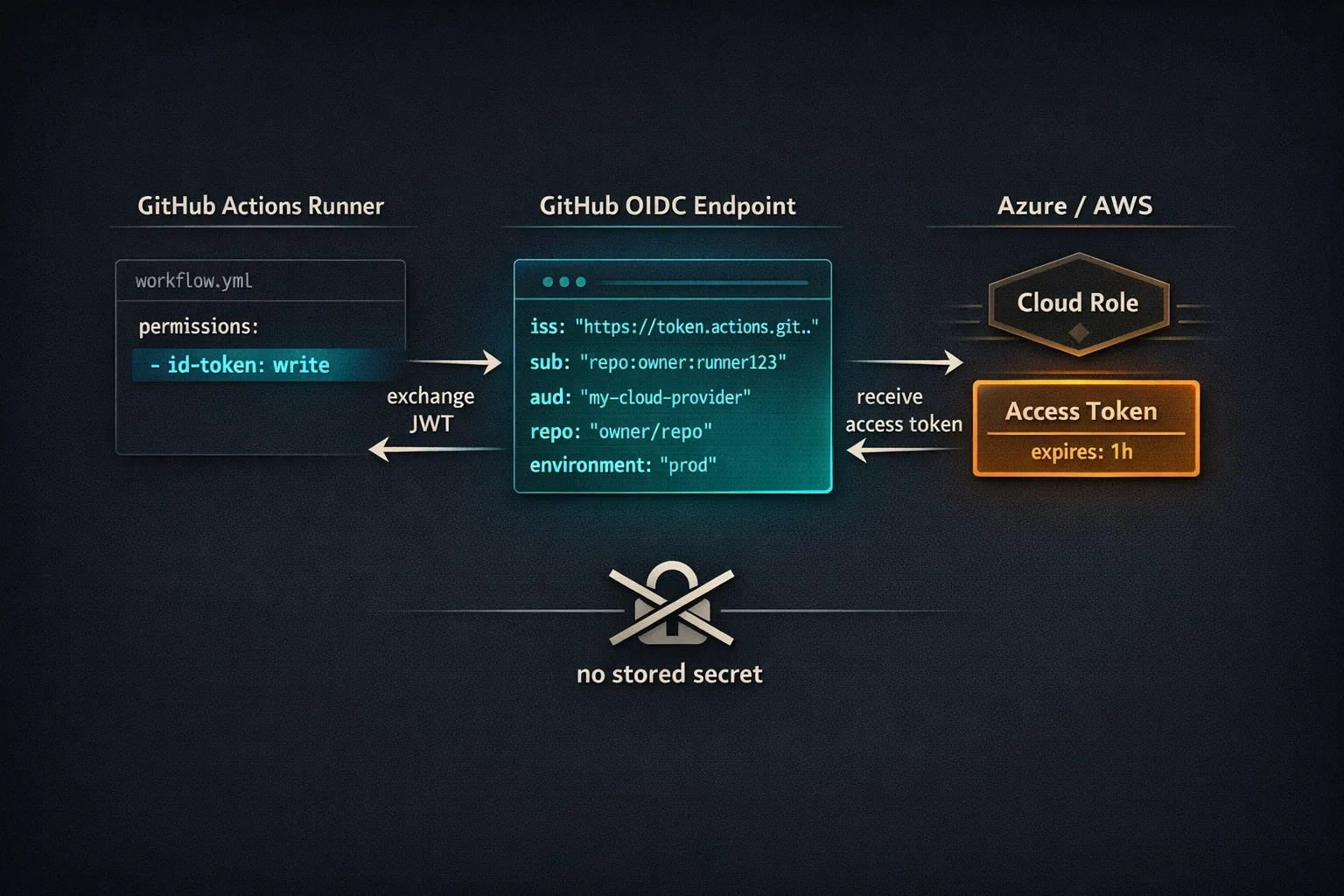
OIDC eliminates this attack surface entirely. With OIDC, your workflow authenticates to the cloud provider by presenting a short-lived token that GitHub mints for that specific workflow run. The cloud provider is configured to trust tokens from GitHub. No static credential is ever stored - not in GitHub secrets, not in environment variables, not anywhere. The token that grants cloud access expires in minutes and cannot be reused outside the context of that workflow run.
This post covers how it works, how to configure it for Azure and AWS, and how to audit your existing workflows to find the credentials you can replace today.
How OIDC Works in This Context
The mechanism is an OAuth 2.0 token exchange. GitHub acts as an OpenID Connect identity provider, issuing signed JWTs that describe the current workflow execution. The cloud provider - Azure, AWS, or GCP - is configured as a relying party that trusts those JWTs and will exchange them for its own short-lived access credentials.
The flow for a single workflow run:
- The workflow runner requests a JWT from GitHub's OIDC endpoint (
https://token.actions.githubusercontent.com). This requires theid-token: writepermission in the workflow'spermissionsblock. - GitHub signs the JWT with its private key and includes claims that identify the workflow: the repository name, the ref (branch or tag), the triggering event, and - critically - the environment name if the job is associated with a GitHub Environment.
- The workflow presents this JWT to the cloud provider's STS (Security Token Service) endpoint.
- The cloud provider verifies the JWT signature against GitHub's published public keys, checks that the claims match the configured trust conditions, and issues a short-lived access token.
- The workflow uses the short-lived access token for the duration of the job. It expires - typically within an hour - and cannot be refreshed without a new workflow run.
The critical property: at no point does a human-created, stored credential enter the picture. The JWT is ephemeral. The access token is ephemeral. An attacker who exfiltrates either has minutes, not months, to use it - and even then, only within the scope of what that specific workflow was authorized to do.
The JWT issued by GitHub contains a
sub(subject) claim that identifies the execution context precisely. For a job running in theproductionenvironment, the sub looks like:repo:owner/repo-name:environment:production. For a branch push, it looks like:repo:owner/repo-name:ref:refs/heads/main. The cloud provider's trust policy checks this claim, which means you can scope trust to a specific environment, branch, or ref - not just to the repository as a whole.
Setting Up OIDC with Azure
Azure's implementation of OIDC federation is called Workload Identity Federation. You configure it on an Azure App Registration, which gives you a service principal you can grant RBAC roles.
Step 1: Create the App Registration
In the Azure portal, navigate to Azure Active Directory -> App registrations -> New registration. Give it a descriptive name that includes the repo and environment, e.g. github-actions-myorg-myrepo-production. You don't need a redirect URI.
After creation, note the Application (client) ID and Directory (tenant) ID - you'll need both in the workflow.
Step 2: Add a Federated Identity Credential
On the App Registration, go to Certificates & secrets -> Federated credentials -> Add credential. Select GitHub Actions deploying Azure resources as the scenario.
Fill in:
- Organization: your GitHub org or username
- Repository: the repo name (without the org prefix)
- Entity type: select Environment and enter
production, or Branch and entermain, depending on what you want to trust
The entity type maps directly to what GitHub puts in the JWT's sub claim. Using Environment is strongly preferred over Branch - it means the trust is scoped to jobs that explicitly run in a named GitHub Environment, which you can protect with required reviewer approval and deployment protection rules.
You can add multiple federated credentials to the same App Registration - one for production, one for staging, each with appropriate trust scope.
Step 3: Assign RBAC Roles
The App Registration is now an identity that GitHub Actions can assume. Grant it the minimum RBAC roles it needs on the specific Azure resources the workflow accesses. For a typical deployment workflow:
Contributoron the target resource group (for deploying resources)AcrPushon the container registry (if pushing images)
Do not grant Owner or Contributor at the subscription level unless the workflow genuinely needs it.
Navigate to the resource group -> Access control (IAM) -> Add role assignment, select the role, and search for your App Registration by name.
Step 4: Update the Workflow
The workflow needs three changes: a permissions block granting id-token: write, the three Azure identifiers as non-secret environment variables (they are not sensitive - they identify the identity, not a credential), and azure/login@v2 using the federated credential flow:
name: Deploy to Azure

on:
  push:
    branches: [main]

permissions:
  contents: read
  id-token: write   # Required for OIDC token request

jobs:
  deploy:
    runs-on: ubuntu-latest
    environment: production   # Must match the federated credential entity
    steps:
      - uses: actions/checkout@v4

      - name: Log in to Azure
        uses: azure/login@v2
        with:
          client-id: ${{ vars.AZURE_CLIENT_ID }}        # Repository variable, not secret
          tenant-id: ${{ vars.AZURE_TENANT_ID }}        # Repository variable, not secret
          subscription-id: ${{ vars.AZURE_SUBSCRIPTION_ID }}  # Repository variable, not secret

      - name: Deploy
        run: az webapp deploy --resource-group my-rg --name my-app --src-path ./dist
Three things worth noting. First, vars.AZURE_CLIENT_ID uses repository variables (not secrets) - these IDs are not credentials and don't need secret-level protection. Storing non-sensitive config in variables rather than secrets is the correct pattern. Second, environment: production on the job is what generates the environment:production subject claim in the JWT - it must match the entity you configured in the federated credential. If this is omitted or mismatched, Azure rejects the token. Third, azure/login@v2 handles the entire OIDC exchange internally - you don't write any token exchange code.
Setting Up OIDC with AWS
AWS's implementation uses IAM Roles and an OIDC Identity Provider. The setup is slightly more involved than Azure because you configure the trust relationship in an IAM role's trust policy.
Step 1: Create the OIDC Identity Provider
In the AWS IAM console, navigate to Identity providers -> Add provider. Select OpenID Connect and enter:
- Provider URL:
https://token.actions.githubusercontent.com - Audience:
sts.amazonaws.com
Click Get thumbprint to fetch GitHub's certificate thumbprint, then create the provider.
This step is done once per AWS account, not once per repo. All GitHub Actions workflows in all repos can use the same OIDC provider.
Step 2: Create an IAM Role with a Trust Policy
Create an IAM role. The trust policy is what controls which GitHub workflows can assume this role. A trust policy scoped to a specific repo and environment:
{
  "Version": "2012-10-17",
  "Statement": [
    {
      "Effect": "Allow",
      "Principal": {
        "Federated": "arn:aws:iam::123456789012:oidc-provider/token.actions.githubusercontent.com"
      },
      "Action": "sts:AssumeRoleWithWebIdentity",
      "Condition": {
        "StringEquals": {
          "token.actions.githubusercontent.com:aud": "sts.amazonaws.com",
          "token.actions.githubusercontent.com:sub": "repo:myorg/myrepo:environment:production"
        }
      }
    }
  ]
}
Replace 123456789012 with your AWS account ID. The sub condition is the critical constraint - it limits assumption of this role to jobs running in the production environment of myorg/myrepo. A workflow running in staging, or a workflow in a different repo, will get a JWT with a different sub claim and will fail this condition.
If you need to trust a branch instead of an environment, change the condition to:
"token.actions.githubusercontent.com:sub": "repo:myorg/myrepo:ref:refs/heads/main"
Attach permission policies to the role granting only what the workflow needs - s3:PutObject for a deployment that uploads to S3, ecr:GetAuthorizationToken and ecr:BatchCheckLayerAvailability for pushing container images. Never attach AdministratorAccess.
Note the role's ARN - you'll use it in the workflow.
Step 3: Update the Workflow
name: Deploy to AWS

on:
  push:
    branches: [main]

permissions:
  contents: read
  id-token: write   # Required for OIDC token request

jobs:
  deploy:
    runs-on: ubuntu-latest
    environment: production
    steps:
      - uses: actions/checkout@v4

      - name: Configure AWS credentials
        uses: aws-actions/configure-aws-credentials@v4
        with:
          role-to-assume: arn:aws:iam::123456789012:role/github-actions-myrepo-production
          aws-region: us-east-1

      - name: Deploy
        run: aws s3 sync ./dist s3://my-bucket --delete
aws-actions/configure-aws-credentials@v4 handles the OIDC exchange and populates the standard AWS_ACCESS_KEY_ID, AWS_SECRET_ACCESS_KEY, and AWS_SESSION_TOKEN environment variables with short-lived values. Subsequent steps use the standard AWS SDK and CLI without any special handling - they pick up the credentials from the environment automatically.
The role ARN in role-to-assume is not sensitive - it's a resource identifier, not a credential. Store it as a repository variable (vars.AWS_ROLE_ARN) rather than a hardcoded string, but it doesn't need secret-level protection.
Scoping Trust Correctly
The trust conditions you configure determine the blast radius if GitHub's OIDC infrastructure were ever compromised or if an attacker found a way to trigger your workflow from a fork. Getting this right is not optional.
Use Environments, Not Branches
Prefer environment-scoped subjects (environment:production) over branch-scoped subjects (ref:refs/heads/main) for any role or identity that has write access to production resources.
The reason: you can protect a GitHub Environment with required reviewers and deployment protection rules. A job running in a protected environment cannot proceed until a designated human approves it. Branch-scoped trust has no equivalent human-in-the-loop mechanism - if the workflow is triggered on main, it runs.
Avoid Wildcard Subjects
This trust policy is too broad:
"token.actions.githubusercontent.com:sub": "repo:myorg/myrepo:*"
A wildcard subject means any job in any context in that repo can assume the role - PRs, scheduled runs, workflow_dispatch from any user with write access. If your deployment role should only be assumed by jobs in the production environment, restrict it to exactly that. The specificity costs nothing.
One Role Per Deployment Target
A role that deploys to production and staging from the same trust policy is a staging-to-production privilege escalation waiting to happen. Create separate roles with separate trust conditions for each environment. The IAM overhead is minimal; the blast radius reduction is significant.
Auditing Existing Workflows
If your repository already has workflows using static credentials, here is a practical approach to finding and replacing them.
Finding Static Cloud Credentials
The patterns to search for vary by provider:
# AWS static credentials
grep -r "AWS_ACCESS_KEY_ID\|AWS_SECRET_ACCESS_KEY" .github/workflows/

# Azure service principal JSON credential
grep -r "AZURE_CREDENTIALS\|clientSecret\|azure-credentials" .github/workflows/

# GCP service account key JSON
grep -r "GCP_SA_KEY\|GOOGLE_CREDENTIALS\|service_account_key" .github/workflows/

# Generic patterns
grep -r "secrets\." .github/workflows/ | grep -i "key\|secret\|credential\|token\|password"
For each match, determine:
- Which cloud provider and what scope the credential has
- Whether the workflow runs on PRs (higher risk - PR workflows can be triggered by external contributors)
- When the credential was last rotated (check the cloud provider's IAM console for last-used date)
Migration Priority
Prioritize the migrations in this order:
- Workflows triggered by
pull_requestfrom forks - these are the highest risk because external contributors can trigger them. A forked PR workflow that exfiltrates a static credential is a realistic attack scenario. - Credentials with broad scope - subscription-level Contributor in Azure, AdministratorAccess in AWS, Owner at the project level in GCP. These have the largest blast radius.
- Credentials that have never been rotated - static credentials that have been alive since a project's initial setup are the most likely to have been quietly exfiltrated without anyone knowing.
After migrating each workflow, revoke the static credential immediately. Leaving it active "just in case" defeats the purpose and leaves a dormant attack surface.
The Rotation Trap
A common counterargument to the OIDC migration effort: "we rotate our credentials regularly." Rotation reduces risk but does not eliminate it. A rotated credential is still a credential that exists, that can be exfiltrated, and that provides valid access until the next rotation cycle. The question OIDC asks is not "how fresh is the credential" but "why does a credential need to exist at all?" For workflows that authenticate to cloud providers, the answer is almost always: it doesn't.
What OIDC Doesn't Cover
OIDC is the right solution for cloud provider authentication from GitHub Actions. It is not a general-purpose secret replacement.
Third-party service credentials - API keys for Datadog, Snyk, Slack, npm, and similar services do not support OIDC federation. These still belong in GitHub secrets, rotated regularly, with minimum scope. OIDC reduces your secret surface area; it doesn't eliminate it.
Intra-workflow secrets - values generated during a workflow run (e.g., a database password for a test environment spun up during CI) should be generated ephemerally and passed between jobs using outputs, not stored in secrets.
Self-hosted runner credentials - if your self-hosted runners need to authenticate to resources at startup (not at workflow execution time), OIDC does not apply. Those credentials are infrastructure-level and belong in a secrets manager (Azure Key Vault, AWS Secrets Manager), not GitHub.
The practical target: after a full OIDC migration, your GitHub secrets should contain only third-party API credentials, and your cloud provider access should require no secrets at all. Most repositories can reach that state within a sprint.
OIDC Migration Checklist
Run this against each repository before and during the migration:
- [ ] Search for static cloud credentials:
grep -r "AWS_ACCESS_KEY_ID\|AZURE_CREDENTIALS\|GCP_SA_KEY\|secrets\..*[Kk]ey\|secrets\..*[Cc]redential" .github/workflows/ - [ ] For each credential found: identify the cloud provider, the scope (subscription vs. resource group vs. specific service), and whether the workflow triggers on
pull_requestfrom forks - [ ] Prioritize: fork-triggerable workflows first, then broad-scope credentials (subscription Contributor, AdministratorAccess), then credentials that have never been rotated
- [ ] Azure: create an App Registration with a Workload Identity federated credential; scope the entity to a GitHub Environment, not a branch
- [ ] AWS: register the GitHub OIDC Identity Provider once per account (
https://token.actions.githubusercontent.com, audiencests.amazonaws.com), then create an IAM role with a trust policy usingStringEqualson thesubclaim - [ ] For each role or App Registration: attach only the minimum permissions the workflow actually needs - no
AdministratorAccess, no subscription-levelContributorunless absolutely required - [ ] Update each workflow: add
permissions: id-token: write, addenvironment:on the job (matching the federated credential entity), replace the secret-based login step with the OIDC-enabled login action (azure/login@v2oraws-actions/configure-aws-credentials@v4) - [ ] Move non-sensitive identifiers (client IDs, tenant IDs, role ARNs, subscription IDs) from secrets to repository variables (
vars.*) - [ ] Run the migrated workflow end-to-end and confirm successful cloud authentication before revoking the static credential
- [ ] Revoke the static credential immediately after successful validation - do not leave it active as a fallback
- [ ] After completing all migrations: audit GitHub secrets and confirm no cloud provider credentials remain; only third-party API keys should be left
OIDC is not a complicated migration. The implementation steps are mechanical and the trust model is sound. The credential that cannot be exfiltrated cannot be misused - and that is a meaningfully different security posture than the one most workflows start with.
Questions about OIDC setup, IAM trust policy design, or auditing workflows across an org? Reach out.