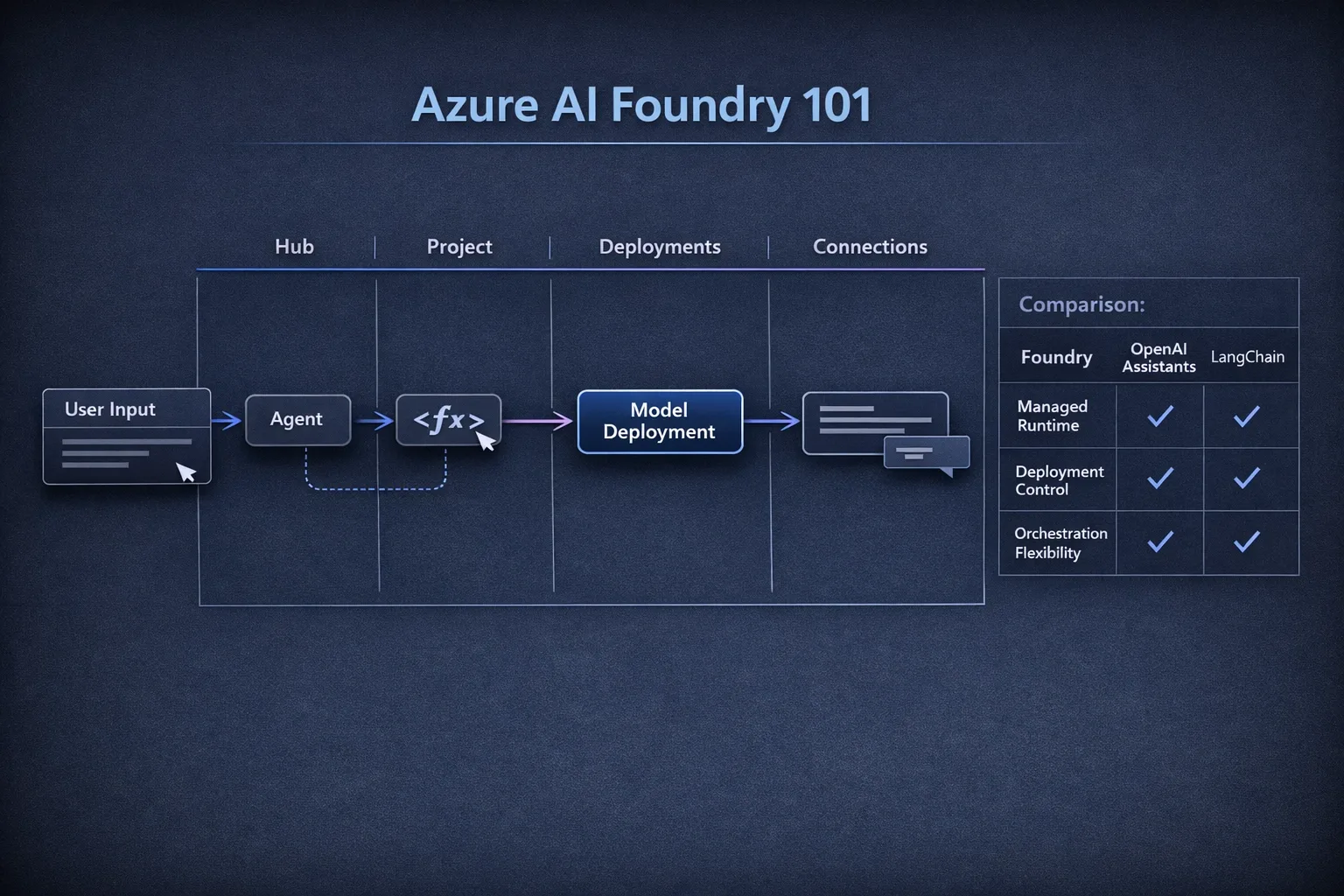
When people describe Azure AI Foundry, they usually start with platform language. If you're a developer trying to build your first agent, that framing is not very useful.
The practical way to think about Foundry is this:
- Hub is your governance and shared resource boundary.
- Project is your app workspace.
- Deployment is the model endpoint your agent will call.
- Connection is how your project reaches external systems (search, storage, keys, APIs).
In this post, we'll stand up a minimal project from scratch, deploy a model, create a basic agent with one tool, run it, and then map the model to OpenAI Assistants and LangChain so you can transfer what you already know.
What You're Building in 30 Minutes
By the end, you'll have:
- An Azure AI Foundry project.
- A deployed chat model (for example,
gpt-4o-miniwhere available). - A simple agent configured with one callable tool.
- A test run where the agent decides to invoke that tool and returns an answer.
This is intentionally the smallest useful workflow.
Prerequisites
You'll need:
- An Azure subscription with permission to create AI Foundry resources.
- Access to Azure AI Foundry in your tenant.
- A model quota/approval in your target region.
If model deployment fails, it's usually one of two things: wrong region or missing quota for that model family.
Step 1: Create a Hub and Project
In the Foundry UI:
- Create a Hub (or use an existing one if your team already has governance in place).
- Inside the hub, create a Project for this app.
- Keep naming explicit (for example
hub-devsecops-labandproj-foundry-first-agent), because these names surface in audit and billing views later.
Think of this as the same separation you'd use for cloud infrastructure:
- Hub = shared platform scope.
- Project = application scope.
Step 2: Deploy a Model
Inside the project:
- Open Models.
- Choose a chat-capable model available in your region.
- Create a deployment with a clear name, e.g.
gpt-4o-mini-chat.
Your deployment name is what the agent targets at runtime. Don't hardcode model marketing names in app logic; use deployment names so you can swap model versions later without changing business code.
Step 3: Add a Connection
Open Connections in the project and add at least one connection you'll use with tools (for example, Azure AI Search, Blob Storage, or Key Vault).
For this first pass, even a placeholder connection is useful because it makes the project structure real: agents don't run in a vacuum, they run with context and systems access.
Step 4: Create a Basic Agent with One Tool
Create an agent in the project and bind it to your model deployment.
Add one simple function tool so the agent can do something beyond plain prompting. A common first tool is a deterministic lookup (for example: get_build_status(service_name)), because it's easy to verify when the model chose to call the tool.
Pseudo-shape of a tool contract:
{
  "name": "get_build_status",
  "description": "Returns CI build status for a service.",
  "parameters": {
    "type": "object",
    "properties": {
      "service_name": { "type": "string" }
    },
    "required": ["service_name"]
  }
}
Then implement the handler in your app:
async function getBuildStatus(serviceName: string): Promise<string> {
  const fakeStatus: Record<string, string> = {
    api: "passing",
    web: "failing",
  };
  return fakeStatus[serviceName] ?? "unknown";
}
Even with a mock tool, you can validate the full loop:
- User asks a question.
- Agent chooses tool call.
- App executes tool.
- Tool result goes back to agent.
- Agent produces final answer.
Step 5: Run It End-to-End
Use the Foundry test interface (or your SDK client) and send:
"What's the current build status for the web service?"
Expected behavior:
- Agent calls
get_build_statuswithservice_name = "web". - Tool returns
failing. - Agent responds in natural language using that tool output.
If the agent never calls the tool, tighten your instructions and tool description. Most first-run failures are prompt clarity failures, not platform failures.
The Four Concepts That Matter (Without the Marketing Layer)
Hub
Governance container for teams, policies, and shared controls.
Project
Implementation workspace for one app or bounded initiative.
Deployment
A concrete, versioned model endpoint you can target and swap safely.
Connection
Managed wiring to external dependencies and data systems.
If you understand those four nouns, Foundry becomes predictable.
Foundry vs. OpenAI Assistants vs. LangChain
Here's the practical mapping:
| If you know... | Rough equivalent in Foundry | Key difference |
|---|---|---|
| OpenAI Assistants | Agent + model deployment + tools | Foundry adds stronger Azure-native project/resource boundaries and enterprise integration points. |
| LangChain | Orchestrated agent flow with tool calls | LangChain is framework-first and code-driven; Foundry is platform-first with managed project/deployment/runtime surfaces. |
Another way to choose:
- Use Foundry when you want managed enterprise controls, Azure integration, and standardized deployment surfaces.
- Use OpenAI Assistants when you want the fastest path in the OpenAI ecosystem with minimal platform overhead.
- Use LangChain when you need maximum orchestration flexibility and are comfortable owning more runtime behavior in code.
They're not mutually exclusive. Many teams prototype orchestration patterns in LangChain, then operationalize on managed platform primitives.
Common First-Week Mistakes
-
Confusing model name with deployment name
Code should target deployment names. -
Skipping connections until later
Agents without real data/tools look good in demos and fail in production. -
Giving tools vague descriptions
Tool selection quality is highly sensitive to clear parameter definitions. -
Treating the first prompt as final architecture
Start simple, inspect traces, tighten tool contracts, then expand.
Where to Go Next
Once this baseline works, the next useful step is multi-agent coordination: one agent for retrieval, one for reasoning, one for action execution, with explicit handoff rules and traceability.
But don't jump there on day one. A single agent with one tool and clean deployment boundaries teaches almost everything you need to avoid the early architecture traps.
If you've already used Assistants or LangChain, Foundry isn't a new mental model - it's a different operating model for the same core pattern: model + tools + context + orchestration.
Azure question? I've got answers.