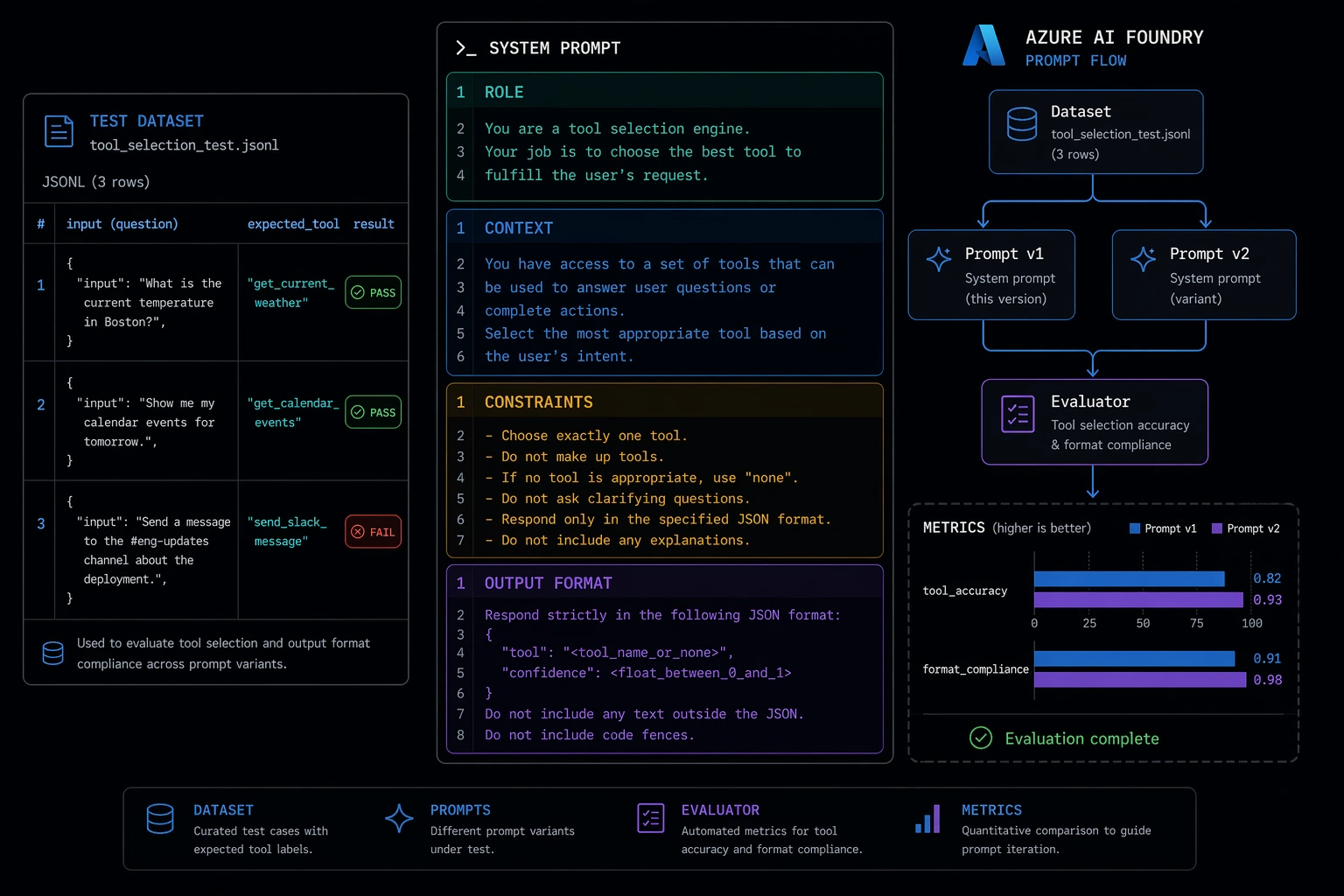
Most prompt engineering advice is written for chatbots. Keep it short. Be conversational. Add "let's think step by step." That advice is fine for a consumer product where a suboptimal response is mildly annoying.
Agents are different. When an agent misreads an instruction, it calls the wrong tool, produces output in the wrong format, or handles an ambiguous user request by silently guessing - and the downstream systems consuming that output don't get a chance to ask for clarification. The cost of a bad prompt in an agentic system isn't a poor answer; it's a corrupt pipeline run or a stuck workflow that fails three steps later with a cryptic error.
Agentic prompts are engineering artifacts. They have inputs, outputs, contracts, and edge cases. They need to be designed with the same rigor as the code that executes them, and they need to be tested against a dataset rather than eyeballed against three example outputs.
This post is a practitioner's guide to that discipline: how to structure a system prompt, how to calibrate tool selection, how to handle ambiguous input, and how to test prompt changes systematically using Azure AI Foundry's prompt flow.
The System Prompt Is a Contract, Not a Greeting
The most common failure mode in agent system prompts is treating them as a preamble - a few sentences of context before the real instruction happens at runtime. That works when the "real instruction" is a chat message. It breaks when the agent has tools, downstream consumers, and no human in the loop to catch errors.
A well-structured agent system prompt has four sections, each doing specific work:
Role establishes identity and capability scope. Not "you are a helpful assistant" - that's too broad. Something like: "You are a CI/CD operations agent for Some Co.. You have access to tools for querying pipeline status, triggering deployments, and opening GitHub issues. You do not have access to production databases or secret management systems."
Context provides the operational facts the agent needs that won't arrive in the user message: the environment it's operating in, the downstream consumers of its output, relevant constraints about those consumers. If your agent's answers are consumed by another service rather than displayed to a human, this section should say so.
Constraints are the hardest section to write and the most important. Constraints tell the agent what it must not do. Without them, the model fills the silence with reasonable-seeming behavior that will eventually be wrong in a costly way. Be explicit: "Do not trigger deployments to the production environment unless the user message explicitly contains the word 'production'. If ambiguous, ask before acting." Constraints on tool use, on output length, on escalation behavior - put them here.
Output format specifies exactly what the response must look like. If downstream code parses the response, define the schema here, not in the application code that processes it.
Here's what this looks like assembled:
You are a CI/CD operations agent for Some Co..

CONTEXT
You have access to three tools: get_pipeline_status, trigger_deployment, and create_github_issue.
Your responses are consumed by an internal Slack integration that renders your output directly
to an engineering channel. Responses must be concise. Do not include preamble.

CONSTRAINTS
- Do not trigger deployments unless the user's message contains an explicit environment name
  (staging, production, preview). If the target environment is ambiguous, ask before proceeding.
- Do not create GitHub issues for pipeline states you have not verified with get_pipeline_status
  in the current turn.
- If a tool call fails, report the failure and stop. Do not retry autonomously.

OUTPUT FORMAT
Respond in the following JSON structure:
{
  "summary": "<one sentence describing what you did or found>",
  "details": "<additional context or next steps, if any>",
  "actions_taken": ["<tool name>: <brief description of what it returned>"]
}
If you need clarification before acting, respond with:
{
  "clarification_needed": "<specific question>"
}
The output format section is doing something important here: it gives downstream code a stable contract. If you change the model, change the temperature, or upgrade to a newer deployment, the output format specification keeps the interface stable for consumers. Treat it accordingly - version it, document it, test it.
Few-Shot Examples for Tool Selection
Tool selection accuracy degrades when tools overlap in capability or when the right tool is context-dependent. The model has to reason from tool descriptions alone unless you give it examples of which tool to reach for in which situation.
Few-shot examples in the system prompt are the calibration mechanism. They don't need to cover every case - they need to establish the pattern clearly enough that the model generalizes correctly.
Add an examples section after your constraints:
TOOL SELECTION EXAMPLES

User: "Is the api-service pipeline passing?"
Correct action: Call get_pipeline_status(repository="api-service").
Do not call create_github_issue unless the status is failing AND the user asks for an issue.

User: "Deploy the latest build."
Correct action: Ask for clarification - "Which environment should I deploy to: staging or production?"
Do not call trigger_deployment without an explicit environment name.

User: "The frontend is broken, create a ticket."
Correct action: Call get_pipeline_status(repository="web-frontend") first to verify current state,
then call create_github_issue with the verified status in the description.
Do not create an issue based solely on the user's report without verification.
Three examples is usually enough to establish a pattern. The examples don't need to be written as formal Q&A - the goal is to make the reasoning chain explicit so the model has a reference to follow. Focus examples on the ambiguous cases, the dangerous actions (deployments, mutations), and the places where two tools could plausibly both apply.
Handling Ambiguous Input Without Halting
Agents hit ambiguous input constantly. A user says "deploy the latest build" without specifying where. A user asks about "the failing pipeline" when three pipelines are failing. A request is underspecified in a way that would cause the agent to silently pick a default that may be wrong.
The naive prompt response is to add "ask for clarification when unsure." That's correct for some cases and wrong for others. An agent that asks a question on every ambiguous request is annoying and slow. An agent that never asks and always proceeds with an assumption is dangerous.
The right approach is to encode a policy - explicit rules that tell the agent when to clarify versus when to proceed with a stated assumption. The key distinction is consequence: if the ambiguity affects a read-only action, proceed and state your assumption. If it affects a write operation or an irreversible action, stop and ask.
Add this to your constraints section:
AMBIGUITY HANDLING POLICY
- For read-only actions (status checks, queries, reports): proceed with the most reasonable
  interpretation and state your assumption in the "summary" field.
  Example: If asked about "the pipeline" when multiple exist, check all relevant pipelines
  and report all of them.
- For write actions (deployments, issue creation, notifications): do not proceed if any
  required parameter is missing or ambiguous. Respond with "clarification_needed" and
  ask exactly one specific question.
- Do not ask multiple questions in a single clarification response. Identify the most
  critical missing parameter and ask about that one.
The "ask exactly one question" constraint is deliberate. Agents that return a list of clarifying questions are almost as bad as agents that don't ask at all - it creates a multi-turn overhead that erodes trust. Force the agent to prioritize.
Testing Prompts Like Code: Prompt Flow in Azure AI Foundry
The practical problem with prompt engineering is that manual testing doesn't scale. You change one line of the system prompt - tighten the ambiguity handling policy, add a new constraint - and you have no way to know whether you fixed the three failing cases without reintroducing regressions on the twelve cases that were previously working.
This is the same problem that motivated unit tests in application development. The solution is the same: a dataset of inputs with expected outputs, a runner that executes each case, and a report that shows pass/fail across the dataset.
Azure AI Foundry's prompt flow is the testing harness for this. A flow is a DAG of execution nodes - LLM calls, Python functions, or both. An evaluation flow is a special flow type that takes a dataset, runs your prompt against each row, and computes metrics using an evaluator you define. The key capability is batch runs with baseline comparison: you run Prompt v1 against your dataset, run Prompt v2, and get a side-by-side metric comparison before you decide which to ship.
Start with a test dataset. Store it as a JSONL file in your project:
{"question": "Is the api-service pipeline passing?", "expected_tool": "get_pipeline_status", "expected_action": "read"}
{"question": "Deploy the latest build.", "expected_tool": null, "expected_action": "clarify"}
{"question": "Deploy to staging.", "expected_tool": "trigger_deployment", "expected_action": "write"}
{"question": "The frontend is broken, open a ticket.", "expected_tool": "get_pipeline_status", "expected_action": "read+write"}
{"question": "What pipelines are failing right now?", "expected_tool": "get_pipeline_status", "expected_action": "read"}
Define the flow as a prompt flow DAG. The flow.dag.yaml structure in Foundry looks like this:
inputs:
  question:
    type: string
outputs:
  response:
    type: string
    reference: ${agent_node.output}
nodes:
  - name: agent_node
    type: llm
    source:
      type: code
      path: agent_call.jinja2
    inputs:
      deployment_name: gpt-4o-mini-chat
      max_tokens: 512
      temperature: 0
      question: ${inputs.question}
    connection: my-foundry-connection
The Jinja2 template (agent_call.jinja2) is where your system prompt lives - this is what you're versioning and iterating on. Temperature 0 is deliberate: you want deterministic outputs for testing. Variability belongs in production, not in your test runs.
The evaluator is a Python node that takes the flow output and the expected values from your dataset and returns a numeric score:
# evaluate_tool_selection.py
def evaluate(response: str, expected_tool: str, expected_action: str) -> dict:
    import json

    try:
        parsed = json.loads(response)
    except json.JSONDecodeError:
        return {"format_valid": 0, "tool_correct": 0}

    format_valid = int(
        "summary" in parsed or "clarification_needed" in parsed
    )

    actions_taken = parsed.get("actions_taken", [])
    tool_correct = int(
        expected_tool is None or any(expected_tool in a for a in actions_taken)
    ) if expected_action != "clarify" else int("clarification_needed" in parsed)

    return {
        "format_valid": format_valid,
        "tool_correct": tool_correct,
        "combined_score": (format_valid + tool_correct) / 2,
    }
Run the evaluation from the Foundry CLI or SDK:
from azure.ai.ml import MLClient
from azure.identity import DefaultAzureCredential
from promptflow.azure import PFClient

pf = PFClient(
    MLClient(DefaultAzureCredential(), subscription_id="...", resource_group_name="...", workspace_name="...")
)

# Run prompt v1 against the test dataset
run_v1 = pf.run(
    flow="./agent-flow",
    data="./test-dataset.jsonl",
    column_mapping={"question": "${data.question}"},
    display_name="agent-prompt-v1",
)

# Run the evaluator against v1's outputs
eval_v1 = pf.run(
    flow="./evaluator-flow",
    run=run_v1,
    column_mapping={
        "response": "${run.outputs.response}",
        "expected_tool": "${data.expected_tool}",
        "expected_action": "${data.expected_action}",
    },
    display_name="eval-agent-prompt-v1",
)

metrics = pf.get_metrics(eval_v1.name)
print(metrics)
# {'format_valid': 0.9, 'tool_correct': 0.75, 'combined_score': 0.825}
Now change your system prompt - add a constraint, refine a few-shot example, tighten the output format specification - and run again as agent-prompt-v2. The Foundry UI will show you the metric delta side by side. An improvement in tool_correct at the cost of format_valid is a trade-off you can reason about. A regression on three specific test cases tells you exactly which inputs your new prompt broke.
This is the discipline that separates prompt engineering from prompt guessing. The test dataset is the specification. Every prompt change is a hypothesis. The batch evaluation run is the experiment. Ship when the metrics support it.
Closing
A system prompt for an agent isn't a polite set of instructions. It's a specification for a component in a larger system - one that needs a defined contract, explicit behavior on edge cases, and a regression suite. The same engineering practices that make application code maintainable apply here.
Structure the system prompt with role, context, constraints, and output format. Use few-shot examples to calibrate tool selection on the ambiguous cases. Encode an explicit policy for ambiguous input rather than leaving the agent to guess. And before you ship any prompt change, run it against a representative dataset and compare the metrics to your baseline.
The agents that fail in production aren't the ones running the wrong model. They're the ones running untested prompts.
Questions or corrections? Reach out.