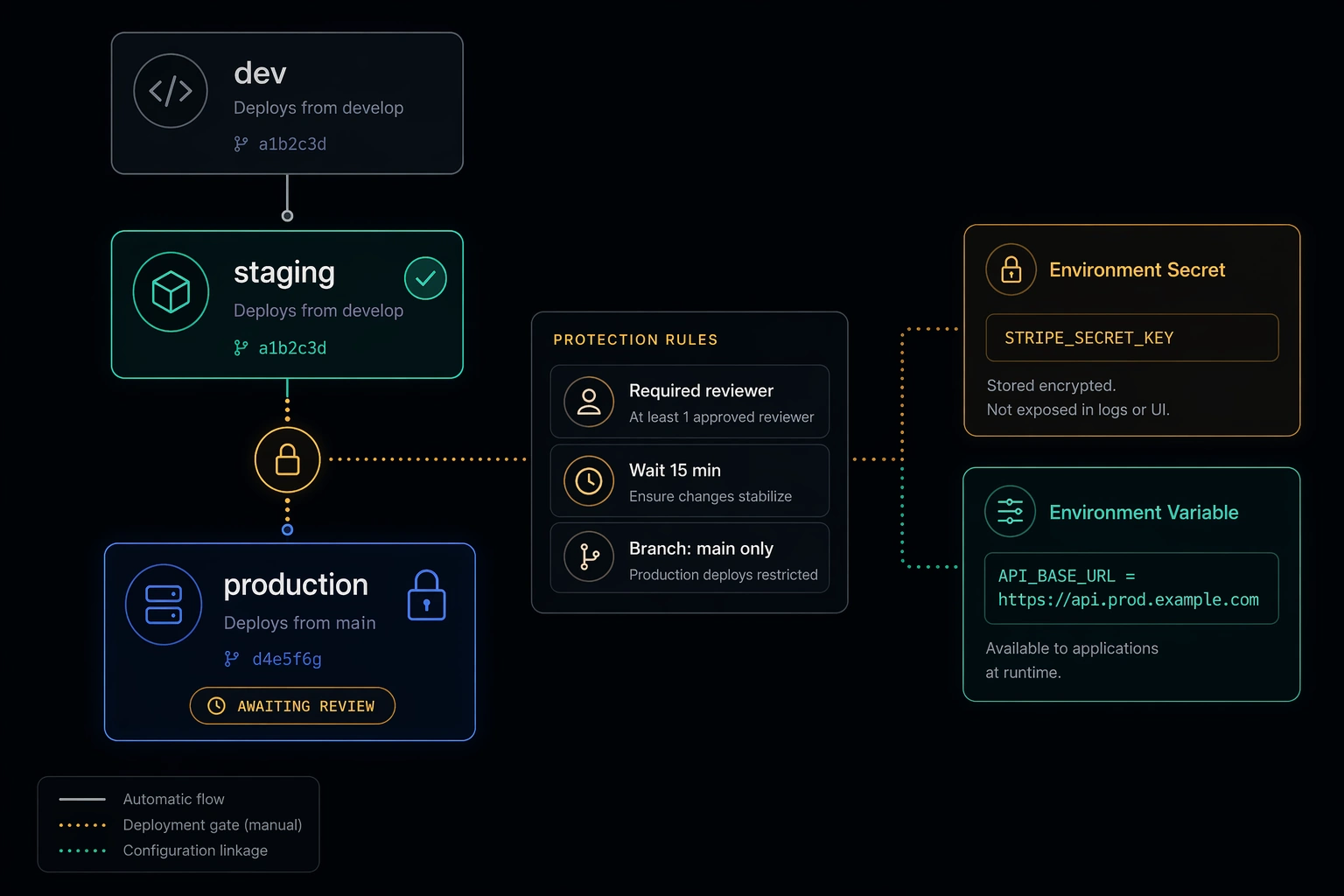
Most teams discover GitHub Environments when they need a required reviewer gate before production. They click through the UI, add a teammate as a reviewer, check the box, and move on. Two months later they're still passing production database URLs in repository-level secrets shared across every workflow in the repo, still manually co-ordinating "don't deploy until the staging smoke test passes," and still wondering why their deployment governance feels held together with convention rather than enforcement.
Environments are a deployment control plane. The approval gate is one feature of several. The rest of the surface area - branch policies, wait timers, custom webhook rules, scoped secrets, and per-environment variables - gives you a model where deployment rules are declared in the repository rather than maintained in team memory.
This is how to use all of it.
What an Environment Is
An environment in GitHub is a named deployment target - staging, production, preview, whatever maps to your infrastructure topology. Environments live on the repository, not the workflow. You configure them at Settings → Environments.
A GitHub Actions job claims an environment with the environment key:
jobs:
  deploy:
    runs-on: ubuntu-latest
    environment:
      name: production
      url: https://example.com
When a job declares an environment, three things happen: the protection rules for that environment are evaluated before the job starts, the job gains access to the environment's secrets and variables, and the deployment appears in the environment's deployment history. That last point is underappreciated - the history gives you a traceable record of what ran, when, who approved it, and whether it succeeded.
A job that does not declare an environment gets none of this. Repository-level secrets, no gate, no history.
Deployment Protection Rules
Required Reviewers
The familiar one. Up to six people or teams must approve a deployment before the waiting job is allowed to run. The person who triggered the workflow can be excluded from approving their own deployments - turn that on. Self-approval of production changes is not a control.
The practical nuance: required reviewers block the job from starting, not from being queued. The workflow runs, the staging job completes, and then the production job sits in a pending state until someone approves it. If no one approves within 30 days, the pending deployment expires. That timeout is not configurable - build your alerting accordingly.
Wait Timer
A wait timer holds a job for a fixed number of minutes after the approval decision (or after queuing, if there are no reviewers). The range is 0 to 43,200 minutes (30 days).
The use case is change freeze windows and canary buffers. If your change management process requires a 15-minute observation window after a staging deployment before production is allowed, encode it here rather than relying on the person who clicks approve to check the clock. A wait timer cannot be circumvented by the reviewer - it runs after the approval, not instead of it.
Branch and Tag Policies
Branch policies restrict which refs can trigger a deployment to the environment. You can require deployments to originate from a specific branch (main), a branch pattern (release/*), or a tag pattern (v*).
This is the control that prevents git push origin feature/hotfix --force && deploy from landing in production. Without a branch policy, any branch with workflow access can claim the environment and fire the job. With a branch policy on main, only code that has gone through your PR process can reach production. Configure this before you configure reviewers - it is the more fundamental control.
Custom Deployment Protection Rules
Custom rules are webhook-based. You register a GitHub App that implements a deployment review webhook, and GitHub calls it whenever a job requests access to the environment. The app responds with approved or rejected.
The integration point for your existing tooling: incident management systems (reject deployments when an open SEV-1 exists), change management platforms (require a linked approved change ticket), and deployment window enforcements (reject outside business hours for regulated environments). The built-in rules cover the common cases. Custom rules cover the organizational-specific constraints that would otherwise live in a runbook.
Environment Secrets vs Repository Secrets
Repository secrets are available to every workflow in the repository, regardless of which environment (if any) the job declares. They are the right choice for credentials that are genuinely cross-cutting - a token that lets CI open pull requests, a package registry credential used in builds.
Environment secrets are scoped to a specific environment and are only injected into jobs that declare that environment. They are the right choice for deployment credentials.
The difference matters for three concrete reasons.
Rotation scope. A repository secret is rotated once and the new value is immediately available to everything. An environment secret for production is rotated independently of the equivalent secret for staging. When your cloud provider rotates credentials on a schedule, environment-scoped secrets give you the right rotation boundary. Rotating production credentials does not require touching the staging configuration, and vice versa.
Audit trail. GitHub's audit log records which environment secret was used in which deployment. A repository secret used across ten workflows tells you only that it was accessed; an environment secret on production tells you it was accessed during a production deployment of a specific workflow run. Smaller signal, easier to act on.
Least privilege. Staging credentials typically have narrower permissions than production credentials - a read-write role on a staging database versus a read-write role on a production database. Storing them as the same secret name at repository scope and overriding per-environment is possible but awkward and error-prone. Environment secrets give each deployment context its own credential with the appropriate permissions attached, with no sharing and no override logic.
In the workflow, the reference syntax is identical regardless of scope - ${{ secrets.DATABASE_PASSWORD }} - but the value injected depends entirely on which environment the job has declared. The right-scoped secret is resolved automatically.
Environment Variables for Config Promotion
Environment variables (the vars context, not secrets) are non-sensitive configuration values that differ across environments. Base URLs, feature flag names, log levels, replica counts - the configuration surface that is not a credential but is not the same between staging and production.
The variable reference in a workflow uses ${{ vars.VARIABLE_NAME }}. Like secrets, the injected value is the one configured for the environment the job has declared. A variable named API_BASE_URL can be https://staging.api.example.com for the staging environment and https://api.example.com for production.
This pattern replaces environment-specific YAML files in the repository, branch-based conditionals in workflow steps, and the "just hardcode it" approach that makes jobs brittle when the config changes. The variable value lives in GitHub, it is visible in the environment settings UI, and changing it does not require a code change or a PR.
The practical limit is that variables are not templated or composed - you cannot reference one variable inside another. For simple values (a base URL, a region identifier, a tier name), they are the right tool. For structured configuration, use them to point to an external configuration source rather than trying to encode the structure in individual variables.
The Workflow: Staging Gate to Production
Here is a complete workflow that ties everything together. Two jobs: deploy-staging runs first, deploys to the staging environment, and validates the deployment with an HTTP smoke test. deploy-production depends on staging success and is additionally held by the protection rules configured on the production environment - required reviewers, a wait timer, and a branch policy restricting deployments to main.
name: Deploy

on:
  push:
    branches: [main]

jobs:
  deploy-staging:
    name: Deploy to Staging
    runs-on: ubuntu-latest
    environment:
      name: staging
      url: https://staging.example.com

    steps:
      - uses: actions/checkout@v4

      - name: Deploy to staging
        run: ./scripts/deploy.sh
        env:
          DEPLOY_ENV: staging
          # Resolved from the staging environment's secrets
          DATABASE_PASSWORD: ${{ secrets.DATABASE_PASSWORD }}
          # Resolved from the staging environment's variables
          API_BASE_URL: ${{ vars.API_BASE_URL }}

      - name: Smoke test
        run: |
          echo "Waiting for deployment to stabilise..."
          sleep 10
          curl --fail \
               --retry 5 \
               --retry-delay 5 \
               --retry-connrefused \
               --max-time 10 \
               "${{ vars.API_BASE_URL }}/health"

  deploy-production:
    name: Deploy to Production
    runs-on: ubuntu-latest
    needs: deploy-staging
    environment:
      name: production
      url: https://example.com

    steps:
      - uses: actions/checkout@v4

      - name: Deploy to production
        run: ./scripts/deploy.sh
        env:
          DEPLOY_ENV: production
          # Same secret name, different value - scoped to production environment
          DATABASE_PASSWORD: ${{ secrets.DATABASE_PASSWORD }}
          # Same variable name, different value - scoped to production environment
          API_BASE_URL: ${{ vars.API_BASE_URL }}
The enforcement chain works like this. The push to main triggers the workflow. deploy-staging runs without any protection gate - staging deployments should be automatic and fast. The smoke test step hits the health endpoint with retry logic; if the application is unhealthy after deployment, curl --fail returns a non-zero exit code and the job fails. deploy-production has needs: deploy-staging - if the staging job failed or was skipped, this job never runs.
If staging passes, deploy-production is queued and GitHub evaluates the production environment's protection rules: required reviewer approval, a 15-minute wait timer, and a branch policy that only allows main. A reviewer sees the pending deployment notification and approves it. The timer runs. The job starts and injects the production-scoped DATABASE_PASSWORD and API_BASE_URL - different values than what the staging job used, resolved automatically from the production environment configuration.
The key property is that the production credentials are never accessible to the staging job, and the production deployment cannot happen unless a human approved it and staging proved the build is deployable. Both constraints are structural rather than procedural.
Configuration Checklist
When setting up an environment from scratch, work through these in order:
Set the branch policy first - typically main for production, possibly release/* if you branch for releases. This is the gate that matters even if no humans are online to approve.
Add required reviewers and exclude self-review. Add the team, not individual people, to avoid a single point of failure when someone is on leave.
Set a wait timer if your change management process or on-call rotation requires an observation window. Fifteen minutes is a reasonable default for most production environments.
Move any deployment credentials out of repository secrets and into environment secrets. The same credential name can exist at both scopes - environment secrets take precedence when a job has declared an environment.
Add non-sensitive environment-specific config as environment variables. Start with anything that differs between staging and production and is currently hardcoded or conditionally set in the workflow YAML.
Closing
The required reviewer gate is the most visible feature of GitHub Environments and the least sufficient one on its own. Branch policies prevent the wrong ref from reaching production. Wait timers encode change-window requirements without relying on human memory. Environment-scoped secrets give each deployment context its own credentials, with rotation and audit that matches the scope. Environment variables replace conditional YAML with managed configuration.
None of this requires significant infrastructure investment. Environments are a repository-level setting. The workflow syntax is minimal. The governance model you get in return - deployment history, protection rule enforcement, scoped secrets - is what most teams are trying to approximate with documentation and convention. Put it in the platform where it can be enforced.
Questions or corrections? Reach out.