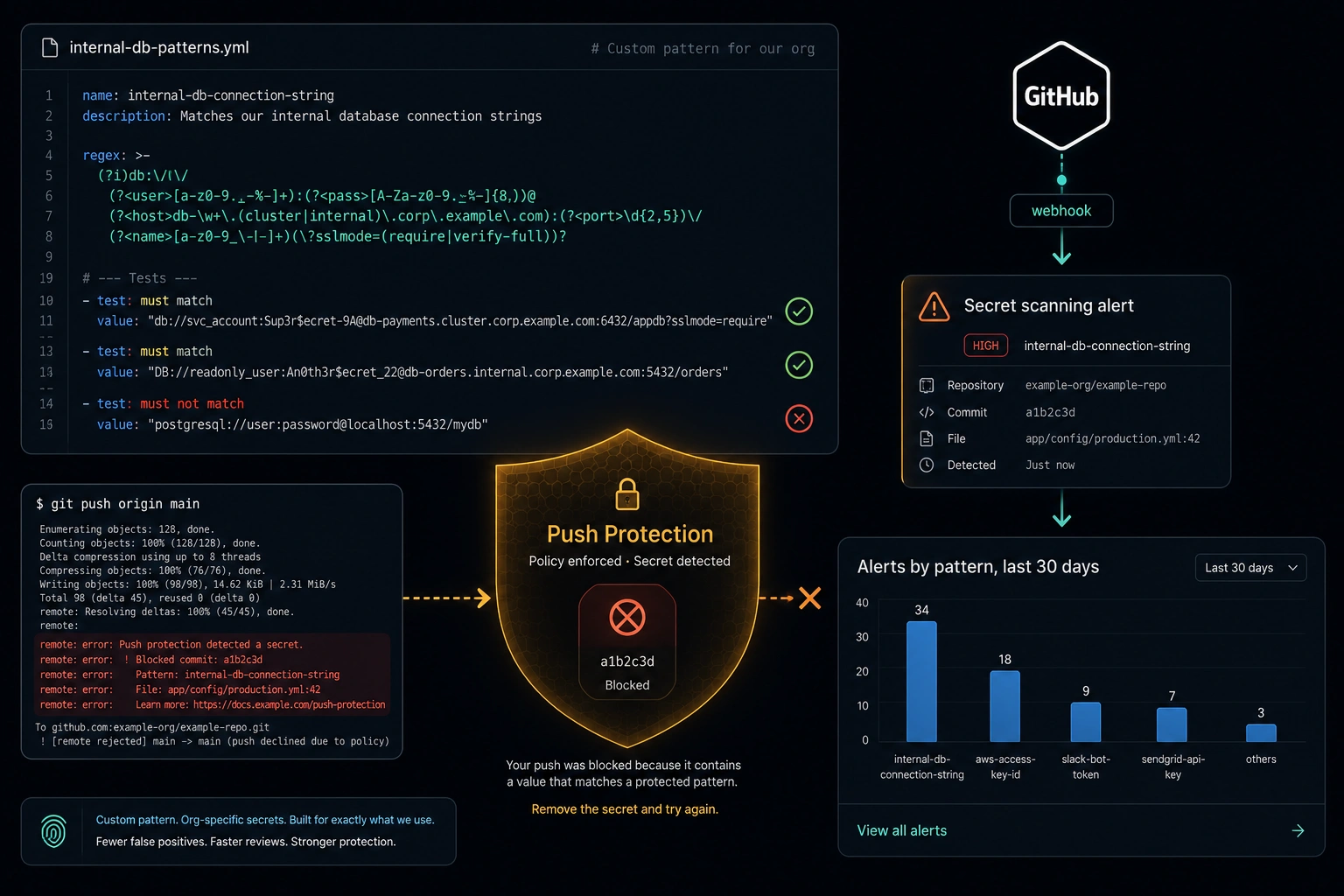
GitHub's secret scanning ships with partner patterns for roughly 200 third-party token formats - AWS access keys, Stripe secrets, npm tokens, Slack webhooks, and so on. If a developer commits one of those, GitHub catches it, usually within minutes, often before the commit even finishes pushing if push protection is on. It is one of the highest-value security features you get for free with GitHub Advanced Security, and most teams that have it enabled stop there.
Stopping there misses the credentials most likely to actually leak from your codebase. Partner patterns cover formats that a third-party vendor registered with GitHub. They do not cover the API key your internal auth service issues, the connection string for your Postgres instance, or the JWT your service mesh mints with your organization's issuer claim. Those formats are yours. Nobody registered them with GitHub, because nobody outside your organization could. If one of them ends up in a commit, the built-in scanner has nothing to match against, and it sails through silently.
Custom patterns close that gap. They have been available at the repository, organization, and enterprise level for years, and configuring one takes about the same effort as writing a good regex - which is to say, less effort than most teams assume and more precision than most teams bother with on the first attempt.
What Partner Patterns Don't See
The partner pattern program works because the format is stable and public: a vendor defines what their tokens look like, GitHub validates the pattern against real examples, and the pattern ships for every repository with secret scanning enabled. That model depends on the format being knowable in advance by someone outside your organization.
Business-specific credentials fail that test by definition. An internal API key's format is a decision your platform team made, possibly last quarter, possibly without documenting it anywhere a partner integration team could find it. A database connection string's shape depends on which database, which driver, and which naming convention your infrastructure team settled on. A service-to-service JWT's issuer claim is a string that only means something inside your network. None of this is discoverable by GitHub. It is only discoverable by you.
The result is a coverage gap that looks like security but isn't. Dependabot alerts are green, secret scanning shows zero open alerts, and the audit checklist has a checkmark next to "secret scanning enabled" - while the actual credentials that would matter most if they leaked (the ones with direct access to your production systems, not a third-party SaaS account) go completely unmonitored.
Anatomy of a Custom Pattern
A custom pattern has three parts: a regex that matches the secret itself, optional context regexes that must appear immediately before or after the match, and a set of test strings that must and must not match. GitHub validates the test strings against the pattern before it lets you save it, which catches the two most common mistakes - a regex that's too loose and matches on plausible-looking-but-innocent text, or one that's too strict and misses real variants of the secret.
Treat pattern definitions as configuration worth reviewing, not something you type once into a settings form and forget. Keep them in the repository, reviewed on pull requests like any other security control:
# secret-patterns.yml
patterns:
  - name: internal-api-key
    description: "Acme internal API key (live environment)"
    regex: "acme_live_[a-f0-9]{32}"
    push_protection: true
    tests:
      must_match:
        - "acme_live_9f2b7a1e4c6d8f0a2b4c6e8f0a2c4e6f"
      must_not_match:
        - "acme_test_9f2b7a1e4c6d8f0a2b4c6e8f0a2c4e6f"
        - "acme_live_tooshort"

  - name: internal-db-connection-string
    description: "Postgres/MySQL/MongoDB URI with embedded credentials, internal hosts only"
    regex: '(?:postgres|postgresql|mysql|mongodb(?:\+srv)?)://[A-Za-z0-9_.-]+:[^@\s"]{8,}@[A-Za-z0-9_.-]+\.internal\.acme\.com'
    push_protection: true
    tests:
      must_match:
        - "postgresql://svc_billing:Tr0ub4dor%263xyz@db-01.internal.acme.com:5432/billing"
      must_not_match:
        - "postgresql://user:password@localhost:5432/db"

  - name: internal-jwt-known-issuer
    description: "Service-to-service JWT minted by auth.acme.internal"
    regex: 'eyJ[A-Za-z0-9_-]{10,}\.eyJpc3MiOiJodHRwczovL2F1dGguYWNtZS5pbnRlcm5hbCIs[A-Za-z0-9_-]+\.[A-Za-z0-9_-]{20,}'
    push_protection: true
    tests:
      must_match:
        - "eyJhbGciOiJSUzI1NiIsInR5cCI6IkpXVCJ9.eyJpc3MiOiJodHRwczovL2F1dGguYWNtZS5pbnRlcm5hbCIsInN1YiI6InN2Yy1iaWxsaW5nIiwiZXhwIjoxODkzNDU2MDAwfQ.vlmOstwQWA0yVTqiVFMb0i8zwwtAeK97xT_4Sx0aCRU"
      must_not_match:
        - "eyJhbGciOiJSUzI1NiIsInR5cCI6IkpXVCJ9.eyJpc3MiOiJodHRwczovL2FjY291bnRzLmdvb2dsZS5jb20iLCJzdWIiOiIxMjMifQ.notarealsignature"
This file is the source of truth. A small CI job validates it before anything gets near GitHub's org settings, so a bad regex never makes it further than a pull request:
// scripts/validate-patterns.js
const fs = require("fs");
const yaml = require("js-yaml");

const { patterns } = yaml.load(fs.readFileSync("secret-patterns.yml", "utf8"));
let failed = false;

for (const p of patterns) {
  const re = new RegExp(p.regex);

  for (const s of p.tests.must_match ?? []) {
    if (!re.test(s)) {
      console.error(`[FAIL] ${p.name}: expected match, got none for: ${s}`);
      failed = true;
    }
  }

  for (const s of p.tests.must_not_match ?? []) {
    if (re.test(s)) {
      console.error(`[FAIL] ${p.name}: expected no match, but matched: ${s}`);
      failed = true;
    }
  }

  if (!failed) console.log(`[OK] ${p.name}`);
}

process.exit(failed ? 1 : 0);
# .github/workflows/validate-secret-patterns.yml
name: Validate Secret Patterns

on:
  pull_request:
    paths:
      - "secret-patterns.yml"

jobs:
  validate:
    runs-on: ubuntu-latest
    steps:
      - uses: actions/checkout@v4
      - uses: actions/setup-node@v4
        with:
          node-version: "22"
      - run: npm install js-yaml
      - run: node scripts/validate-patterns.js
A PR that adds or edits a pattern gets its regex validated against its own test strings automatically, before a reviewer even looks at it. If the regex is wrong, the check fails with the exact string that broke it.
Three Patterns Worth Writing
The three patterns above cover the categories that come up most often when teams start writing their own. Each one earns its place in the config for a different reason.
Internal API key prefix. The simplest and highest-signal pattern you can write, if your platform team already prefixes generated credentials (acme_live_, acme_test_, or similar). The prefix does double duty: it's a strong anchor that avoids false positives, and the _live_ vs. _test_ distinction means you can scan for production credentials specifically, which is exactly the ones that matter for an incident.
Database connection strings. These are dangerous specifically because they are convenient - a developer debugging locally copies a full connection string into a script, a notebook, or a .env.local that isn't in .gitignore, and the string carries a live password. Anchoring the pattern to your internal domain suffix (.internal.acme.com in the example) keeps it from firing on every postgresql://user:password@localhost placeholder in documentation and tutorials - which is the single most common false-positive source for connection-string patterns.
JWTs with a known issuer. This one is less obvious to write correctly, because you can't decode base64 inside a regex - you can only match text. The trick is that JSON is deterministic: if your auth service always serializes the iss claim first, the JSON payload always starts with the same bytes ({"iss":"https://auth.acme.internal",), and a fixed byte sequence always base64url-encodes to the same fixed character sequence, as long as it aligns on a 3-byte boundary. In the example above, that prefix is exactly 36 bytes - divisible by 3 - so it encodes cleanly to eyJpc3MiOiJodHRwczovL2F1dGguYWNtZS5pbnRlcm5hbCIs with no partial-byte ambiguity at the boundary. Anchor the regex on that encoded prefix, between the header and signature segments, and you have a pattern that matches only tokens minted by your issuer - not every JWT that happens to pass through a commit.
Dry-Run Before You Publish
A pattern that looks precise on three test strings can still be noisy against a real codebase - a connection-string regex that's slightly too loose might match code examples in your own documentation, or a JWT pattern might catch fixture data in a test suite. GitHub's custom patterns support a dry run: publish the pattern in dry-run mode and it evaluates against your repository's existing content without generating alerts or triggering push protection.
Use it. Publish the pattern as dry run, review the hit list, and look specifically for matches that are clearly not real secrets - fixtures, examples, redacted placeholders that happen to fit the shape. Tighten the regex or add a context anchor (a .internal. domain suffix, a _live_ prefix, a known-issuer fragment) until the dry-run results are close to zero false positives. Only then publish it for real.
Skipping the dry run is how teams end up with a custom pattern that generates forty alerts against a documentation folder on day one, gets muted by the security team out of alert fatigue, and never gets fixed. A pattern nobody trusts is worse than no pattern, because it creates the appearance of coverage without the substance.
Push Protection: Stopping It at git push
An alert on a secret that's already in the commit history is a cleanup task - rotate the credential, scrub the history if you're thorough, and hope nothing scraped it in the interim. Push protection turns the same pattern into a preventive control: when a push contains a match for a pattern with push protection enabled, GitHub rejects the push before it lands, and the developer sees exactly which pattern matched and where.
The developer then has two paths. Remove the secret and push again - the common case, and the one push protection is built to encourage. Or bypass, which requires selecting a reason (used in tests, false positive, or will fix later) that gets logged against their account and surfaced to the security team. The bypass log matters more than the block itself over time - it's the signal that tells you which patterns are too aggressive (high bypass rate, usually a false-positive problem worth fixing) versus which real secrets got pushed anyway despite the warning (a conversation, not a regex problem).
Enable push protection per pattern once the dry run shows it's clean, not before. A noisy pattern with push protection on doesn't just alert your security team - it blocks your developers' pushes, which is a fast way to get the whole control disabled by request rather than refined.
Routing Alerts to a Security Dashboard
Alerts that only exist in each repository's Security tab don't get reviewed consistently across an organization with any real number of repos. Subscribe an organization webhook to the secret_scanning_alert event and route it somewhere a human actually looks.
# .github/workflows/secret-alert-intake.yml
name: Secret Scanning Alert Intake

on:
  repository_dispatch:
    types: [secret-scanning-alert]

jobs:
  notify:
    runs-on: ubuntu-latest
    steps:
      - name: Post to security dashboard
        env:
          ALERT_PAYLOAD: ${{ toJson(github.event.client_payload) }}
          DASHBOARD_WEBHOOK_URL: ${{ secrets.DASHBOARD_WEBHOOK_URL }}
        run: |
          curl -sf -X POST "$DASHBOARD_WEBHOOK_URL" \
            -H "Content-Type: application/json" \
            -d "$ALERT_PAYLOAD"
The organization webhook targets a small receiver (an Azure Function or a Container App endpoint works well) that verifies the webhook signature, normalizes the payload, and fans it out - a repository_dispatch call to trigger the workflow above, a row in a dashboard table, or both. The workflow itself stays simple on purpose: its only job is turning an alert into a notification someone will see, not doing triage logic that's easier to iterate on in the receiver.
What goes on the dashboard matters more than the plumbing. Track alerts by pattern, by repository, and by time-to-resolution - not just an open count. A pattern that consistently takes days to resolve is telling you something different than one that gets fixed in minutes, and "alerts by pattern, last 30 days" surfaces which of your custom patterns are pulling their weight versus which ones are still too noisy to trust.
Keeping Patterns Reviewable
Everything in this post works because the patterns live in a file, not in institutional memory or a settings page nobody has opened since the person who configured it left the team. secret-patterns.yml, reviewed on pull requests, validated in CI against its own test strings, synced to the organization on merge - that's the same discipline this blog keeps coming back to for every other class of configuration: infrastructure, workflow permissions, branch protection. Secret scanning patterns are no different. They are security-critical config, and security-critical config that isn't versioned and reviewed drifts, silently, until someone notices it missed something it should have caught.
Closing
The built-in scanner is not the ceiling on what secret scanning can catch - it's the floor. It covers what's knowable to GitHub in advance, which is exactly the set of credentials that are least specific to your organization and, not coincidentally, often the least dangerous if they leak. Your internal API keys, your database credentials, your service-to-service tokens - the ones with direct access to systems that matter - are the ones only you can teach the scanner to recognize.
Writing the pattern is the easy part. A regex, a handful of test strings, and an afternoon. The discipline that makes it worth doing - dry run before you trust it, push protection once it's clean, alerts routed somewhere they get triaged, and the pattern itself versioned and reviewed like the security control it is - is what turns a clever regex into coverage you can actually rely on.
Questions or corrections? Reach out.