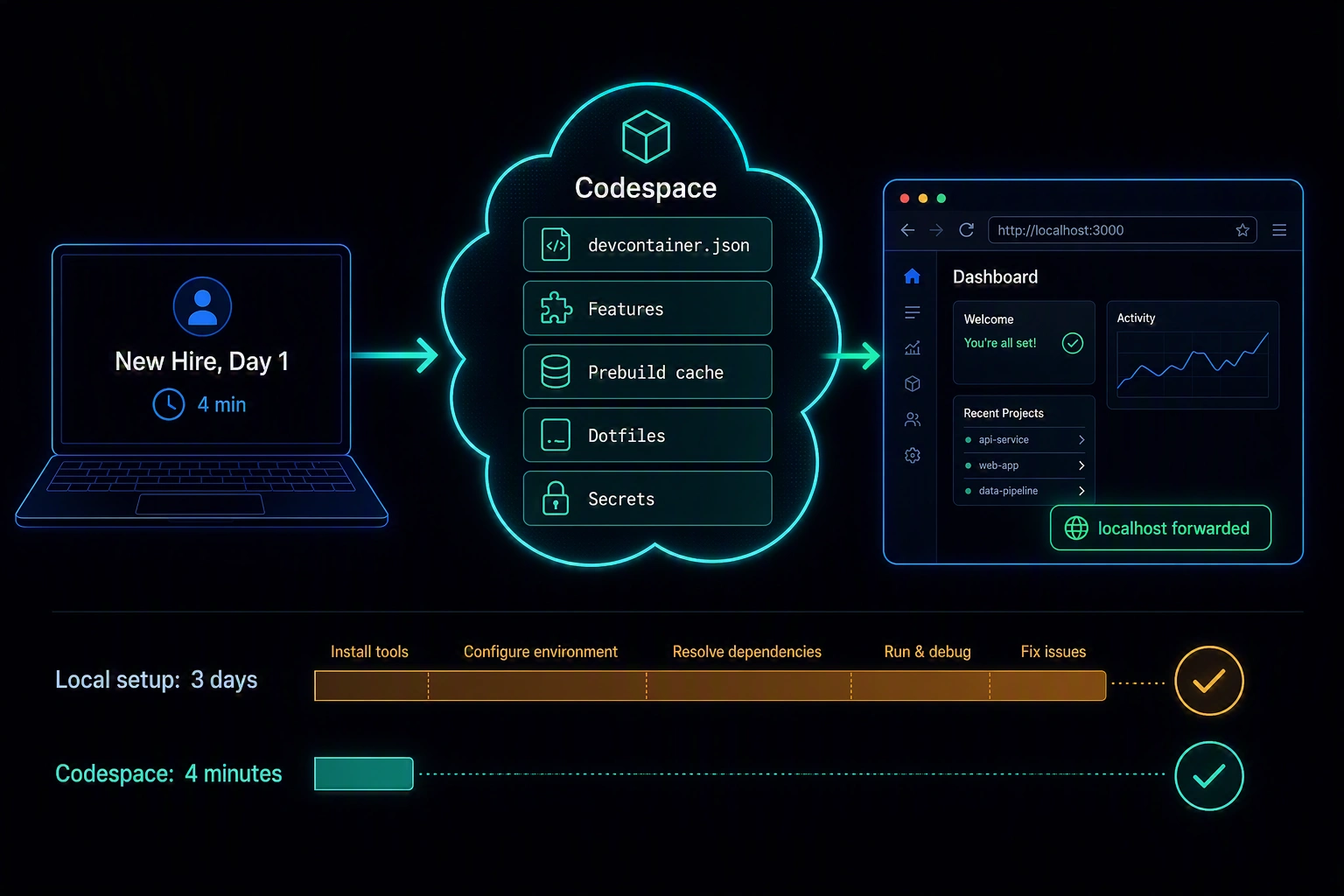
A new hire's first day usually goes one of two ways. Either they spend it running brew install sixteen times, debugging a Node version mismatch, and asking in Slack why the app won't start - or they open a browser tab, click "Create codespace," and are looking at a running application four minutes later. The difference isn't luck. It's whether someone invested in the .devcontainer/ configuration before the new hire showed up.
A Codespace that isn't configured well is just a more expensive, slightly slower version of local development - a container that still needs manual setup steps, still has undocumented dependencies, still produces "works in my Codespace, not in yours" bugs. The value isn't "development happens in the cloud." It's "the environment is fully specified in the repository, so creating one is deterministic." That property is what actually kills "works on my machine" - and it's earned by getting five specific things right, not by turning Codespaces on.
devcontainer.json From Scratch
Everything starts with .devcontainer/devcontainer.json. The minimum viable version picks a base image and stops there:
{
  "name": "app-dev",
  "image": "mcr.microsoft.com/devcontainers/typescript-node:1-22-bookworm"
}
That's enough to get a container with Node 22 and TypeScript tooling preinstalled - but it's rarely enough to get a specific app running. Two more fields do most of the real work:
{
  "name": "app-dev",
  "image": "mcr.microsoft.com/devcontainers/typescript-node:1-22-bookworm",
  "features": {
    "ghcr.io/devcontainers/features/docker-in-docker:2": {},
    "ghcr.io/devcontainers/features/github-cli:1": {}
  },
  "forwardPorts": [3000, 5432],
  "portsAttributes": {
    "3000": { "label": "App", "onAutoForward": "openBrowser" },
    "5432": { "label": "Postgres", "onAutoForward": "silent" }
  },
  "postCreateCommand": "npm install"
}
Features are reusable, composable installers - docker-in-docker if the app builds container images as part of its dev loop, github-cli if scripts shell out to gh. They're versioned, maintained independently of your base image, and mixing several together is the normal way to compose a dev environment rather than hand-rolling a custom Dockerfile for each combination.
forwardPorts/portsAttributes control what happens when something inside the container starts listening on a port. onAutoForward: "openBrowser" on the app's port means a teammate doesn't have to know the app runs on 3000 - it just opens. "silent" on the database port means Postgres doesn't generate a notification every time it starts; nobody's browsing to a raw Postgres port.
Lifecycle Commands: Getting the Ordering Right
Five lifecycle hooks run at different points, and the most common Codespaces misconfiguration is putting the wrong work in the wrong one:
onCreateCommand: runs once, during initial container creation. Cached as part of a prebuild (see below) - put OS-level setup here that doesn't depend on the specific state of the repo's dependency lockfiles.updateContentCommand: runs during prebuild refresh and at creation, after the repo's content is available. This is where dependency installation from a lockfile belongs - it needs the actualpackage-lock.json/poetry.lockpresent, but you still want it captured in the prebuild cache.postCreateCommand: runs every time a container is created, afterupdateContentCommand. Use this for anything that must run fresh per-Codespace and can't be cached - generating a local.envfrom a template, running a one-time DB migration for that instance.postStartCommand: runs every time the container starts, including resuming a stopped Codespace - not just on creation. Starting a background service that doesn't persist across a stop/start cycle goes here.postAttachCommand: runs every time a tool (VS Code, a terminal) attaches to the running container. Rarely needed; mostly for editor-specific setup that has to happen per-connection.
The failure mode this ordering prevents: putting npm install in postCreateCommand instead of updateContentCommand means it reruns uncached on every single Codespace creation, even when a prebuild exists that already did the work. That's the entire cold-start time savings from prebuilding, thrown away by one command being in the wrong hook.
Prebuilds: Killing Cold-Start Time
A Codespace built from scratch runs the full onCreateCommand/updateContentCommand sequence live - pulling the base image, installing Features, running npm install - every single time someone clicks "Create codespace." For a dependency-heavy repo, that's minutes of dead time before a new hire sees anything.
Prebuilds run that same sequence ahead of time, on a schedule or on push to specific branches, and cache the resulting container image. Configure one from repo Settings → Codespaces → Set up prebuild: pick the branch (main, or wherever onboarding usually starts from), the regions your team actually creates Codespaces from, and which machine types to prebuild for. When someone creates a Codespace against a prebuilt configuration, it starts from the cached image - onCreateCommand and updateContentCommand already ran; only postCreateCommand executes live.
The tradeoff is real, not hypothetical: prebuilds consume compute on every triggering push, whether or not anyone creates a Codespace that day. For a small team with infrequent onboarding, that's paying to cache something rarely used. For a team onboarding contractors or new hires regularly, or with a dependency install step that takes several minutes, the math flips quickly - a few dollars of prebuild compute against every new hire's first hour being productive instead of stuck on npm install.
Dotfiles: Personal Preferences Without Polluting the Repo
devcontainer.json is team-shared and repo-committed - it has to work identically for everyone, which means it's the wrong place for anyone's personal shell aliases, prompt theme, or editor keybindings. GitHub's dotfiles integration solves this without those preferences ever touching the app repo: point Settings → Codespaces → Automatically install dotfiles at a personal dotfiles repository, and GitHub clones it into every Codespace you create and runs the first script it finds named install, install.sh, bootstrap, or setup.
This is a genuinely useful separation of concerns: devcontainer.json defines what the team needs to run the app, dotfiles define what you personally want your terminal to look like. Neither belongs in the other's territory - a PR that adds someone's personal zsh theme to .devcontainer/devcontainer.json is the sign this boundary got crossed.
Codespaces Secrets for Environment-Specific Config
Codespaces has its own secret store, separate from GitHub Actions secrets - configured at Settings → Codespaces → Secrets (personal) or at the organization level, scoped to specific repositories. These get injected as environment variables into every matching Codespace automatically, without living in devcontainer.json or anywhere else in the repo.
Use this for anything that's genuinely per-developer or too sensitive for a committed config file - a personal API key for a third-party service used in local testing, credentials for a personal sandbox account. It is not a replacement for how your app actually manages secrets in staging or production; it's specifically for what an individual developer's Codespace needs that shouldn't be shared or committed.
The Cost Model: Codespaces vs. Local Dev
Codespaces billing has two components: compute (per-core-hour, scaled by machine type - a 2-core Codespace costs less per hour than an 8-core one) and storage (per-GB-month for the persistent disk, billed even while stopped). Personal accounts get a monthly allotment of free core-hours and storage; organizations need Codespaces enabled with billing configured.
The lever that matters most for controlling cost is the idle timeout - a Codespace left running with no activity auto-stops after a configurable period (30 minutes by default). Nobody's paying compute for a Codespace someone opened Friday afternoon and forgot about, as long as that default isn't disabled. Storage keeps billing while stopped, but at a much lower rate than active compute.
Whether Codespaces is worth it against local dev is a real cost comparison, not a foregone conclusion: (developers) × (hours/month) × (machine-type rate) + storage against the labor cost of onboarding friction - new-hire ramp time lost to environment setup, the ongoing "works on my machine" support burden, and environment drift across a team's local machines that produces bugs nobody can reproduce. The case gets stronger with team size, onboarding frequency, and how complex the local setup actually is. A two-person team with a npm install && npm run dev setup has little to gain. A twenty-person team onboarding contractors quarterly, with a stack that needs three services and a specific database version, recoups the compute cost from the first prevented "let me debug your local environment" call.
Closing
The mechanism that makes Codespaces actually eliminate "works on my machine" isn't the cloud part - it's that the environment can no longer be implicit. Every dependency, every service, every port, every setup step has to be written down in devcontainer.json for a Codespace to work at all, which means it's also written down for anyone trying to reproduce a bug, onboard a new hire, or understand what the dev environment actually requires. Local dev can have all the same specification discipline without ever touching Codespaces. In practice, it rarely does - because nothing forces it to. Codespaces forces it, and a four-minute onboarding time is the visible side effect of an environment that finally has no undocumented parts.
Questions or corrections? Reach out.