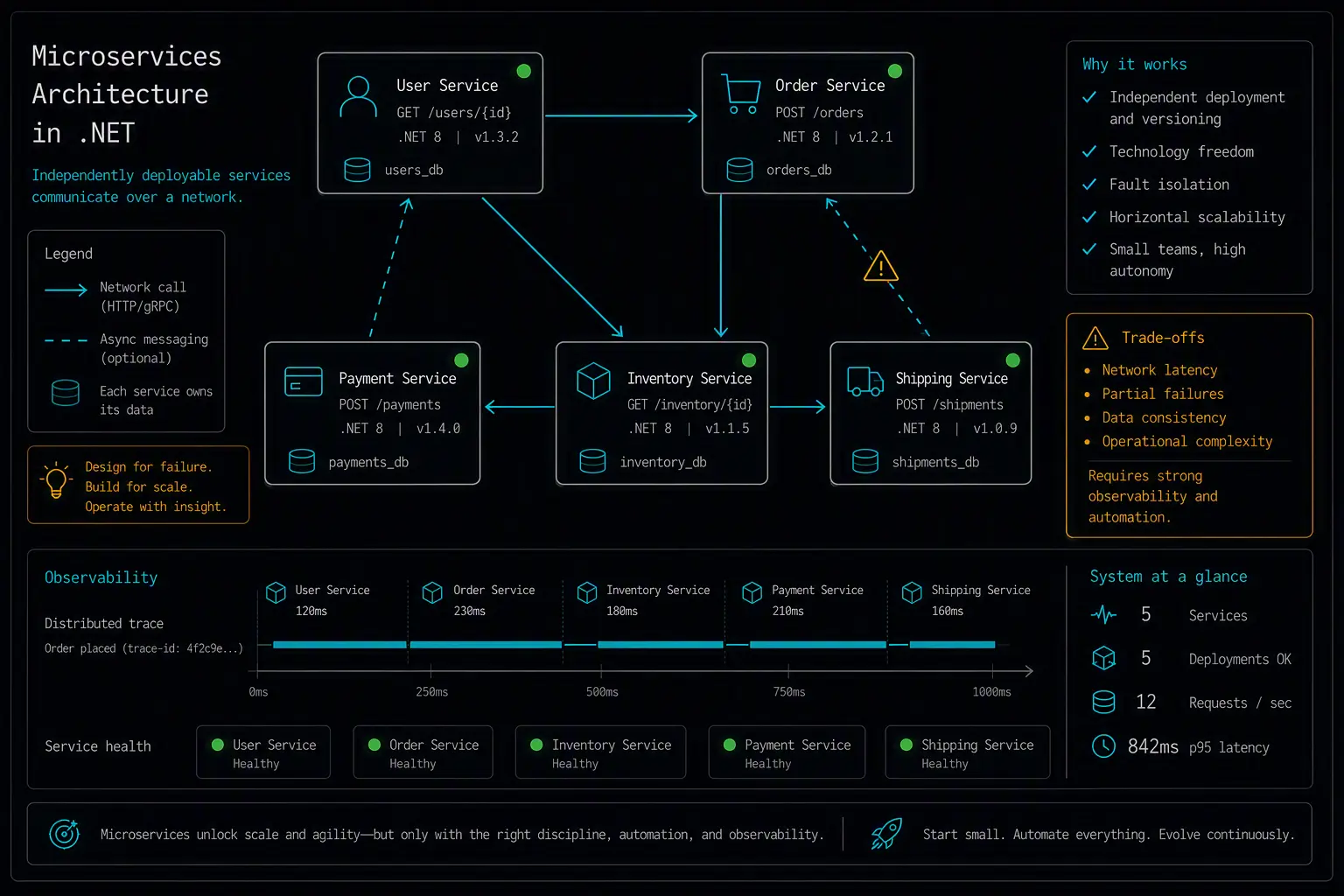
Microservices solve a problem most projects don't have yet: independent teams needing to deploy, scale, and release parts of a system without blocking each other. When that problem is real, the pattern pays for itself. When it isn't, the same distributed-systems overhead - network calls where there used to be method calls, eventual consistency where there used to be a transaction - becomes pure cost with no corresponding benefit. .NET Aspire has made the local development side of this dramatically less painful than it used to be, but it doesn't change the fundamental trade-off.
This guide covers scaffolding a microservices solution in .NET using Aspire, bootstrapping service-to-service communication and observability, the core workflow of adding or changing a service, and the best practices that keep a distributed system debuggable instead of chaotic. By the end you'll have a local development setup that mirrors production topology without requiring a full Kubernetes cluster on your laptop.
If you're deciding between architecture styles first, a comparison of the top .NET architecture patterns covers where Microservices fit relative to layered architecture, Clean Architecture, Vertical Slice, and Modular Monolith - including why a Modular Monolith is often the more honest starting point.
What You'll Need
- .NET 8 SDK or later (.NET Aspire requires .NET 8.0 or later)
- Docker or Podman, since Aspire orchestrates containerized dependencies (databases, message brokers) locally
- Visual Studio 2022+, VS Code with the C# Dev Kit, or the .NET CLI
Installing and Scaffolding
.NET Aspire is the current standard tooling for building and running a multi-service .NET solution locally. Install the workload and scaffold a starter solution:
dotnet workload update
dotnet new install Aspire.ProjectTemplates

dotnet new aspire-starter -n MyApp
cd MyApp
This generates an AppHost project (the orchestrator), a ServiceDefaults project (shared configuration), and starter service projects. To add services by hand instead:
dotnet new webapi -n MyApp.OrdersService
dotnet new webapi -n MyApp.InventoryService
dotnet new aspire-apphost -n MyApp.AppHost
dotnet new aspire-servicedefaults -n MyApp.ServiceDefaults

dotnet add MyApp.AppHost reference MyApp.OrdersService MyApp.InventoryService
dotnet add MyApp.OrdersService reference MyApp.ServiceDefaults
dotnet add MyApp.InventoryService reference MyApp.ServiceDefaults
Bootstrapping the Ideal Environment
The AppHost project is where the whole distributed system gets described in code - what services exist, what infrastructure they depend on, and how they discover each other.
Defining services and their dependencies in AppHost
// MyApp.AppHost/Program.cs
var builder = DistributedApplication.CreateBuilder(args);

var ordersDb = builder.AddPostgres("orders-db").AddDatabase("orders");
var inventoryDb = builder.AddPostgres("inventory-db").AddDatabase("inventory");

var inventory = builder.AddProject<Projects.MyApp_InventoryService>("inventory")
    .WithReference(inventoryDb);

var orders = builder.AddProject<Projects.MyApp_OrdersService>("orders")
    .WithReference(ordersDb)
    .WithReference(inventory);   // service discovery -- no hardcoded URLs

builder.Build().Run();
Running this single project brings up Postgres containers for each service, starts both APIs, wires service discovery between them, and opens a dashboard showing logs, traces, and health across the whole system - replacing what used to be a docker-compose file, manually managed connection strings, and separate terminal windows per service.
dotnet run --project MyApp.AppHost
ServiceDefaults: shared configuration without shared code coupling
Every service references ServiceDefaults for consistent health checks, OpenTelemetry, and resilience configuration, without services depending on each other's business logic:
// MyApp.ServiceDefaults/Extensions.cs
public static IHostApplicationBuilder AddServiceDefaults(this IHostApplicationBuilder builder)
{
    builder.ConfigureOpenTelemetry();
    builder.AddDefaultHealthChecks();
    builder.Services.AddServiceDiscovery();
    builder.Services.ConfigureHttpClientDefaults(http => http.AddStandardResilienceHandler());
    return builder;
}
// MyApp.OrdersService/Program.cs
var builder = WebApplication.CreateBuilder(args);
builder.AddServiceDefaults();
builder.AddNpgsqlDbContext<OrdersDbContext>("orders");

var app = builder.Build();
app.MapDefaultEndpoints(); // health checks, etc.
app.Run();
Calling another service through service discovery, not a hardcoded URL
// MyApp.OrdersService -- calling the inventory service
builder.Services.AddHttpClient<IInventoryClient, InventoryClient>(client =>
{
    client.BaseAddress = new("http://inventory"); // resolved via Aspire service discovery
});
The WithReference(inventory) call in AppHost is what makes http://inventory resolvable - Aspire injects the actual address as configuration at run time, so nothing is hardcoded per environment.
AppHost is a development tool, not a production deployment target
This is worth being explicit about: AppHost orchestrates local development and CI, but it never gets deployed itself. In production, each service runs as a standard container on whatever platform you use - Kubernetes, Azure Container Apps, AWS ECS - with Aspire's role limited to generating manifests or informing that deployment, not running the show at runtime.
Core Workflow
Adding or changing a service looks different depending on scope:
- Changing one service's internal logic - work entirely within that service's project; if it doesn't change its public API or events, no other service needs to know
- Adding a new service - create the project, add it to AppHost with its dependencies declared via
WithReference, and decide upfront whether it needs its own database - Changing how two services communicate - this is the highest-risk category; a change to a request/response contract or event schema needs coordination (often versioning) since the calling service can't be redeployed atomically with the one it calls
Verifying Your Setup
- The AppHost dashboard shows every service healthy - run the AppHost and confirm all services and their infrastructure dependencies report healthy status
- Service discovery resolves correctly - confirm a service can reach another by its Aspire-assigned name (
http://inventory) without a hardcoded port or host - Traces span service boundaries - make a request that touches two services and confirm the dashboard shows a single distributed trace across both, not two disconnected logs
- Each service's data is genuinely isolated - confirm one service's database credentials and connection string aren't accessible to another service
Best Practices
Don't adopt Microservices until you have the organizational problem they solve. Independent team ownership and deployment cadence is the actual justification - if one team owns the whole system, a Modular Monolith usually serves better with far less overhead.
Version your service contracts deliberately. Because services deploy independently, a breaking change to a request or event shape can't assume the consumer has already updated - plan for backward-compatible changes or explicit versioning.
Invest in observability from the start, not after the first production incident. Aspire's dashboard is excellent locally, but production needs the same OpenTelemetry data flowing into a real observability platform - distributed tracing is not optional once you have more than one service.
Give each service its own database. Sharing a database across services reintroduces the tight coupling Microservices are supposed to eliminate, even if the services themselves are deployed separately.
Design for failure explicitly. A downstream service being slow or unavailable needs to be handled deliberately - retries, circuit breakers, timeouts - rather than assumed away. ServiceDefaults' standard resilience handler is a starting point, not a complete answer for every failure mode your system will actually encounter.
Comparison with Modular Monolith
| Dimension | Microservices | Modular Monolith |
|---|---|---|
| Deployment unit | Many independent services | One application |
| Communication | Network calls (HTTP, messaging) | In-process, through Contracts interfaces |
| Data isolation | Enforced by physical separation | Enforced by convention/DbContext scoping |
| Failure modes | Network failures, partial outages, eventual consistency | Simpler - largely in-process failure modes |
| Operational tooling | Aspire (dev), Kubernetes/Container Apps/ECS (prod), distributed tracing | Standard single-app deployment and monitoring |
| Best fit | Multiple teams needing independent deployment and scaling | Systems needing internal boundaries without distributed complexity |
Aspire genuinely closes the local-development gap between these two patterns - but it's worth being honest that Aspire only removes friction from building and running microservices locally; it doesn't remove the production-grade concerns (contract versioning, partial failure handling, distributed data consistency) that are the actual cost of the pattern.
Frequently Asked Questions
Do I need Kubernetes to build microservices in .NET?
Not for local development - Aspire handles local orchestration without requiring Kubernetes on your machine. For production, you'll need some container orchestration platform (Kubernetes, Azure Container Apps, AWS ECS, or similar), but that's a production deployment decision separate from your local development setup.
Is .NET Aspire a production runtime?
No. Aspire's AppHost orchestrates local development and CI - starting containers, wiring service discovery, providing a dashboard - but it is never deployed to production itself. In production, each service runs as a standard container on whatever platform your team uses.
How do services talk to each other without hardcoding URLs?
Through Aspire's service discovery in local development - declaring WithReference(otherService) in AppHost makes that service resolvable by name, with the actual address injected as configuration. In production, the equivalent is typically handled by your container platform's own service discovery or a service mesh.
Should every microservice have its own database?
Yes, as a strong default. Sharing a database across services undermines the independence Microservices are meant to provide - a schema change for one service can silently break another if they share tables. Independent databases per service, with communication happening through APIs or events rather than shared queries, keep the boundary real.
How do I handle a service being temporarily unavailable?
Explicitly, not by assumption. Retries with backoff, circuit breakers, and sensible timeouts are the baseline - ServiceDefaults' standard resilience handler provides a starting point, but real production systems need to think through what a caller should do when a dependency is degraded, not just when it's fully down.
When is a Microservices architecture the wrong choice?
When the organizational problem it solves - independent team deployment and scaling - doesn't actually exist yet. A single team building a system doesn't need the operational overhead of distributed services; a Modular Monolith delivers most of the internal-boundary benefit without the network calls, eventual consistency, and per-service infrastructure that Microservices require.
Can I start with a Modular Monolith and migrate specific modules to Microservices later?
Yes, and this is often the lower-risk path. A Modular Monolith with well-enforced module boundaries - narrow public contracts, isolated data per module - translates naturally into service boundaries later. Migrating one module into its own service once a concrete scaling or ownership need appears is generally safer than architecting for distributed systems complexity from day one.
C# or .NET question? Ask away.