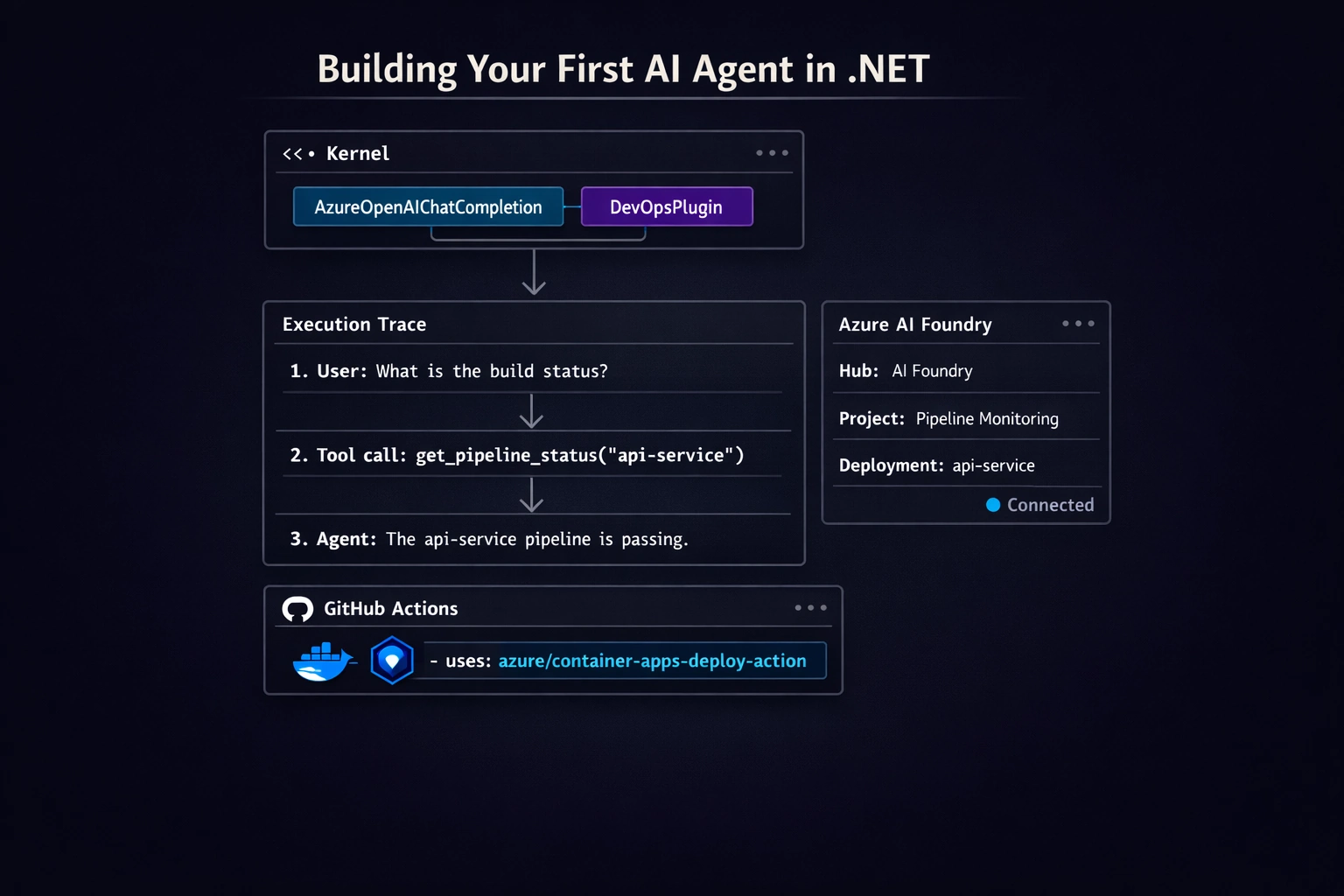
Python has LangChain. .NET has Semantic Kernel. They solve the same problem - how do you wire a language model to tools, memory, and business logic in a way that's testable and deployable - but for a different runtime and a different operational context.
This post builds a working agent from scratch: a Kernel instance backed by a Foundry-hosted model, a plugin with a real tool function the model can call, and a multi-step interaction where the agent decides when to invoke the tool and uses the result in its answer. At the end, a GitHub Actions workflow deploys the whole thing to Azure Container Apps with no stored secrets.
If you've read the Foundry first-look post, you know the platform primitives. This post puts .NET code behind those primitives.
The Model: What Semantic Kernel Actually Does
Semantic Kernel (SK) is an orchestration SDK. It doesn't host models. It doesn't manage infrastructure. What it does is define a composable execution model for agents:
- Kernel - the central object. Holds services (AI connectors, logging) and a plugin registry.
- Plugin - a class with annotated methods the model can call as tools.
- Chat completion service - the connector to the underlying model (Foundry, Azure OpenAI, OpenAI, etc.).
- FunctionChoiceBehavior - tells SK whether to let the model decide which tools to call, require a specific one, or call none.
Azure AI Foundry hosts the model endpoint the kernel connects to. SK handles the rest: tool discovery, function call dispatch, result injection, conversation state.
Prerequisites
You need:
- An Azure subscription with access to Azure AI Foundry.
- A Foundry hub and project created. If you haven't done this yet, follow Steps 1-2 from the Foundry first-look post.
- A model deployment inside the project - for example,
gpt-4o-mini-chat. - Your deployment's endpoint URL and API key (or a managed identity - more on that below).
- .NET 8 SDK.
Project Setup
Create a new console app and add the required packages:
dotnet new console -n DevOpsAgent
cd DevOpsAgent
dotnet add package Microsoft.SemanticKernel
dotnet add package Microsoft.SemanticKernel.Connectors.AzureOpenAI
dotnet add package Azure.Identity
Microsoft.SemanticKernel is the core SDK. Microsoft.SemanticKernel.Connectors.AzureOpenAI provides the Azure OpenAI connector SK uses to talk to your Foundry-hosted model. Azure.Identity is for DefaultAzureCredential - the right way to authenticate in Azure-hosted deployments.
Wiring Up the Kernel
The kernel is built with a builder pattern. You add services - starting with the chat completion connector - and then call Build():
using Azure.Identity;
using Microsoft.SemanticKernel;

// Development: use API key directly
var builder = Kernel.CreateBuilder();
builder.AddAzureOpenAIChatCompletion(
    deploymentName: "gpt-4o-mini-chat",
    endpoint: "https://<your-project>.openai.azure.com/",
    apiKey: Environment.GetEnvironmentVariable("AZURE_OPENAI_API_KEY")!
);

var kernel = builder.Build();
For production - where you want managed identity instead of a stored API key - swap the credential parameter:
builder.AddAzureOpenAIChatCompletion(
    deploymentName: "gpt-4o-mini-chat",
    endpoint: "https://<your-project>.openai.azure.com/",
    credential: new DefaultAzureCredential()
);
The endpoint format is the Azure OpenAI endpoint for your Foundry project. In the Foundry portal, find it under Deployments → your deployment → Target URI, and strip the path - you want just https://<resource-name>.openai.azure.com/. The deployment name is the name you assigned when you created the model deployment, not the model's marketing name.
Plugins and Tool Functions
A plugin is a C# class. Methods you want the model to be able to call get a [KernelFunction] attribute. The [Description] attribute on the method and its parameters is what the model sees - treat those descriptions the same way you'd treat API documentation, because they directly affect whether the model calls the right tool with the right arguments.
using System.ComponentModel;
using Microsoft.SemanticKernel;

public class DevOpsPlugin
{
    [KernelFunction("get_pipeline_status")]
    [Description("Returns the latest CI pipeline status for a given repository.")]
    public string GetPipelineStatus(
        [Description("The repository name, for example 'api-service' or 'web-frontend'")]
        string repositoryName)
    {
        // In production: call your CI system's API here.
        // For this example, a deterministic stub makes the tool call easy to verify.
        var statuses = new Dictionary<string, string>(StringComparer.OrdinalIgnoreCase)
        {
            ["api-service"]    = "passing",
            ["web-frontend"]   = "failing",
            ["data-pipeline"]  = "pending",
        };

        return statuses.TryGetValue(repositoryName, out var status)
            ? $"Pipeline for '{repositoryName}' is currently {status}."
            : $"No pipeline found for repository '{repositoryName}'.";
    }

    [KernelFunction("list_repositories")]
    [Description("Returns a list of all tracked repositories.")]
    public IEnumerable<string> ListRepositories() =>
        ["api-service", "web-frontend", "data-pipeline"];
}
Register the plugin with the kernel before building, or add it to an already-built kernel:
// Before Build():
builder.Plugins.AddFromType<DevOpsPlugin>("DevOps");
var kernel = builder.Build();

// Or after Build():
kernel.Plugins.AddFromType<DevOpsPlugin>("DevOps");
SK inspects the class at registration time, reads the [KernelFunction] and [Description] attributes, and builds a tool schema the model can reason over. The model never sees your C# method names directly - it sees the function name you passed to [KernelFunction] and the descriptions you wrote.
Running a Multi-Step Plan
With the kernel configured and the plugin registered, the agent loop looks like this:
using Microsoft.SemanticKernel.ChatCompletion;
using Microsoft.SemanticKernel.Connectors.AzureOpenAI;

var chatService = kernel.GetRequiredService<IChatCompletionService>();
var history = new ChatHistory();

history.AddSystemMessage(
    "You are a DevOps assistant. Use the available tools to answer questions " +
    "about CI pipeline status. Always check current status before reporting.");

var executionSettings = new AzureOpenAIPromptExecutionSettings
{
    FunctionChoiceBehavior = FunctionChoiceBehavior.Auto()
};

// Turn 1: ask about a specific repo
history.AddUserMessage(
    "What's the current pipeline status for api-service and web-frontend?");

var response = await chatService.GetChatMessageContentAsync(
    history,
    executionSettings,
    kernel);

Console.WriteLine(response.Content);
history.AddAssistantMessage(response.Content!);

// Turn 2: follow-up that requires the model to call list_repositories first
history.AddUserMessage("Which of our repos are currently failing?");

response = await chatService.GetChatMessageContentAsync(
    history,
    executionSettings,
    kernel);

Console.WriteLine(response.Content);
FunctionChoiceBehavior.Auto() is the key setting. It tells SK to let the model decide when to call tools. In practice: the model receives the conversation history and the available tool schemas; when it decides a tool call is warranted, SK intercepts the tool call response, dispatches it to the registered plugin method, appends the result to the conversation, and sends the updated history back to the model automatically. Your application code doesn't need to handle the function call / function result round-trip - SK manages that loop.
For the second turn, the model will typically call list_repositories first (because it doesn't know the full list), then call get_pipeline_status for each repo, then synthesize the answer. That's a multi-step plan executed without any orchestration code on your side.
A Note on Memory
Semantic Kernel supports semantic memory via ITextEmbeddingGenerationService and a vector store backend. The pattern:
builder.AddAzureOpenAITextEmbeddingGeneration(
    deploymentName: "text-embedding-3-small",
    endpoint: "https://<your-project>.openai.azure.com/",
    credential: new DefaultAzureCredential()
);
You'd then use ISemanticTextMemory (or the newer kernel memory abstractions in SK 1.x) to store and retrieve documents, runbooks, or conversation history by semantic similarity, grounding agent answers against a knowledge base.
Memory is worth a post of its own. The short version: for agents that need to retrieve internal documentation or past context before answering, add embedding generation and a vector store (Azure AI Search works well here via Microsoft.SemanticKernel.Connectors.AzureAISearch). For tool-calling agents like the one in this post, memory is optional.
Deploying to Azure Container Apps
The agent above is a console app. To run it as a persistent service - listening on a queue, exposing an HTTP endpoint, or processing events - containerize it and deploy to Azure Container Apps. Here's a workflow that does the full build-push-deploy cycle with OIDC authentication and no stored cloud credentials.
First, the Dockerfile (place this at the repo root, adjust paths to match your project layout):
FROM mcr.microsoft.com/dotnet/sdk:8.0 AS build
WORKDIR /src
COPY src/DevOpsAgent/DevOpsAgent.csproj DevOpsAgent/
RUN dotnet restore DevOpsAgent/DevOpsAgent.csproj
COPY src/DevOpsAgent/ DevOpsAgent/
RUN dotnet publish DevOpsAgent/DevOpsAgent.csproj -c Release -o /app/publish

FROM mcr.microsoft.com/dotnet/runtime:8.0
WORKDIR /app
COPY --from=build /app/publish .
ENTRYPOINT ["dotnet", "DevOpsAgent.dll"]
Then the GitHub Actions workflow:
name: Deploy DevOps Agent

on:
  push:
    branches: [main]

permissions:
  id-token: write
  contents: read
  packages: write

env:
  REGISTRY: ghcr.io
  IMAGE_NAME: ${{ github.repository }}/devops-agent
  AZURE_RESOURCE_GROUP: rg-devops-agent
  CONTAINER_APP_NAME: devops-agent
  CONTAINER_APP_ENV: cae-devops-prod

jobs:
  build-and-deploy:
    runs-on: ubuntu-latest

    steps:
      - uses: actions/checkout@v4

      - name: Set up .NET 8
        uses: actions/setup-dotnet@v4
        with:
          dotnet-version: '8.0.x'

      - name: Run tests
        run: dotnet test --no-build --verbosity normal

      - name: Log in to GitHub Container Registry
        uses: docker/login-action@v3
        with:
          registry: ghcr.io
          username: ${{ github.actor }}
          password: ${{ secrets.GITHUB_TOKEN }}

      - name: Build and push container image
        uses: docker/build-push-action@v5
        with:
          context: .
          push: true
          tags: |
            ${{ env.REGISTRY }}/${{ env.IMAGE_NAME }}:${{ github.sha }}
            ${{ env.REGISTRY }}/${{ env.IMAGE_NAME }}:latest

      - name: Azure login (OIDC - no stored credentials)
        uses: azure/login@v2
        with:
          client-id: ${{ secrets.AZURE_CLIENT_ID }}
          tenant-id: ${{ secrets.AZURE_TENANT_ID }}
          subscription-id: ${{ secrets.AZURE_SUBSCRIPTION_ID }}

      - name: Deploy to Azure Container Apps
        uses: azure/container-apps-deploy-action@v1
        with:
          resourceGroup: ${{ env.AZURE_RESOURCE_GROUP }}
          containerAppName: ${{ env.CONTAINER_APP_NAME }}
          containerAppEnvironment: ${{ env.CONTAINER_APP_ENV }}
          imageToDeploy: ${{ env.REGISTRY }}/${{ env.IMAGE_NAME }}:${{ github.sha }}
A few things worth noting:
OIDC instead of service principal secrets. The azure/login@v2 step exchanges a short-lived GitHub OIDC token for a short-lived Azure access token - no AZURE_CREDENTIALS JSON, no credential rotation. You configure a federated identity credential on the Azure managed identity or app registration once; the workflow runs without stored secrets from then on. The OIDC post covers this setup in detail if you haven't configured it yet.
GITHUB_TOKEN for GHCR. The packages: write permission and secrets.GITHUB_TOKEN handle container registry authentication. No PAT needed.
Agent environment variables at deploy time. The Container App needs AZURE_OPENAI_API_KEY (for development) or a managed identity binding (for production). For managed identity, assign the Cognitive Services OpenAI User role to the Container App's system-assigned identity on the Azure OpenAI resource, and the DefaultAzureCredential() in your kernel setup will work without any key in the environment.
Closing
Python developers reaching for LangChain get orchestration, tool calling, memory, and a deployment story. .NET developers get the same thing with Semantic Kernel and Azure AI Foundry - the kernel manages orchestration and tool dispatch, Foundry manages model hosting and deployment boundaries, and Container Apps runs the workload in a managed environment without cluster overhead.
The pattern here - kernel + plugin + FunctionChoiceBehavior.Auto + Foundry endpoint - is the smallest complete unit of a production-ready .NET agent. It's not a prototype. The same structure scales to multi-plugin agents, streaming responses, Redis or Azure AI Search-backed memory, and distributed agent networks with explicit handoff rules. You grow by adding plugins and services to the kernel, not by rearchitecting.
For teams already deployed on Azure, this is the path of least resistance. For teams evaluating frameworks, it's the path that keeps infrastructure and orchestration inside the same ecosystem.
Questions or corrections? Reach out.