The bottleneck in agentic systems isn't the model. It's the orchestration.
A single agent eventually runs into three walls: the context window fills up before a complex task is done, specialization conflicts with generalization (a security reviewer that also writes code does both worse), and latency stacks up when one agent is responsible for every step of a pipeline. None of those are model problems. They're architecture problems.
Azure AI Foundry provides the primitives to solve them - managed agent runtime, thread-based message passing, tool registration - without requiring you to build orchestration infrastructure from scratch. But Foundry doesn't tell you which pattern to reach for. That's the design decision, and it determines whether your multi-agent system scales or collapses under real workloads.
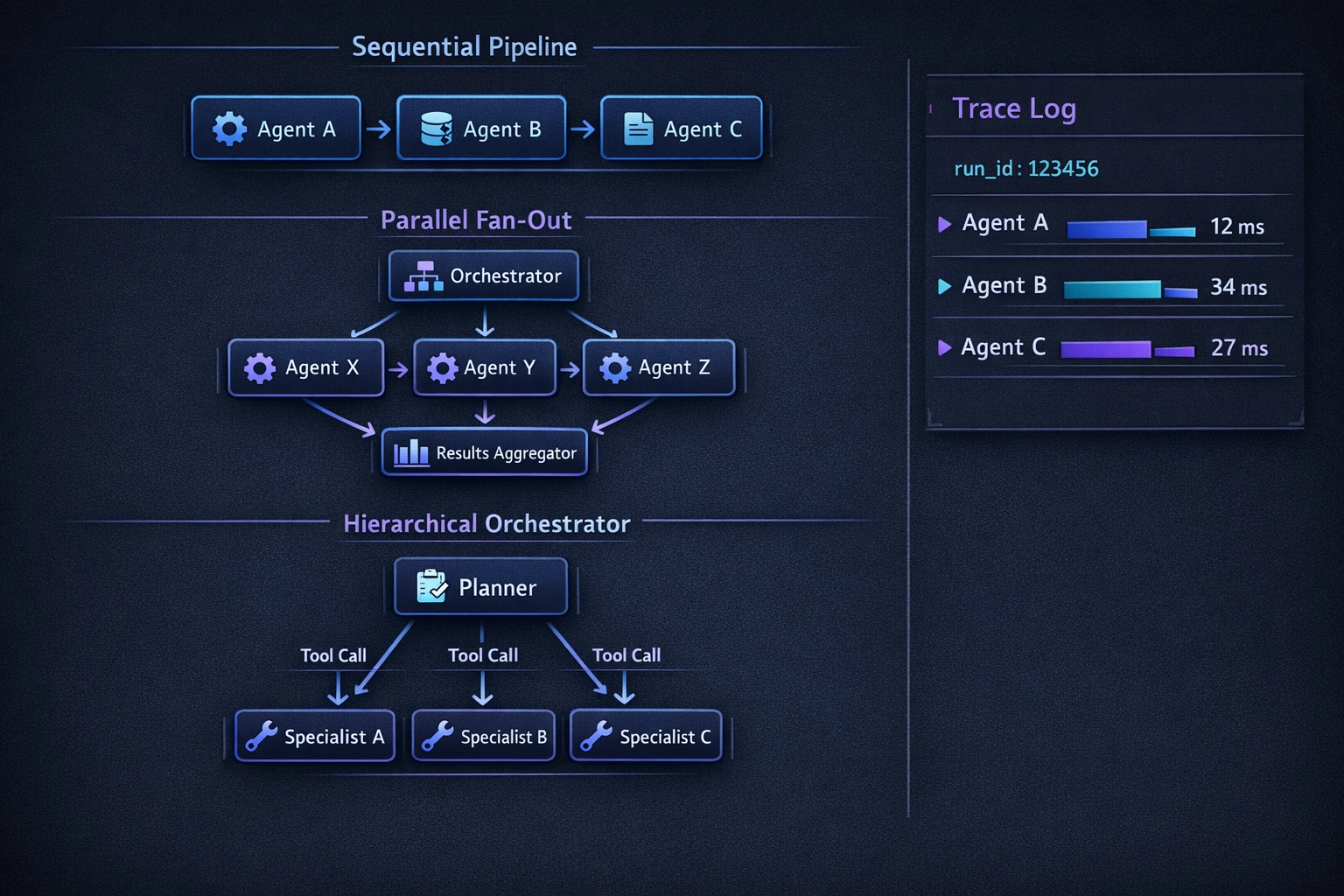
This post covers three patterns: sequential pipeline, parallel fan-out, and hierarchical orchestrator/sub-agent. Each one addresses a different constraint. They're not mutually exclusive. The closing section covers shared state, error handling, and observability across all three.
If you haven't set up a Foundry project yet, start with the first-look post before continuing here.
Setup
Install the required packages:
pip install azure-ai-projects azure-ai-agents azure-identity opentelemetry-sdk opentelemetry-api
The azure-ai-projects package is your entry point to Foundry project resources. azure-ai-agents provides the agent and thread runtime. All examples below use Python 3.11+.
Initialize the project client once and reuse it:
import os
from azure.ai.projects import AIProjectClient
from azure.identity import DefaultAzureCredential

client = AIProjectClient(
    endpoint=os.environ["AZURE_AI_PROJECT_ENDPOINT"],
    credential=DefaultAzureCredential(),
)
AZURE_AI_PROJECT_ENDPOINT is the endpoint URI for your Foundry project - find it in the portal under your project's Overview tab.
Pattern 1: Sequential Pipeline
Each agent's output is the next agent's input. The pipeline runs to completion in order. No step starts until the previous step finishes.
Use case: a content pipeline - research agent gathers sources, draft agent writes from them, review agent flags problems, publish agent formats the final output. Each stage depends strictly on the previous one's output. You can't draft before you have sources; you can't review a draft that doesn't exist.
When to use it: strict data dependencies between stages. The output of stage N is meaningfully different from the input to stage N - it's not just forwarded, it's transformed.
Where it breaks: error propagation and latency. A failure in stage 2 kills stages 3 and 4. And because stages run serially, total latency is the sum of all stage latencies. Don't use this pattern for independent subtasks - that's what fan-out is for.
Here's a minimal sequential pipeline with three agents - researcher, drafter, and reviewer:
import asyncio
from azure.ai.agents.models import MessageRole

async def run_sequential_pipeline(topic: str) -> str:
    agents_client = client.agents

    # Create three specialized agents
    researcher = await agents_client.create_agent(
        model="gpt-4o",
        name="researcher",
        instructions=(
            "You are a technical researcher. Given a topic, return a structured "
            "set of key findings and source references. Be factual and concise."
        ),
    )
    drafter = await agents_client.create_agent(
        model="gpt-4o",
        name="drafter",
        instructions=(
            "You are a technical writer. Given research findings, produce a clear, "
            "well-structured draft suitable for a developer audience."
        ),
    )
    reviewer = await agents_client.create_agent(
        model="gpt-4o",
        name="reviewer",
        instructions=(
            "You are a technical editor. Given a draft, identify factual errors, "
            "unclear explanations, and structural problems. Return structured feedback."
        ),
    )

    try:
        # Stage 1: Research
        thread = await agents_client.create_thread()
        await agents_client.create_message(
            thread_id=thread.id,
            role=MessageRole.USER,
            content=f"Research this topic and return structured findings: {topic}",
        )
        run = await agents_client.create_and_process_run(
            thread_id=thread.id, agent_id=researcher.id
        )
        research_output = await _get_last_message(agents_client, thread.id)

        # Stage 2: Draft - pass research output as input to a new thread
        thread = await agents_client.create_thread()
        await agents_client.create_message(
            thread_id=thread.id,
            role=MessageRole.USER,
            content=f"Write a draft based on these research findings:\n\n{research_output}",
        )
        run = await agents_client.create_and_process_run(
            thread_id=thread.id, agent_id=drafter.id
        )
        draft_output = await _get_last_message(agents_client, thread.id)

        # Stage 3: Review - pass draft as input
        thread = await agents_client.create_thread()
        await agents_client.create_message(
            thread_id=thread.id,
            role=MessageRole.USER,
            content=f"Review this draft and return structured feedback:\n\n{draft_output}",
        )
        run = await agents_client.create_and_process_run(
            thread_id=thread.id, agent_id=reviewer.id
        )
        review_output = await _get_last_message(agents_client, thread.id)

        return review_output

    finally:
        # Clean up agents after use
        for agent in [researcher, drafter, reviewer]:
            await agents_client.delete_agent(agent.id)


async def _get_last_message(agents_client, thread_id: str) -> str:
    messages = await agents_client.list_messages(thread_id=thread_id)
    assistant_messages = [
        m for m in messages.data if m.role == MessageRole.ASSISTANT
    ]
    if not assistant_messages:
        raise RuntimeError(f"No assistant message in thread {thread_id}")
    # Messages are returned newest-first
    content = assistant_messages[0].content
    return content[0].text.value if content else ""
Each stage gets its own thread. The state handoff is explicit: the orchestrator extracts the final message from stage N and passes it as the user message to stage N+1. This is intentional - implicit state sharing between threads creates hard-to-trace bugs. Make the data flow visible in the code.
Pattern 2: Parallel Fan-Out
The orchestrator dispatches to N specialist agents simultaneously and collects results. Stages don't depend on each other - they run in parallel and converge at aggregation.
Use case: analyzing a codebase across multiple dimensions simultaneously - security vulnerabilities, performance anti-patterns, code style violations. Each dimension is independent. Running them sequentially wastes time.
When to use it: independent subtasks that don't need each other's output before they start. Total latency is bounded by the slowest agent, not the sum of all agents.
Where it breaks: partial failure. If one agent fails, do you fail the whole operation or return partial results? That's a policy decision. The example below returns partial results and includes failure information in the aggregated output.
import asyncio
from dataclasses import dataclass
from typing import Optional

@dataclass
class AgentResult:
    dimension: str
    output: Optional[str]
    error: Optional[str] = None

    @property
    def succeeded(self) -> bool:
        return self.error is None


async def analyze_dimension(
    agents_client,
    dimension: str,
    instructions: str,
    content: str,
) -> AgentResult:
    agent = await agents_client.create_agent(
        model="gpt-4o",
        name=f"analyst-{dimension}",
        instructions=instructions,
    )
    try:
        thread = await agents_client.create_thread()
        await agents_client.create_message(
            thread_id=thread.id,
            role=MessageRole.USER,
            content=content,
        )
        await agents_client.create_and_process_run(
            thread_id=thread.id, agent_id=agent.id
        )
        output = await _get_last_message(agents_client, thread.id)
        return AgentResult(dimension=dimension, output=output)
    except Exception as exc:
        return AgentResult(dimension=dimension, output=None, error=str(exc))
    finally:
        await agents_client.delete_agent(agent.id)


async def run_parallel_fanout(codebase_summary: str) -> dict[str, AgentResult]:
    agents_client = client.agents

    dimensions = {
        "security": (
            "You are a security reviewer. Analyze the provided code for vulnerabilities, "
            "hardcoded secrets, injection risks, and insecure dependencies. Return findings "
            "as a JSON array of {severity, finding, location} objects."
        ),
        "performance": (
            "You are a performance engineer. Identify N+1 queries, blocking I/O, "
            "unnecessary allocations, and missing cache opportunities. Return findings "
            "as a JSON array of {impact, finding, recommendation} objects."
        ),
        "style": (
            "You are a code reviewer focused on maintainability. Flag naming inconsistencies, "
            "missing error handling, and structural problems. Return findings "
            "as a JSON array of {severity, finding, suggestion} objects."
        ),
    }

    tasks = [
        analyze_dimension(
            agents_client=agents_client,
            dimension=dim,
            instructions=instructions,
            content=f"Analyze this codebase summary:\n\n{codebase_summary}",
        )
        for dim, instructions in dimensions.items()
    ]

    # All three agents run simultaneously
    results = await asyncio.gather(*tasks, return_exceptions=False)

    aggregated = {r.dimension: r for r in results}

    failed = [r.dimension for r in results if not r.succeeded]
    if failed:
        # Log partial failure but return what succeeded
        print(f"Warning: {len(failed)} analysis dimension(s) failed: {failed}")

    return aggregated
asyncio.gather() dispatches all coroutines concurrently. If one agent call raises an unhandled exception, gather propagates it by default. The try/except inside analyze_dimension converts agent-level failures into structured AgentResult objects so the aggregation layer can reason about them without crashing.
The caller decides what to do with partial results. That's the right place for that policy - not buried inside the agent call.
Pattern 3: Hierarchical Orchestrator/Sub-Agent
A planner agent decomposes an incoming task and routes subtasks to specialists via tool calls. The orchestrator never executes domain logic directly - it delegates. Specialists never decide what to work on - they only execute what's delegated.
Use case: a customer support system. An orchestrator receives incoming requests and routes to a billing agent, a technical support agent, or an escalation agent based on the content. The orchestrator understands intent; the specialists own execution.
When to use it: dynamic routing where the task structure isn't known in advance. The orchestrator figures out which specialist to call based on the input - something you can't hard-code in a sequential pipeline.
Where it breaks: prompt quality for the orchestrator. If the orchestrator's routing logic is vague, it will hallucinate routing decisions. Tool definitions must be precise - the orchestrator picks tools the same way models pick any function: based on the description.
The orchestrator's tools are wrappers around sub-agent calls. Define them as standard function tools:
import json
from azure.ai.agents.models import FunctionTool, ToolSet

async def call_billing_agent(query: str) -> str:
    """Route a billing-related query to the billing specialist agent."""
    agents_client = client.agents
    agent = await agents_client.create_agent(
        model="gpt-4o",
        name="billing-specialist",
        instructions=(
            "You are a billing specialist. Answer questions about invoices, charges, "
            "subscription changes, and refunds accurately and concisely. If you cannot "
            "resolve the issue, return a JSON object: {\"escalate\": true, \"reason\": \"...\"}."
        ),
    )
    try:
        thread = await agents_client.create_thread()
        await agents_client.create_message(
            thread_id=thread.id, role=MessageRole.USER, content=query
        )
        await agents_client.create_and_process_run(
            thread_id=thread.id, agent_id=agent.id
        )
        return await _get_last_message(agents_client, thread.id)
    finally:
        await agents_client.delete_agent(agent.id)


async def call_technical_agent(query: str) -> str:
    """Route a technical support query to the technical specialist agent."""
    agents_client = client.agents
    agent = await agents_client.create_agent(
        model="gpt-4o",
        name="technical-specialist",
        instructions=(
            "You are a technical support specialist. Diagnose and resolve technical issues "
            "with API integrations, SDK behavior, and platform configuration. Return a "
            "structured resolution or escalation recommendation."
        ),
    )
    try:
        thread = await agents_client.create_thread()
        await agents_client.create_message(
            thread_id=thread.id, role=MessageRole.USER, content=query
        )
        await agents_client.create_and_process_run(
            thread_id=thread.id, agent_id=agent.id
        )
        return await _get_last_message(agents_client, thread.id)
    finally:
        await agents_client.delete_agent(agent.id)


# Tool definitions the orchestrator will see
billing_tool = FunctionTool(
    name="route_to_billing",
    description=(
        "Route a customer query to the billing specialist. Use this for questions about "
        "invoices, charges, subscription plans, payment failures, and refund requests."
    ),
    parameters={
        "type": "object",
        "properties": {
            "query": {
                "type": "string",
                "description": "The customer's billing question, verbatim.",
            }
        },
        "required": ["query"],
    },
)

technical_tool = FunctionTool(
    name="route_to_technical",
    description=(
        "Route a customer query to the technical support specialist. Use this for questions "
        "about API errors, SDK configuration, integration issues, and platform behavior."
    ),
    parameters={
        "type": "object",
        "properties": {
            "query": {
                "type": "string",
                "description": "The customer's technical question, verbatim.",
            }
        },
        "required": ["query"],
    },
)
Wire the orchestrator with the tool definitions and a function dispatch map:
async def run_orchestrator(customer_query: str) -> str:
    agents_client = client.agents

    toolset = ToolSet()
    toolset.add(billing_tool)
    toolset.add(technical_tool)

    orchestrator = await agents_client.create_agent(
        model="gpt-4o",
        name="support-orchestrator",
        instructions=(
            "You are a customer support orchestrator. Analyze the customer query and route it "
            "to the appropriate specialist using the available tools. You do not answer "
            "domain questions directly - you always delegate. If the query spans multiple "
            "domains, make multiple tool calls. Synthesize the specialist responses into a "
            "single coherent reply for the customer."
        ),
        tools=toolset.definitions,
    )

    # Map tool names to async handler functions
    tool_handlers = {
        "route_to_billing": call_billing_agent,
        "route_to_technical": call_technical_agent,
    }

    try:
        thread = await agents_client.create_thread()
        await agents_client.create_message(
            thread_id=thread.id, role=MessageRole.USER, content=customer_query
        )

        # Process the run, handling tool calls as they arrive
        run = await agents_client.create_run(
            thread_id=thread.id, agent_id=orchestrator.id
        )

        while run.status in ("queued", "in_progress", "requires_action"):
            run = await agents_client.get_run(thread_id=thread.id, run_id=run.id)

            if run.status == "requires_action":
                tool_outputs = []
                for tool_call in run.required_action.submit_tool_outputs.tool_calls:
                    fn_name = tool_call.function.name
                    fn_args = json.loads(tool_call.function.arguments)
                    handler = tool_handlers.get(fn_name)
                    if handler:
                        result = await handler(**fn_args)
                    else:
                        result = json.dumps({"error": f"Unknown tool: {fn_name}"})
                    tool_outputs.append(
                        {"tool_call_id": tool_call.id, "output": result}
                    )
                run = await agents_client.submit_tool_outputs_to_run(
                    thread_id=thread.id,
                    run_id=run.id,
                    tool_outputs=tool_outputs,
                )
            elif run.status not in ("queued", "in_progress"):
                break

            await asyncio.sleep(0.5)

        return await _get_last_message(agents_client, thread.id)

    finally:
        await agents_client.delete_agent(orchestrator.id)
The orchestrator reasons about the query and decides which tool to call - or both, in sequence or parallel, if the query spans domains. Your application code handles the dispatch; the orchestrator handles the routing logic. Neither leaks into the other's domain.
Shared State and Memory
Agents don't share memory by default. Every thread is isolated. That isolation is a feature - it prevents state contamination across runs. But real pipelines need shared context. There are three ways to provide it, and they trade off differently.
Passing state in messages is the simplest approach and the one used in all the examples above. The orchestrator extracts output from agent N and passes it as input to agent N+1. The data flow is explicit and traceable. The limitation: large context increases token usage at every step, and there's no retrieval - if agent N+3 needs something from agent N, the orchestrator has to carry it the whole way.
Azure AI Search as a shared vector store works well when agents need to retrieve knowledge from a shared corpus - documentation, previous run outputs, domain knowledge. Each agent gets an Azure AI Search connection and performs retrieval before generating its response. The agents don't share working memory; they share a retrieval layer.
from azure.ai.projects.models import AzureAISearchTool

search_tool = AzureAISearchTool(
    index_connection_id=os.environ["AZURE_AI_SEARCH_CONNECTION_ID"],
    index_name="shared-knowledge-base",
)

agent = await agents_client.create_agent(
    model="gpt-4o",
    name="retrieval-agent",
    instructions="Use the available search tool to retrieve relevant context before answering.",
    tools=[search_tool.definitions],
    tool_resources=search_tool.resources,
)
Azure Cosmos DB or Blob Storage for structured shared state is the right choice when agents need to write state that other agents will read - progress records, intermediate computation results, task queues. The orchestrator writes a structured record after each agent completes; the next agent reads it at startup. This decouples agents from each other in time, which matters for long-running pipelines where agents may run hours apart.
The tradeoff is straightforward: pass state in messages when it's small and the pipeline is short; externalize it when it's large, needs retrieval, or spans a pipeline that runs over minutes or hours.
Error Handling When a Sub-Agent Fails
Sub-agents fail. Networks time out, rate limits hit, model responses come back malformed. The orchestrator needs to handle these failures gracefully rather than propagating exceptions upward blindly.
The key design decision: errors from sub-agents should be structured, not plain text. The orchestrator is a model - it reasons over tool outputs. A structured error gives the model enough information to make a policy decision (retry, fallback, degrade gracefully). A plain text exception does not.
import asyncio
from typing import Any

async def call_agent_with_retry(
    agents_client,
    agent_id: str,
    query: str,
    max_retries: int = 3,
    base_delay: float = 1.0,
) -> dict[str, Any]:
    """
    Call an agent with exponential backoff retry.
    Returns a structured result the orchestrator can reason about.
    """
    last_error = None

    for attempt in range(max_retries):
        try:
            thread = await agents_client.create_thread()
            await agents_client.create_message(
                thread_id=thread.id, role=MessageRole.USER, content=query
            )
            run = await agents_client.create_and_process_run(
                thread_id=thread.id, agent_id=agent_id
            )
            output = await _get_last_message(agents_client, thread.id)
            return {
                "status": "success",
                "output": output,
                "attempt": attempt + 1,
            }

        except Exception as exc:
            last_error = exc
            if attempt < max_retries - 1:
                delay = base_delay * (2 ** attempt)
                await asyncio.sleep(delay)

    # All retries exhausted - return a structured failure
    return {
        "status": "failed",
        "error_type": type(last_error).__name__,
        "error_message": str(last_error),
        "attempts": max_retries,
    }
The orchestrator receives a dict in both the success and failure cases. If status == "failed", the orchestrator can choose a fallback path - a simpler agent, a cached response, a graceful degradation message to the user - without that decision being forced on it by an unhandled exception.
Return structured JSON errors, not plain text. A model reading "The billing service is unavailable due to a transient error after 3 attempts." has less to work with than a model reading {"status": "failed", "error_type": "TimeoutError", "attempts": 3}. The latter is something it can act on.
Observability: Tracing a Request Through the Chain
A request enters the orchestrator and fans out across multiple agents, threads, and model calls. Without tracing, debugging a failure means reading logs in isolation without understanding causality. With tracing, you can reconstruct the entire call graph from a single trace_id.
Azure AI Foundry integrates with Azure Monitor / Application Insights. Enable it on the project client:
from azure.ai.projects.models import ApplicationInsightsConfiguration

# Enable built-in tracing to Application Insights
client.telemetry.enable(
    destination=client.telemetry.get_connection_string()
)
For custom spans at each handoff point, use OpenTelemetry directly:
from opentelemetry import trace
from opentelemetry.sdk.trace import TracerProvider
from opentelemetry.sdk.trace.export import BatchSpanProcessor
from opentelemetry.exporter.otlp.proto.grpc.trace_exporter import OTLPSpanExporter

# Configure the tracer once at startup
provider = TracerProvider()
provider.add_span_processor(
    BatchSpanProcessor(OTLPSpanExporter())
)
trace.set_tracer_provider(provider)

tracer = trace.get_tracer("multi-agent-pipeline")


async def run_pipeline_with_tracing(topic: str) -> str:
    with tracer.start_as_current_span("pipeline.run") as root_span:
        root_span.set_attribute("pipeline.topic", topic)

        with tracer.start_as_current_span("agent.research") as span:
            span.set_attribute("agent.model", "gpt-4o")
            span.set_attribute("agent.name", "researcher")
            research_output = await run_research_stage(topic)
            span.set_attribute("agent.output_tokens", len(research_output.split()))

        with tracer.start_as_current_span("agent.draft") as span:
            span.set_attribute("agent.model", "gpt-4o")
            span.set_attribute("agent.name", "drafter")
            span.set_attribute("agent.input_source", "researcher.output")
            draft_output = await run_draft_stage(research_output)

        with tracer.start_as_current_span("agent.review") as span:
            span.set_attribute("agent.model", "gpt-4o")
            span.set_attribute("agent.name", "reviewer")
            review_output = await run_review_stage(draft_output)

        return review_output
What to record at each handoff: input token count, output content hash or length (not the full content - keep spans lightweight), the model and deployment name, the thread ID and run ID, and latency. The thread ID and run ID let you correlate a span in your trace backend with the full conversation in the Foundry portal.
Correlate the Foundry run_id with your trace spans by attaching it as an attribute. When a run fails, you can pivot from your trace view directly to the Foundry thread that contains the full model interaction.
Choosing the Right Pattern
The decision is mechanical once you understand the constraints:
Sequential pipeline when: stage N's output is the direct input to stage N+1, and partial results from stage N have no value if stage N+1 never runs. Use it when data transformation between stages is the point.
Parallel fan-out when: subtasks are independent - they don't read each other's outputs before they start. Use it when the bottleneck is latency and the subtasks can run side-by-side.
Hierarchical orchestrator/sub-agent when: the routing decision is dynamic and can't be hard-coded. The orchestrator reasons about what to call and when. Use it when different requests need different agent combinations.
Patterns compose. A hierarchical orchestrator can route to a sequential pipeline for one task class and a parallel fan-out for another. Start with the simplest pattern that fits the constraint. Introduce complexity when the constraint changes.
Closing
The orchestration layer is where agentic applications win or lose. A single agent with GPT-4o and a good prompt is a prototype. A multi-agent system that correctly decomposes tasks, routes dynamically, shares state explicitly, handles partial failures gracefully, and produces traceable execution is production infrastructure.
Azure AI Foundry gives you the building blocks: managed agent runtime, thread isolation, tool registration, built-in observability. The architecture is still yours to design. The three patterns here - sequential pipeline, parallel fan-out, hierarchical orchestrator - cover most of the routing problems you'll encounter. What they don't do is choose themselves.
Pick the pattern that matches the constraint. Don't add orchestration complexity until you've hit the wall that requires it.
Questions or corrections? Reach out.