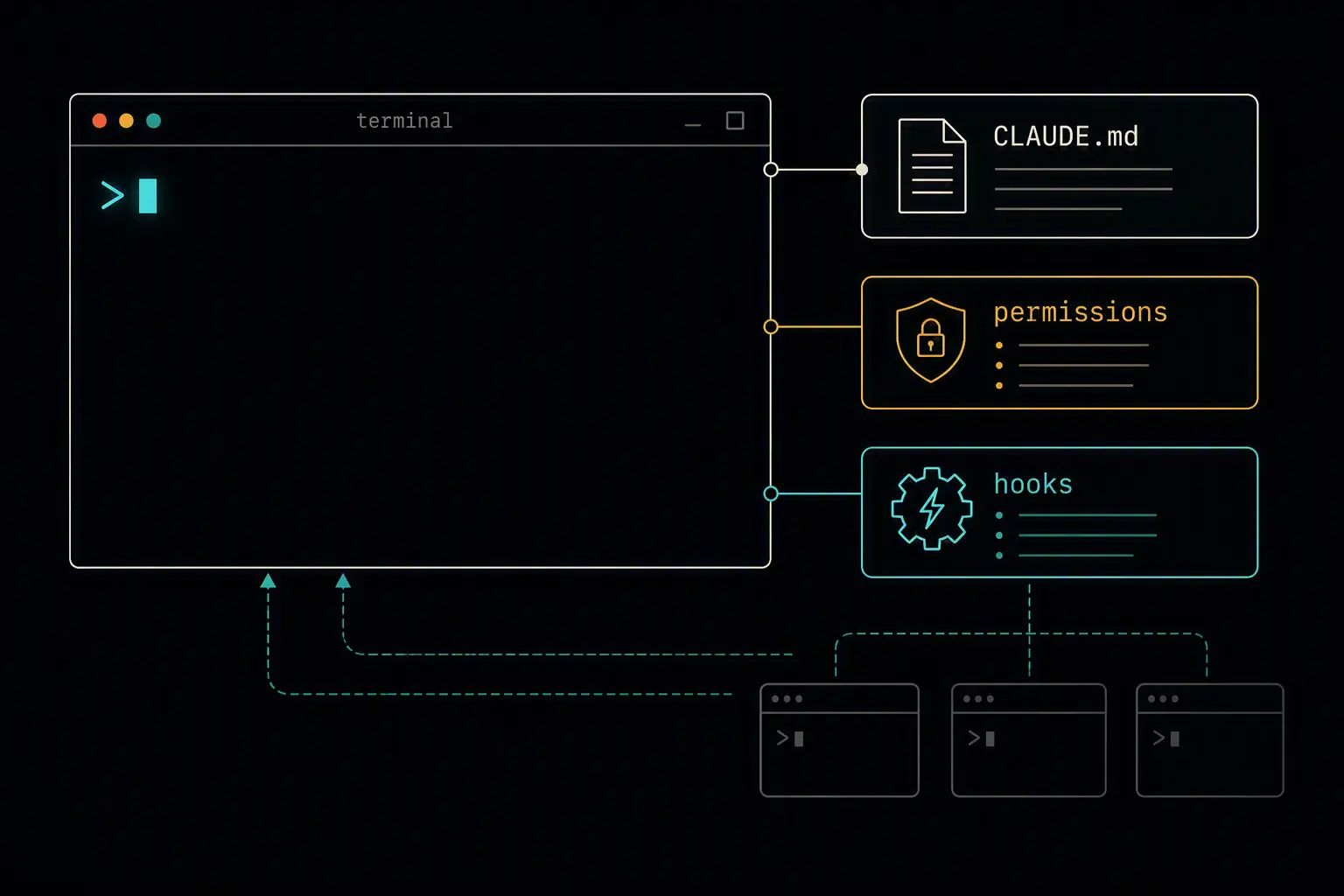
Installing Claude Code takes under a minute. Getting real, repeatable value out of it is a different task entirely - it depends on a handful of configuration files, permission choices, and habits that aren't obvious from a first "hello world" session. Most of what makes Claude Code feel like a programmable agent rather than a chatbot with file access lives in setup most people skip on day one.
This guide covers installing Claude Code, bootstrapping a project so the agent understands your codebase from the first prompt, the core workflow once it's running, and the best practices that separate a productive setup from a fragile one. By the end you'll have an environment that gets more useful the longer you use it, not less.
If you're deciding between Claude Code and other agents first, a comparison of the top AI coding agents covers where it fits relative to Copilot, Codex, Cursor, and Kiro.
What You'll Need
- A Claude Pro, Max, Teams, Enterprise, or Console (API) account - the free Claude.ai plan does not include Claude Code access
- macOS, Windows, or Linux
- Node.js 18+ only if you're installing via npm; the native installer has no Node dependency
Installing Claude Code
Anthropic offers a few install paths depending on how you like to manage tools. For most people, the native installer is the lowest-friction option:
curl -fsSL https://claude.ai/install.sh | bash
If npm is already part of your standard tooling, or you want to pin versions in lockstep with a team:
npm install -g @anthropic-ai/claude-code
Homebrew (macOS) and winget (Windows) casks are also available if you prefer a package-manager-managed install. Whichever path you choose, verify it worked and sign in:
claude --version
claude
The first run prompts you to authenticate against your Claude account. Native installs auto-update in the background; npm installs need a manual npm update -g @anthropic-ai/claude-code when you want the latest version.
Bootstrapping the Ideal Environment
This is the step that actually determines whether Claude Code feels sharp or generic. Three things matter most: the memory file, the permission model, and what you choose to automate with hooks.
CLAUDE.md: give it standing instructions
CLAUDE.md is a markdown file Claude Code reads automatically at the start of every session. Without it, the agent infers your stack and conventions from file contents and makes reasonable guesses - guesses that can drift session to session. With it, those conventions are fixed from the first prompt.
Generate a starting point automatically:
claude
> /init
Or write one directly at your project root:
# My App

## Commands
- `npm run dev` ,  start dev server on port 3000
- `npm run build` ,  production build
- `npm test` ,  run Jest
- `npm run lint` ,  ESLint check

## Architecture
- Next.js 15 with App Router
- PostgreSQL + Drizzle ORM
- Auth via Clerk

## Conventions
- Server components by default
- TypeScript strict mode, no `any`
- Commits in imperative mood, max 72 characters
CLAUDE.md supports a three-level hierarchy - user-level (~/.claude/CLAUDE.md), project-level (./CLAUDE.md), and directory-level (./src/CLAUDE.md) - merged in order of specificity. Commit the project-level file to Git so every team member gets the same baseline automatically instead of re-explaining the codebase individually.
Permissions: decide what Claude can do without asking
Claude Code asks before running commands or editing files outside what you've already approved. You can pre-approve common, low-risk actions in .claude/settings.json so you're not clicking "allow" on the same npm test call every session, while keeping destructive operations (force pushes, rm -rf, production deploys) behind an explicit prompt every time.
Hooks: make the non-negotiables automatic
Hooks are deterministic scripts that fire at defined lifecycle points - they don't rely on the model remembering an instruction, which matters for anything that must happen every single time:
{
  "hooks": {
    "PostToolUse": [
      {
        "matcher": "Edit|Write",
        "hooks": [{ "type": "command", "command": "npx eslint --fix $CLAUDE_FILE_PATH" }]
      }
    ]
  }
}
Common first hooks: run a linter after every edit, block dangerous git commands before they execute, or inject project context automatically when a session starts. Anything that must happen 100% of the time belongs in a hook, not a line in CLAUDE.md hoping the model remembers.
Commit .claude/settings.json, CLAUDE.md, and any shared subagent or hook definitions to version control. Sharing .claude/ is how your whole team gets the same defaults without each person configuring it by hand.
Core Workflow
A typical session looks like:
cd your-project
claude
From there:
- Plan before you code. For anything non-trivial, ask Claude to outline its approach before making changes - it's much cheaper to redirect a plan than to unwind a half-finished multi-file edit.
- Delegate side tasks to subagents. If a task involves a lot of searching, log-reading, or file-scanning you won't personally need to review, hand it to a subagent so that work happens in its own context window and only a summary comes back to your main session.
- Use custom slash commands for repeated workflows.
/deploy,/pr-summary, or anything your team does often is worth turning into a reusable command rather than re-typing the same prompt. - Run parallel sessions for independent work. Each terminal window is its own session - many teams run one for the main feature, one for tests, one for docs, tiled in a terminal multiplexer.
Verifying Your Setup
Confirm the basics are actually working:
CLAUDE.mdis being read - ask Claude what commands it would run to test the project; it should cite your actualnpm testor equivalent, not guess- Hooks fire - make an edit and confirm your linter or formatter runs automatically afterward
- Permissions behave as expected - routine commands shouldn't prompt you every time, but destructive ones still should
- Team members get the same setup - have a teammate clone the repo fresh and confirm Claude Code picks up the same conventions without manual configuration
Best Practices
Budget time to revisit your configuration, not just write it once. CLAUDE.md rots as your stack evolves, permissions drift as you approve one-off prompts, and hooks go stale when your toolchain changes. A short review each sprint keeps all three current.
Keep CLAUDE.md focused, not exhaustive. A file under roughly 200 lines that covers commands, architecture, and conventions is more useful than an exhaustive document Claude has to wade through every session. Use imports for anything beyond that.
Treat hooks as your enforcement layer, not your documentation layer. If something must always happen, make it a hook. If it's a preference the model can reasonably interpret, it belongs in CLAUDE.md instead.
Use subagents for anything that would flood your main session with noise. Search results, log dumps, and multi-step investigation you won't personally reference again are exactly what subagents exist to isolate.
Don't skip the permission model to move faster. Pre-approving genuinely safe, repeated actions saves real time; pre-approving everything just to stop the prompts removes the safety net that catches a bad edit before it happens.
Comparison with GitHub Copilot
| Dimension | Claude Code | GitHub Copilot |
|---|---|---|
| Surface | Terminal, desktop app, IDE extensions | IDE extension |
| Standing instructions | CLAUDE.md |
.github/copilot-instructions.md or AGENTS.md |
| Deterministic automation | Hooks (25+ lifecycle events) | Less mature; mostly prompt-driven |
| Delegated parallel work | Subagents with isolated context | Cloud coding agent (issue → PR) |
| Sharing team config | Commit .claude/ to the repo |
Commit .github/ instructions to the repo |
Both read project-level markdown instructions automatically and both support MCP servers for external tool access - the meaningful difference is how much of the workflow you're expected to script yourself versus how much comes pre-integrated into an existing platform.
Frequently Asked Questions
Do I need the API to use Claude Code, or does a Claude subscription work?
Either works. Claude Pro, Max, Teams, and Enterprise plans all include Claude Code access, and usage draws from that subscription. You can alternatively authenticate with an API key and pay per token through the Claude API if you'd rather not tie usage to a subscription tier.
What's the difference between CLAUDE.md and a system prompt?
A system prompt is set once and applies uniformly across a conversation at the API level. CLAUDE.md is read automatically at the start of every Claude Code session and functions more like a living project brief - commands, architecture, conventions - that you edit directly as a markdown file rather than configuring through an API parameter.
Should I commit .claude/ to version control?
Yes, for anything meant to be shared - CLAUDE.md, settings.json, subagent definitions, and hook scripts. This is how a team gets consistent defaults without every developer configuring Claude Code by hand. Session data and caches are transient and belong in .gitignore instead.
What are subagents actually for?
Subagents handle a task in their own context window and return only a summary to your main session. Use them when a side task would otherwise flood your conversation with content you won't reference again - file searches, log analysis, or multi-step investigation - or when you find yourself spawning the same kind of worker repeatedly with the same instructions.
How is Claude Code different from just using Claude in a chat window?
Claude Code is agentic: it reads your actual codebase, executes shell commands, and edits files directly as part of a multi-step loop, rather than you copying code back and forth from a chat window. The configuration layer - CLAUDE.md, hooks, permissions, subagents - exists specifically to make that autonomy safe and consistent across a real project.
Can I run more than one Claude Code session at once?
Yes. Each terminal window is an independent session, and many developers run two or three in parallel - one for a feature, one for tests, one for documentation - tiled in a terminal multiplexer. Subagents additionally run within a single session's own isolated context for delegated work.
What's the most common mistake in a first Claude Code setup?
Treating CLAUDE.md, permissions, and hooks as one-time configuration instead of something that needs periodic upkeep. The other common one is skipping CLAUDE.md entirely and relying on the model to re-infer your stack and conventions every session, which produces inconsistent results compared to giving it standing instructions upfront.
Questions about this? I can help.