GitHub Copilot is the AI coding tool most developers touch first, largely because it lives inside editors they already have open. That familiarity is also why a lot of teams never get past inline autocomplete - agent mode, custom instructions, and the cloud coding agent are all there, but none of them turn on by exploring the UI casually. They're a deliberate setup step.
This guide covers installing Copilot, bootstrapping a repository so agent mode understands your conventions from the start, the difference between in-editor agent mode and the cloud coding agent, and the best practices that keep its output consistent across a team. By the end you'll have gone from "autocomplete with better taste" to an agent that actually knows your project.
If you're comparing Copilot against other options first, a comparison of the top AI coding agents covers where it fits relative to Claude Code, Codex, Cursor, and Kiro.
What You'll Need
- A GitHub account with a Copilot subscription - the Free tier includes a limited allowance of agent mode interactions per month, enough to evaluate fit; Pro and above unlock the full cloud coding agent
- VS Code (latest stable), a JetBrains IDE, Visual Studio, or another supported editor
- The GitHub CLI (
gh) if you want to trigger the cloud coding agent from your terminal
Installing GitHub Copilot
In VS Code, install the GitHub Copilot extension from the marketplace and sign in with your GitHub account when prompted. Agent mode works out of the box once the extension is installed - there's no separate flag or setting to enable in 2026, since it's generally available.
Open the Chat panel (Ctrl+Alt+I on Windows/Linux, ⌃⌘I on Mac), and use the mode dropdown at the top to switch between Ask, Edit, and Agent modes.
For terminal workflows, install the Copilot CLI:
gh extension install github/gh-copilot
Bootstrapping the Ideal Environment
Copilot's usefulness scales almost entirely with how well you tell it about your project - there's a layered instruction system, and most of the value sits in the two layers most people skip.
copilot-instructions.md: repository-wide standing instructions
Create .github/copilot-instructions.md at your repository root. Copilot reads this before starting work in both Chat and Agent Mode:
# Copilot Instructions

## Language & Runtime
- TypeScript 5.x strict mode. Never use `any` or `unknown` without explicit justification in a comment.
- React 18+ with function components and hooks only. No class components.

## Imports
- Absolute imports only. Path alias `@/` maps to `src/`.

## Testing
- Every component has a co-located `*.test.tsx` file.
This influences code generation strongly in Chat and Agent Mode, though it does not directly affect inline completion (ghost text) - that's a separate, lighter-weight suggestion path.
AGENTS.md: the cross-tool option
If your team also uses other AI coding tools, AGENTS.md at the repository root is worth maintaining instead of (or alongside) copilot-instructions.md - it's readable by Copilot's cloud coding agent as well as several other agentic tools, making it the strongest single investment if you only want to maintain one instruction file.
Path-specific instructions for larger repos
For monorepos or projects with genuinely different conventions per directory, use .github/instructions/*.instructions.md files scoped with an applyTo glob pattern, so backend and frontend code each get their own rules rather than one file trying to cover both.
Onboarding the cloud coding agent specifically
The cloud-based coding agent (the one that turns a GitHub Issue into a pull request) benefits from a one-time onboarding pass. You can literally ask it to generate its own onboarding file:
"Onboard this repository to Copilot cloud agent by adding a
.github/copilot-instructions.mdfile that describes how a cloud agent seeing it for the first time can work most efficiently - focus on reducing the chance of a PR failing CI or a validation pipeline."
Review and merge what it proposes rather than accepting blindly, but this single pass meaningfully improves how reliably the cloud agent's PRs pass your checks going forward.
Core Workflow
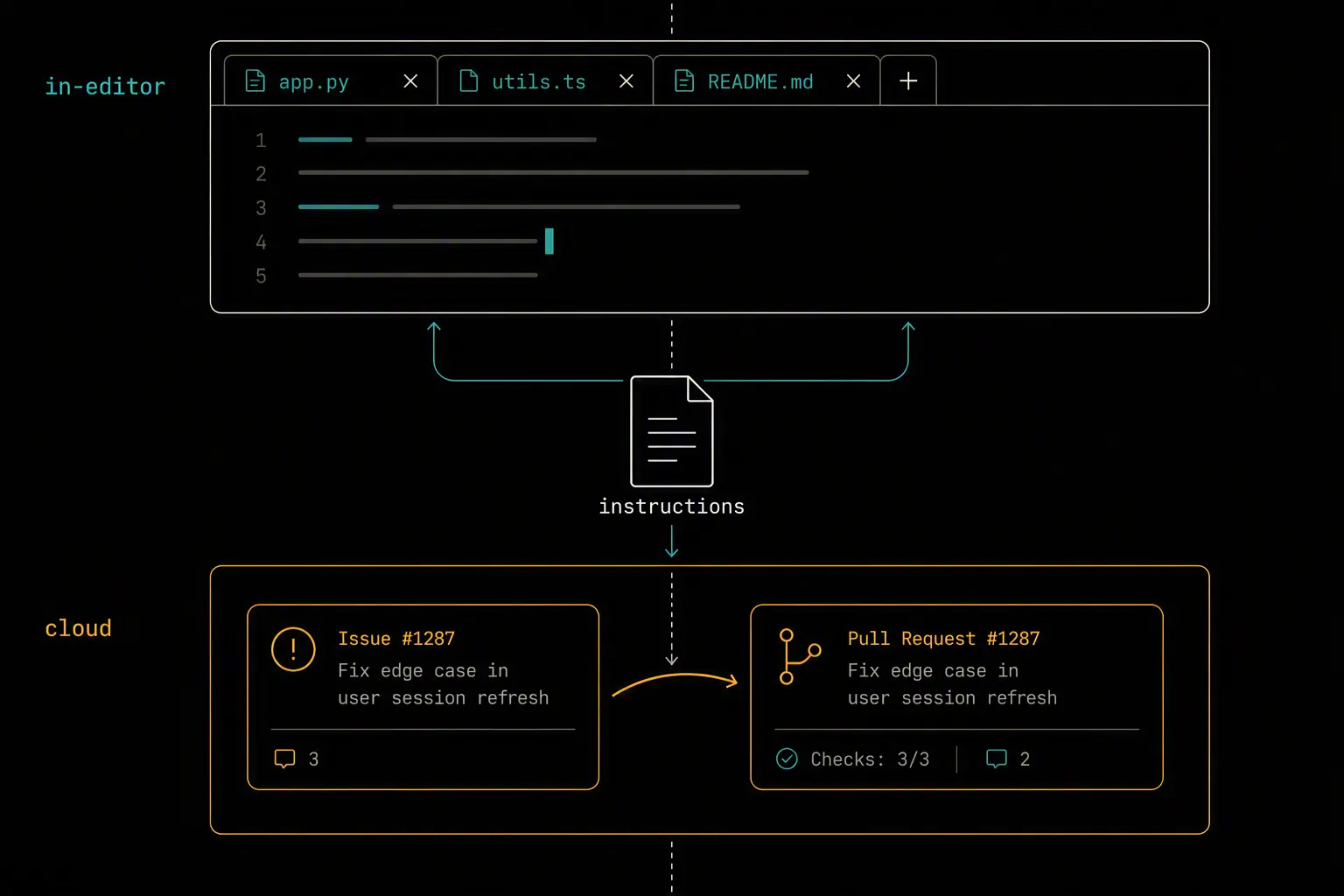
Copilot splits into two distinct agentic surfaces, and picking the right one matters:
Agent mode (in-editor) - autonomous multi-file edits, terminal command execution, and self-correction, all while you watch and can interrupt. Best for interactive work where you want to stay in the loop step by step.
Coding agent (cloud, via GitHub Actions) - assign a GitHub Issue, and Copilot works asynchronously in the background, returning a pull request when it's done. Best for well-scoped, lower-risk tasks you're comfortable reviewing after the fact rather than watching live.
A practical pattern: use agent mode for anything you're actively pairing on, and hand off clearly-scoped issues (a well-defined bug, a small feature with clear acceptance criteria) to the cloud coding agent so it runs in the background while you work on something else.
Prompt agent mode with intent, scope, and a stop condition - tell it what "done" looks like and to run tests and lint before finishing, rather than leaving the definition of complete implicit.
Verifying Your Setup
- Instructions are being read - ask Copilot Chat a question about your conventions and confirm it references what's actually in
copilot-instructions.md, not a generic guess - Agent mode runs multi-file edits - give it a small, real task and confirm it edits more than one file and runs relevant terminal commands without you manually triggering each step
- The cloud coding agent opens real PRs - assign a small, low-risk issue and confirm a draft PR appears with your CI running against it
- Path-specific instructions apply where expected - in a monorepo, confirm backend-specific rules aren't leaking into frontend suggestions and vice versa
Best Practices
Write copilot-instructions.md (or AGENTS.md) before you lean on agent mode heavily. Without it, Copilot infers conventions from surrounding code, which drifts across sessions and contributors.
Use path-specific instructions for anything beyond a small, single-stack repo. One instructions file trying to cover a Python backend and a React frontend produces worse results than two scoped files.
Reserve the cloud coding agent for well-scoped work. It shines on clearly defined issues with obvious acceptance criteria; open-ended or architecturally significant changes are still better handled interactively in agent mode where you can redirect it mid-task.
Always review agent output before merging, especially from the cloud coding agent. Enable security scanning in agent workflows where available, and treat an agent-authored PR the same way you'd treat one from an unfamiliar contributor.
Keep instructions current as your stack changes. A stale copilot-instructions.md that references a deprecated pattern actively steers the agent wrong, which is worse than having no instructions at all.
Comparison with Claude Code
| Dimension | GitHub Copilot | Claude Code |
|---|---|---|
| Surface | IDE extension | Terminal, desktop app, IDE extensions |
| Standing instructions | .github/copilot-instructions.md or AGENTS.md |
CLAUDE.md |
| Interactive autonomy | Agent mode (in-editor) | Full agentic loop with hooks and subagents |
| Async/background work | Cloud coding agent (issue → PR) | Subagents within a session; no native async cloud runner |
| Ecosystem | Deep GitHub integration (Issues, PRs, Actions) | Deep terminal/CLI extensibility (hooks, MCP, plugins) |
Both read a project-level markdown instructions file automatically, and both support MCP for connecting external tools - the practical difference is that Copilot's strength is being deeply wired into GitHub's own workflow, while Claude Code's strength is being a more programmable, scriptable agent outside any single platform.
Frequently Asked Questions
What's the difference between copilot-instructions.md and AGENTS.md?
They serve the same purpose - standing project context read automatically before Copilot starts work - but AGENTS.md is also read by several other AI coding tools, making it the better single investment if your team uses more than one agent. copilot-instructions.md is Copilot-specific and takes precedence for Copilot if both exist.
Does agent mode work on the Free tier?
Yes, agent mode is available on the Free tier with a limited monthly allowance of agent requests - enough to evaluate whether it fits your workflow. The cloud coding agent (issue-to-PR automation) requires a Pro subscription or higher.
What's the difference between agent mode and the coding agent?
Agent mode runs in your editor interactively - you watch it make multi-file edits and run commands, and can interrupt or redirect it. The coding agent runs asynchronously in the cloud via GitHub Actions: you assign an Issue, it works in the background, and you review a pull request when it's finished.
Do path-specific instructions affect inline autocomplete?
No. Both repository-wide and path-specific instructions primarily influence Copilot Chat and Agent Mode. Inline completion (ghost text as you type) is a separate, lighter-weight suggestion mechanism that isn't directly steered by these instruction files.
Can I use Copilot instructions across a monorepo with different stacks?
Yes - that's exactly what path-specific instructions (.github/instructions/*.instructions.md with an applyTo glob) are for. Scope backend and frontend conventions to their respective directories instead of trying to cram both into one repository-wide file.
Should I let the cloud coding agent run security-sensitive changes unsupervised?
No. Reserve the cloud coding agent for well-scoped, lower-risk work, and keep security-sensitive or architecturally significant changes in interactive agent mode where you can review and redirect at each step. Enable automated security scanning on agent-authored PRs regardless, but don't treat that as a substitute for human review.
How do I get Copilot to follow my testing conventions consistently?
Put your testing standards explicitly in copilot-instructions.md - which test runner to use, naming conventions, coverage expectations - and tell agent mode directly in your prompt to run tests before considering a task finished. Without an explicit stop condition, the agent may consider the task done once code compiles, not once it's verified.
Questions about this? I can help.