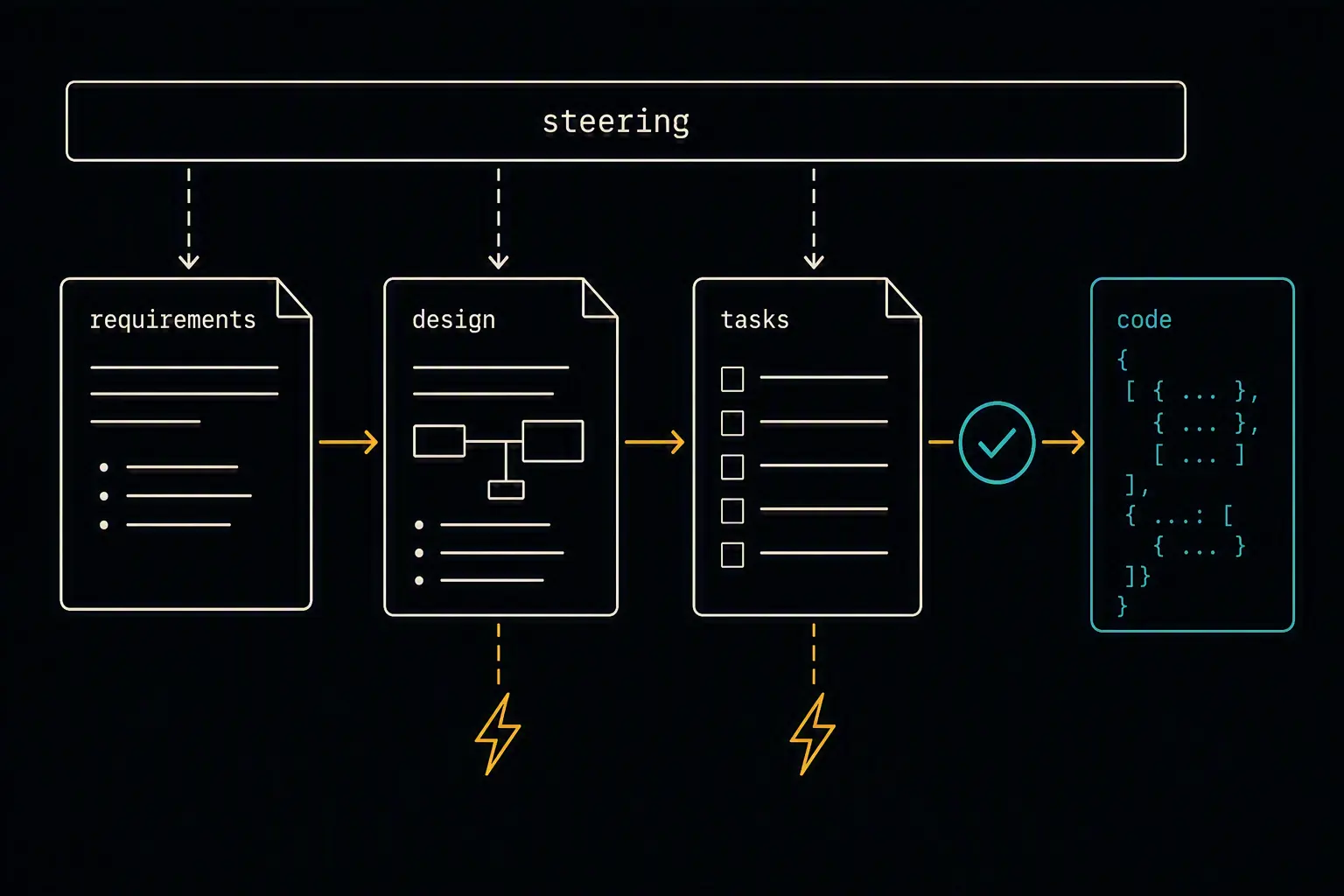
Kiro asks you to do something most AI coding tools don't: stop and write down what you actually want before any code gets generated. That's the entire premise of spec-driven development, and it's also why a rushed Kiro setup feels slower than just prompting a normal agent - the value only shows up once steering, specs, and hooks are actually in place, not during the first five minutes of exploring the UI.
This guide covers installing Kiro, bootstrapping a project through steering documents and your first spec, the hooks system that automates the routine work around a feature, and the best practices that make spec-driven development worth its upfront cost instead of just overhead. By the end you'll have a workflow suited to production feature work, not quick prototyping.
If you're comparing Kiro against other options first, a comparison of the top AI coding agents covers where it fits relative to Claude Code, Copilot, Codex, and Cursor.
What You'll Need
- macOS, Windows, or Linux
- An AWS account for authentication (a free AWS account is sufficient for Kiro's free tier - no paid AWS subscription required)
- An existing project or a new one to start from scratch
Installing Kiro
Download the Kiro desktop application directly from kiro.dev. It's built on Code OSS - the same open-source base as VS Code - so it inherits familiar themes, keyboard shortcuts, and Open VSX marketplace extension compatibility. During initial setup, Kiro offers a one-click import of your existing VS Code extensions and settings.
Open a project either through the UI or from the command line:
kiro .
Kiro is also available as a CLI and a zero-setup sandboxed Web surface, both of which share the same .kiro/ configuration as the desktop IDE - you can start a spec in the IDE, continue it from the CLI, and hand implementation off to the Web agent without losing context, since everything stays in sync through that shared directory.
Bootstrapping the Ideal Environment
Kiro's workflow has a defined shape: generate steering, write a spec, implement against it, let hooks handle the routine work. Skipping straight to "just build this" defeats the point of choosing Kiro over a lighter-weight agent.
Steering: give Kiro durable project context
Steering documents live in .kiro/steering/ and are shared across every Kiro surface. Generate an initial set automatically:
- Open the Kiro panel in the sidebar
- Choose Generate Steering Docs
Kiro analyzes your repository - structure, language, dependencies, configuration - and produces steering documents covering your stack and conventions. From there, add custom steering files for anything the automatic pass missed: coding standards, architectural decisions, team-specific workflows.
Steering files can be always-applied, conditionally included based on context, or manual (invoked with #file-name in chat, or as a slash command):
---
inclusion: auto
name: api-design
description: REST API design patterns and conventions. Use when creating or modifying API endpoints.
---

- All endpoints return a consistent envelope: `{ data, error, meta }`
- Versioned under `/v1/`; breaking changes require a new version, not a mutation
- Auth via bearer token, validated in middleware before the handler runs
Keep steering current as your project evolves - stale steering actively misguides the agent rather than just being unhelpful.
Specs: the primary artifact, not an afterthought
This is Kiro's core inversion of how other tools work: the spec is the source of truth, and code is a build artifact generated from it. A spec moves through three phases:
- Requirements - user stories with acceptance criteria, often written in EARS (Easy Approach to Requirements Syntax) notation
- Design - technical architecture and implementation approach
- Tasks - a structured, ordered breakdown of implementation steps
Start a spec for a real but scoped piece of work - a new endpoint, a defined refactor - rather than an entire application at once. Review and adjust the generated requirements and design before Kiro proceeds to tasks; catching a misunderstood requirement at this stage is far cheaper than catching it after code exists.
Hooks: automate what should never require a manual prompt
Hooks are event-driven and fire on file saves, spec task completion, or manual triggers. Each hook is a JSON file under .kiro/hooks/:
{
  "version": "v1",
  "hooks": [
    {
      "name": "lint-on-save",
      "trigger": "PostFileSave",
      "matcher": "\\.(ts|tsx)$",
      "action": { "type": "command", "command": "npx eslint --fix" }
    }
  ]
}
A practical starting hook: when touching anything under infra/**, trigger a request for a security and cost review before proceeding. Hooks tied to the Stop trigger can include a confirm block to ask before running, which is worth using for anything with side effects beyond the local workspace.
Commit .kiro/ to version control
Steering files, specs, and hooks are meant to be shared and versioned the same way code is - this is central to Kiro's pitch that intent and process, not just output, should be traceable across a team.
Core Workflow
Kiro supports two working modes, and picking the right one matters:
- Vibe sessions - fast, prompt-driven work without the spec overhead. Good for quick fixes, small exploratory changes, or anything where you're still figuring out what you want.
- Spec sessions - the full requirements → design → tasks flow. Good for production features where getting the requirements right matters more than speed of a first draft.
A typical spec-driven cycle:
Open Project → Generate Steering → Create Spec
  → Requirements → Design → Tasks
  → Implement → Hooks fire automatically → MCP retrieves external context as needed
For genuinely large features, Kiro's full spec-driven flow is designed to surface architectural tradeoffs and define constraints before parallel agents build against the approved plan - worth using when a feature is complex enough that getting the design wrong would be expensive to unwind.
Verifying Your Setup
- Steering is being read - ask Kiro about your project's conventions and confirm it references your actual steering documents, not a generic guess
- Specs produce reviewable artifacts - confirm a new spec actually generates
requirements.md,design.md, and a task breakdown you can read and edit before implementation starts - Hooks fire on the right triggers - save a matching file and confirm the hook's action actually runs
- Configuration is shared - have a teammate open the project fresh and confirm steering, specs, and hooks are all present without manual setup
Best Practices
Keep steering documents current, not just generated once. Update them whenever your project's structure, stack, or standards change - stale steering steers the agent toward outdated conventions.
Write specs before implementing anything non-trivial. The upfront cost of requirements and design is what prevents expensive rework later; skipping it for anything beyond a quick fix defeats the reason to choose Kiro in the first place.
Reserve full spec-driven flow for production, non-trivial features. For rapid prototyping or exploratory "let me see what happens" work, a Vibe session is a better fit - forcing every change through the full spec flow adds friction without a corresponding benefit.
Use hooks for repetitive, well-defined automation. Linting, formatting, test generation, and documentation updates are exactly the kind of routine work hooks exist to eliminate from manual attention.
Treat specs as living, versioned documents. Because they're the source of truth, keep them in sync with the code they describe rather than letting them go stale once implementation starts.
Comparison with Cursor
| Dimension | Kiro | Cursor |
|---|---|---|
| Core philosophy | Spec-first: plan and approve before code | Fast, direct prompt-to-code editing |
| Primary artifact | The spec (requirements, design, tasks) | The code itself |
| Standing instructions | Steering files in .kiro/steering/ |
.cursor/rules/*.mdc |
| Best fit | Complex, production-bound features | Quick iteration and fast in-editor work |
| Ecosystem | Deep AWS integration (Bedrock, IAM, CodeCatalyst) | Multi-vendor model choice, broad general-purpose use |
Both are built on Code OSS and support MCP servers, so a lot of the underlying editor experience will feel familiar switching between them. The real difference is workflow philosophy: Cursor optimizes for getting to working code as fast as possible, while Kiro optimizes for getting the requirements right before code exists at all - which one serves you better depends entirely on whether you already know what you're building.
Frequently Asked Questions
Do I need an AWS account to use Kiro?
Yes, for authentication - but a free AWS account is sufficient for Kiro's free tier; you don't need a paid AWS subscription to get started.
What's the difference between a Vibe session and a Spec session?
A Vibe session is fast, prompt-driven work without the requirements/design overhead - suited to quick fixes and exploration. A Spec session runs the full requirements → design → tasks flow before implementation begins, suited to production features where getting the plan right matters more than speed of a first draft.
Is spec-driven development always worth the extra time?
No - it depends on the task. For complex, production-bound features, catching a misunderstood requirement at the design stage saves real rework later. For quick prototypes or exploratory work where you're still discovering what you want, the upfront planning overhead can slow you down more than it helps. Use Vibe sessions for the latter.
Can I use Kiro without adopting AWS services?
Kiro itself doesn't require you to build on AWS, but its deepest integrations - Bedrock, IAM, CodeCatalyst - are AWS-native, so teams already on AWS get more out of it than teams on other cloud providers. The spec-driven workflow itself is cloud-agnostic.
How do hooks in Kiro compare to a CI pipeline?
Hooks automate actions within your local development flow - linting on save, generating a test file alongside a new component, triggering a review request when infrastructure files change. They're a complement to CI, not a replacement - CI still validates the final state before merge, while hooks reduce the manual, repetitive work that happens during development itself.
What happens if my steering documents go stale?
The agent continues generating code, but against outdated conventions or an outdated picture of your architecture, which produces increasingly inconsistent results over time. Steering isn't a one-time setup step - treat it as documentation that needs the same upkeep as any other living project document.
What's the most common mistake in a first Kiro setup?
Skipping straight to implementation without generating steering or writing a spec first, which produces the same undifferentiated experience as any other AI coding tool and misses the entire reason to choose Kiro. The second most common mistake is applying full spec-driven rigor to quick prototyping work where a Vibe session would serve better.
Questions about this? I can help.