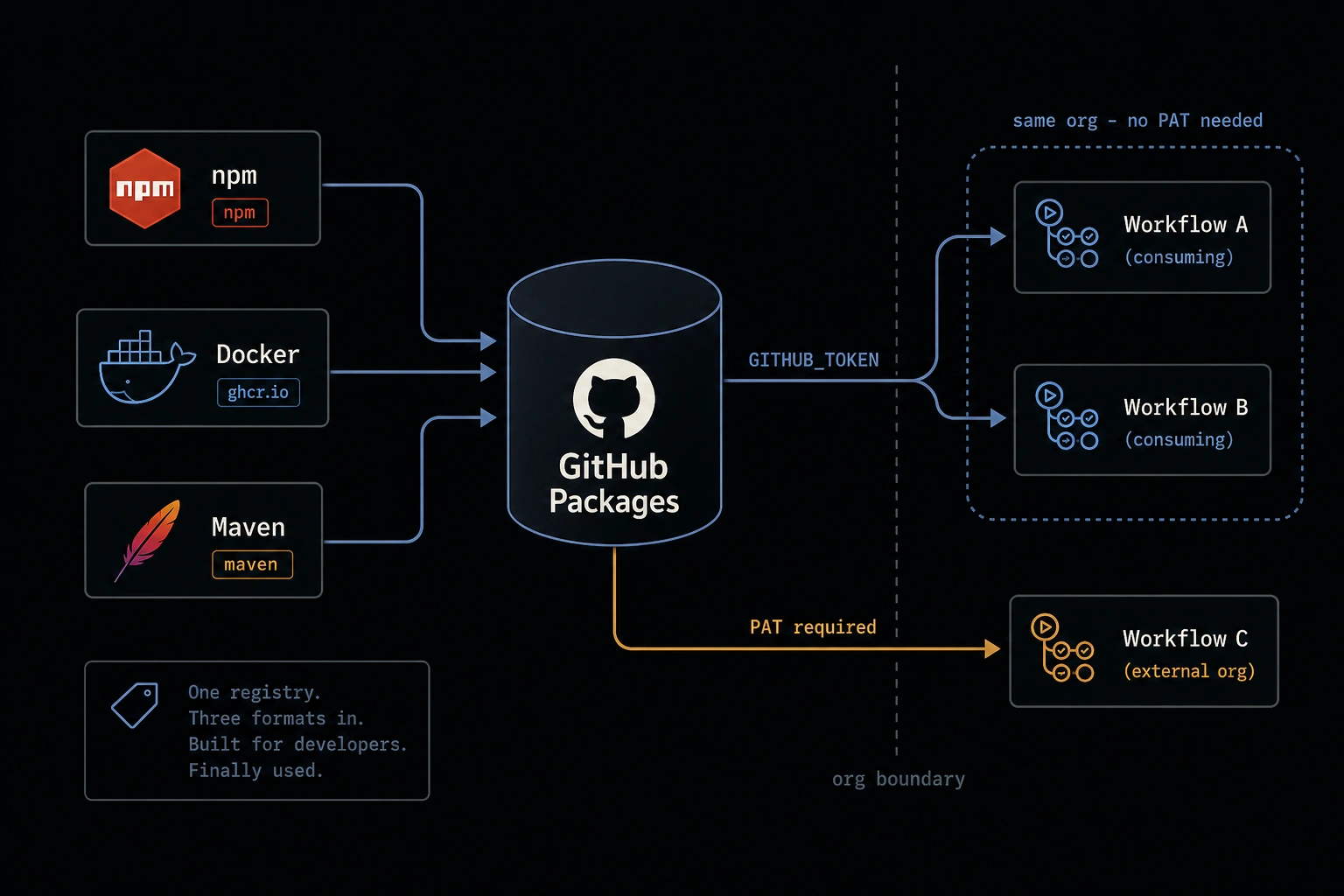
A team that needs to publish internal npm packages, share Docker images across services, or distribute Maven artifacts between projects usually starts evaluating registry options: run Nexus, stand up JFrog Artifactory, or use a public registry with private packages bolted on. All three are reasonable choices. All three are also infrastructure you now own, with credentials you now manage separately from everything else - a second identity system bolted onto a CI/CD pipeline that already runs entirely on GitHub.
GitHub Packages is the option most teams skip evaluating, usually because "GitHub has a package registry" doesn't register as news if you've never gone looking for it. It supports npm, Docker/OCI images, Maven, NuGet, and RubyGems, it's tied to the repository or organization you're already using, and - the part that actually saves operational effort - it authenticates with the same GITHUB_TOKEN every Actions workflow already gets for free. No separate registry credentials to provision, rotate, or leak.
This post covers publishing all three common formats - npm, Docker, and Maven - from a GitHub Actions workflow, consuming them in downstream workflows without a PAT, setting visibility and cleaning up old versions, and the one place where GITHUB_TOKEN isn't enough.
What GitHub Packages Actually Is
One registry, multiple package format endpoints, each tied to a GitHub repository (and, by extension, an organization). A package published from a repository is associated with that repository - visible on its own Packages tab - and its default access control matches the repository's own visibility, though you can override that independently per package.
The reason this matters operationally: package permissions inherit from the same access control model as everything else in the repo. Someone who has read access to the repository has read access to its packages by default. No separate ACL to maintain, no second place for offboarding to miss.
Publishing an npm Package
GitHub Packages requires npm package names to be scoped to the owner - @your-org/package-name, not a bare package-name. Set that in package.json, then publish from a workflow using the zero-baseline permissions pattern:
name: Publish npm Package

on:
  release:
    types: [published]

permissions: {}

jobs:
  publish:
    runs-on: ubuntu-latest
    permissions:
      contents: read
      packages: write
    steps:
      - uses: actions/checkout@v4
      - uses: actions/setup-node@v4
        with:
          node-version: "22"
          registry-url: "https://npm.pkg.github.com"
      - run: npm ci
      - run: npm publish
        env:
          NODE_AUTH_TOKEN: ${{ secrets.GITHUB_TOKEN }}
setup-node's registry-url input writes the registry into .npmrc for the job, so npm publish sends the package to npm.pkg.github.com instead of the public registry without any manual .npmrc editing. NODE_AUTH_TOKEN is what npm's CLI actually reads for registry auth - setting GITHUB_TOKEN as that env var is the whole authentication story. No token generation, no secret to create in repository settings.
Publishing a Docker Image
Docker images go to ghcr.io - the GitHub Container Registry - authenticated the same way:
name: Publish Container Image

on:
  push:
    branches: [main]
    tags: ["v*"]

permissions: {}

jobs:
  publish:
    runs-on: ubuntu-latest
    permissions:
      contents: read
      packages: write
    steps:
      - uses: actions/checkout@v4

      - uses: docker/login-action@v3
        with:
          registry: ghcr.io
          username: ${{ github.actor }}
          password: ${{ secrets.GITHUB_TOKEN }}

      - uses: docker/metadata-action@v5
        id: meta
        with:
          images: ghcr.io/${{ github.repository }}
          tags: |
            type=sha
            type=ref,event=tag
            type=raw,value=latest,enable={{is_default_branch}}

      - uses: docker/build-push-action@v6
        with:
          context: .
          push: true
          tags: ${{ steps.meta.outputs.tags }}
          labels: ${{ steps.meta.outputs.labels }}
docker/metadata-action is doing the tagging strategy work: every build gets a commit-sha tag (traceable to an exact source commit, never overwritten), pushes to a version tag get the matching semver tag, and only builds on the default branch get latest moved forward. That last condition matters - without it, a build on a feature branch could overwrite latest and ship an image nobody meant to promote to that tag.
Publishing a Maven Artifact
Maven needs the registry declared in the project itself, not just the workflow - add a <distributionManagement> block to pom.xml:
<distributionManagement>
  <repository>
    <id>github</id>
    <name>GitHub Packages</name>
    <url>https://maven.pkg.github.com/your-org/your-repo</url>
  </repository>
</distributionManagement>
Then supply the matching server credentials via a settings.xml, generated in the workflow rather than committed to the repo:
name: Publish Maven Artifact

on:
  release:
    types: [published]

permissions: {}

jobs:
  publish:
    runs-on: ubuntu-latest
    permissions:
      contents: read
      packages: write
    steps:
      - uses: actions/checkout@v4
      - uses: actions/setup-java@v4
        with:
          java-version: "21"
          distribution: "temurin"
          server-id: github
          server-username: GITHUB_ACTOR
          server-password: GITHUB_TOKEN

      - run: mvn --batch-mode deploy
        env:
          GITHUB_ACTOR: ${{ github.actor }}
          GITHUB_TOKEN: ${{ secrets.GITHUB_TOKEN }}
setup-java's server-id/server-username/server-password inputs generate ~/.m2/settings.xml for you, mapping the id: github from pom.xml's distributionManagement to the environment variables that hold the actual credentials. Same shape as the npm and Docker examples: a format-specific tool reads GITHUB_TOKEN through whatever credential mechanism that ecosystem uses, and nothing format-specific has to be provisioned.
Consuming Packages: No PAT Required, Within the Same Org
This is the part that's genuinely different from running your own registry. A downstream workflow in the same organization that needs to install one of these packages authenticates with its own GITHUB_TOKEN - not a shared secret, not a PAT, not credentials anyone had to provision for this specific purpose:
jobs:
  consume:
    runs-on: ubuntu-latest
    permissions:
      contents: read
      packages: read
    steps:
      - uses: actions/checkout@v4
      - uses: actions/setup-node@v4
        with:
          node-version: "22"
          registry-url: "https://npm.pkg.github.com"
      - run: npm install @your-org/internal-package
        env:
          NODE_AUTH_TOKEN: ${{ secrets.GITHUB_TOKEN }}
For Docker, the equivalent is a docker/login-action step with packages: read, then a normal docker pull ghcr.io/your-org/image:tag. For Maven, the same settings.xml generation as the publish workflow, with packages: read instead of write. In every case, the consuming workflow's own GITHUB_TOKEN - scoped down to read-only for packages, per the zero-baseline pattern - is sufficient, as long as the consuming repository is in the same organization as the one that published the package.
Visibility and Cleaning Up Old Versions
Package visibility (public, private, or internal) is set per-package under the package's own Package settings, independent of the source repository's visibility if you want it to be - a private repo can publish a public package, though that's an unusual choice worth a deliberate reason, not a default.
Retention is the part GitHub Packages doesn't do automatically. Every publish creates a new version, and nothing prunes old ones unless you tell it to. For container images especially - where CI might publish a new sha-tagged image on every commit - that adds up fast. A scheduled cleanup workflow using actions/delete-package-versions keeps it bounded:
name: Prune Old Package Versions

on:
  schedule:
    - cron: "0 3 * * 0"  # weekly

permissions: {}

jobs:
  prune:
    runs-on: ubuntu-latest
    permissions:
      packages: write
    steps:
      - uses: actions/delete-package-versions@v5
        with:
          package-name: "your-image-name"
          package-type: "container"
          min-versions-to-keep: 10
          delete-only-untagged-versions: true
delete-only-untagged-versions: true is the safe default - it removes versions that aren't referenced by any tag (typically superseded sha-tagged builds) without touching anything a deployment might still be pointing at by tag. Drop that flag only once you're confident about which tagged versions are genuinely safe to remove.
The One Real Limitation: Cross-Org Consumption Needs a PAT
Everything above works because GITHUB_TOKEN is trusted within the organization that owns the package. Step outside that boundary - a different organization, or a personal account outside any org - and GITHUB_TOKEN stops being sufficient. The consuming workflow needs a personal access token (fine-grained, scoped to read:packages on the specific package) stored as a secret in the consuming repository.
This isn't a bug or an oversight - it's the same trust boundary that makes GITHUB_TOKEN safe to use without provisioning in the first place. A token that any org's workflow could use to pull from any other org's private packages by default would be a much bigger problem than the inconvenience of provisioning one PAT for genuinely cross-org cases. If your consumption is entirely within one organization - the common case for an internal registry - you'll likely never need to reach for a PAT at all.
Closing
The infrastructure most teams evaluate registry vendors to get - format support, access control tied to identity, CI-native publishing - is already running, attached to the org GitHub Actions workflows already operate in. The credential story is the actual improvement over a standalone registry: no service account to provision, no separate secret to rotate, no second place for an offboarded contributor's access to linger. GITHUB_TOKEN, scoped down to exactly packages: read or packages: write per job, is the whole authentication model for anything staying inside the organization boundary - which, for most internal artifact sharing, is the only boundary that matters.
Questions or corrections? Reach out.